커뮤니티

포인트
쿠폰
내 강의실
국비 신청 내역
증명서
계정
로그아웃
학습 질문
개발 일지
나의 활동
답변 완료
첫 주차 강의 때 모르는 상태에서 들었던 기억 다 끄집어내서 한번 연습용 만들어보는 중에 ...
코딩이 처음이어도 쉽게 배우는 웹개발 A to Z
기타


이*호
댓글
8
・
추천
0
・
조회수
19
조회수
19
답변 완료
* 겪고 있는 문제 상황을 최대한 자세하게 작성해주세요.
* 문제 해결을 위해 어떤 시도를 해보았는지 구체적으로 함께 알려주세요.
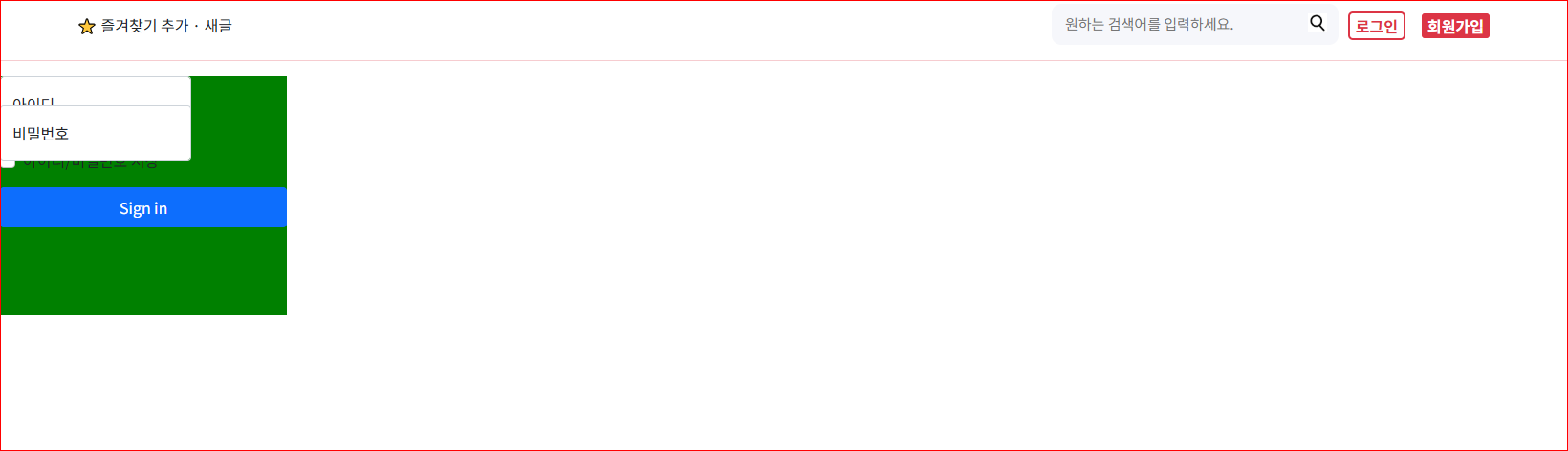
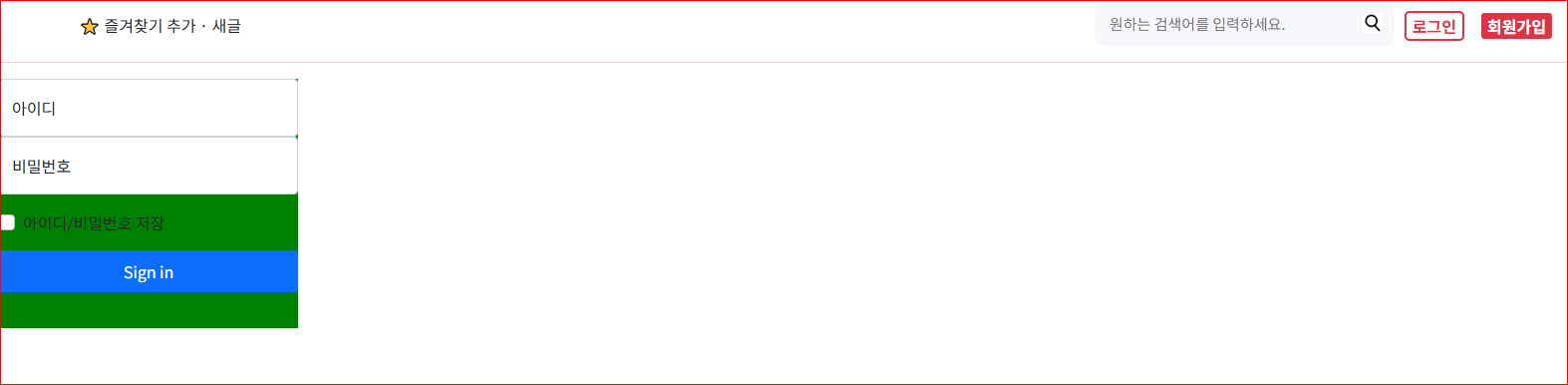
아이디/ 비밀번호 창 두껍게 나와서
사이즈 변경하려고 시도하고 있는데요!
막힙니다 ...ㅜㅜ (5시간 째 /구글링&지피티&만든 프로젝트들 코드 보고 있는데 막힘이 뚫리지 않습니다 ..)
첫 번째 질문!
1-1 첫 번째 시도
<style>
        .loginform {
            background-color: green;
            width: 300px;
            height: 250px;
        }

        .form-floating {
            width: 200px;
            height: 30px;
        }

</style>
<body>
    <div class="loginform">
        <main class="form-signin w-100 m-auto">
            <form>
                <div class="form-floating">
                    <input type="text" class="form-control" id="floatingInput" size="10px;" placeholder="아이디">
                    <label for="floatingInput">아이디</label>
                </div>
                <div class="form-floating">
                    <input type="password" class="form-control" id="floatingPassword" placeholder="비밀번호">
                    <label for="floatingPassword">비밀번호</label>
                </div>


                <div class="form-check text-start my-3">
                    <input class="form-check-input" type="checkbox" value="remember-me" id="checkDefault">
                    <label class="form-check-label" for="checkDefault">
                        아이디/비밀번호 저장
                    </label>
                </div>
                <button class="btn btn-primary w-100 py-2" type="submit">Sign in</button>
            </form>
        </main>
    </div>
</body>
1-1 결과 (찌부 됨)
1-2 두 번째 시도
                <div class="form-floating">
                    <input type="text" class="form-control" id="floatingInput" size="50px" placeholder="아이디">
                    <label for="floatingInput">아이디</label>
                </div>
                <div class="form-floating">
                    <input type="password" class="form-control" id="floatingPassword" size="50px" placeholder="비밀번호">
                    <label for="floatingPassword">비밀번호</label>
                </div>
1-2 결과 (변화 없음)
1 첫 번째 질문
로그인 인풋 크기 조절 하는 방법
2 두 번째 질문
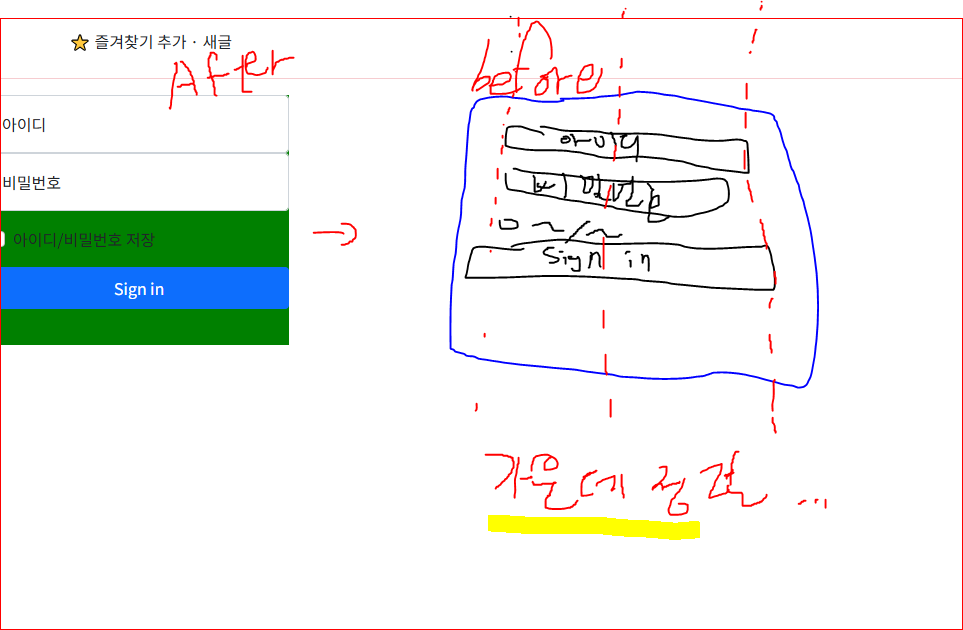
before 처럼
사이즈 조절 후 가운데 정렬 하기 위해서 순차적으로 풀어나가야 하는 방법이 궁금합니다 ㅠㅠ
    <div class="loginform">
        <main class="form-signin w-100 m-auto">
            <form>
                <div class="form-floating">
                    <input type="text" class="form-control" id="floatingInput" size="50px" placeholder="아이디">
                    <label for="floatingInput">아이디</label>
                </div>
                <div class="form-floating">
                    <input type="password" class="form-control" id="floatingPassword" size="50px" placeholder="비밀번호">
                    <label for="floatingPassword">비밀번호</label>
                </div>


                <div class="form-check text-start my-3">
                    <input class="form-check-input" type="checkbox" value="remember-me" id="checkDefault">
                    <label class="form-check-label" for="checkDefault">
                        아이디/비밀번호 저장
                    </label>
                </div>
                <button class="btn btn-primary w-100 py-2" type="submit">Sign in</button>
            </form>
        </main>
    </div>
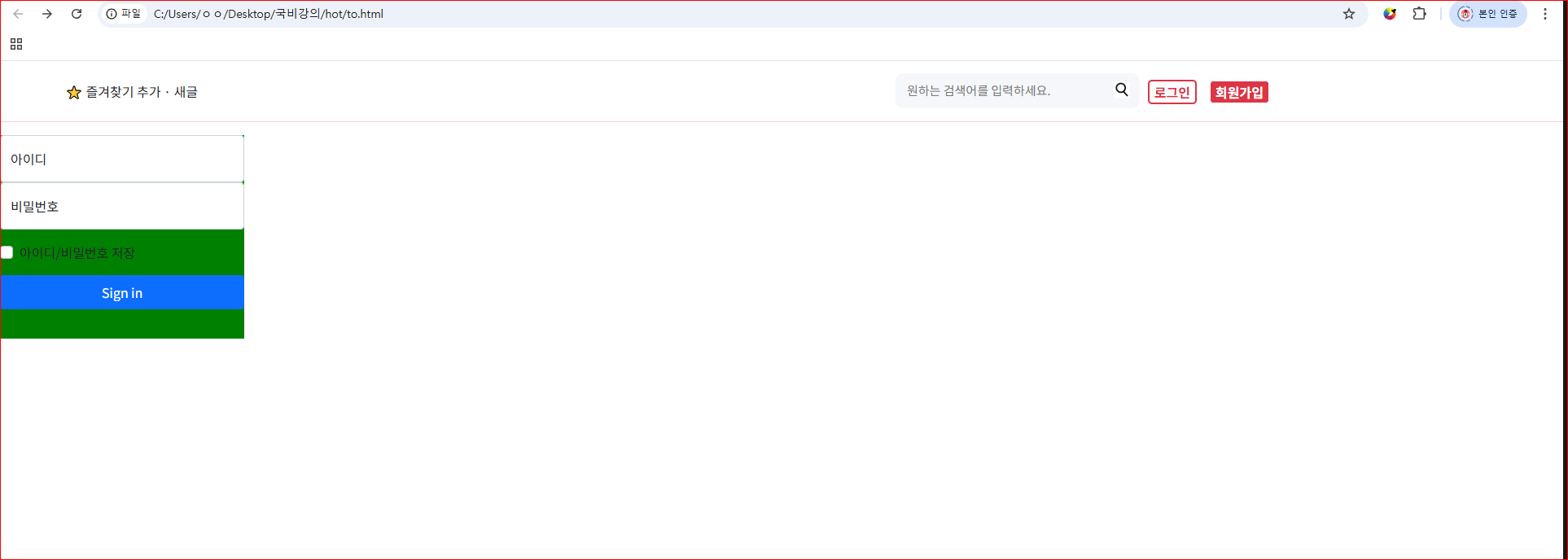
↓ 값 주기 전
<!DOCTYPE html>
<html lang="en">


<head>
    <meta charset="UTF-8">
    <meta name="viewport" content="width=device-width, initial-scale=1.0">
    <title>Document</title>
    <script src="https://ajax.googleapis.com/ajax/libs/jquery/3.4.1/jquery.min.js"></script>
    <link href="https://cdn.jsdelivr.net/npm/bootstrap@5.0.2/dist/css/bootstrap.min.css" rel="stylesheet"
        integrity="sha384-EVSTQN3/azprG1Anm3QDgpJLIm9Nao0Yz1ztcQTwFspd3yD65VohhpuuCOmLASjC" crossorigin="anonymous">
    <script>
    </script>
    <style>
        @import url('https://fonts.googleapis.com/css2?family=Gowun+Dodum&family=Noto+Sans+KR:wght@100..900&display=swap');


        * {
            font-family: "Noto Sans KR", sans-serif;
        }


        /*↓ 검색바 */
        .highup {
            position: relative;
        }


        .highlist {
            position: absolute;
            left: 80px;
            top: 10px;
        }


        .search {
            width: 300px;
            margin: 15px 0px 10px 1100px;
            position: relative;
        }


        .search>input {
            width: 100%;
            background-color: #f6f7fb;
            border: none;
            border-radius: 10px;
            font-size: 15px;
            padding: 10px 14px;
        }


        .search>img {
            position: absolute;
            width: 20px;
            margin: 0;
            right: 12px;
            top: 10px;
        }


        .search>.searchbtn1 {
            background-color: #ffffff;
            border-color: #dc3545;
            color: #dc3545;
            border: 2px solid;
            border-radius: 5px;
            position: absolute;
            right: -75px;
            margin: 5px;
            top: 3px;
            font-size: 16px;
            font-weight: bold;
        }


        .search>.searchbtn2 {
            background-color: #dc3545;
            border-color: #dc3545;
            color: #ffffff;
            border: 2px solid;
            border-radius: 5px;
            position: absolute;
            right: -165px;
            top: 3px;
            margin: 5px;
            font-size: 16px;
            font-weight: bold;
        }


        .hr {
            color: #dc3545;
        }


        /*↓ 로그인 뭉치 */
        .loginform {
            background-color: green;
            width: 300px;
            height: 250px;
        }


    </style>
</head>


<body>
    <div class="highup">
        <div class="highlist">
            <a>⭐ 즐겨찾기 추가</a>
            <a>· 새글</a>
        </div>
    </div>
    <!--상단-->
    <div class="search">
        <input type="text" placeholder="원하는 검색어를 입력하세요.">
        <img
            src="https://search.pstatic.net/sunny/?src=https%3A%2F%2Fcdn-icons-png.freepik.com%2F512%2F5069%2F5069532.png&type=sc960_832">
        <button type="button" class="searchbtn1">로그인</button>
        <button type="button" class="searchbtn2">회원가입</button>
    </div>
    </div>
    <hr class="hr">
    <!-- https://search.pstatic.net/sunny/?src=https%3A%2F%2Fcdn-icons-png.freepik.com%2F512%2F5069%2F5069532.png&type=sc960_832 -->


    <!--로그인-->
    <div class="loginform">
        <main class="form-signin w-100 m-auto">
            <form>
                <div class="form-floating">
                    <input type="text" class="form-control" id="floatingInput" placeholder="아이디">
                    <label for="floatingInput">아이디</label>
                </div>
                <div class="form-floating">
                    <input type="password" class="form-control" id="floatingPassword" placeholder="비밀번호">
                    <label for="floatingPassword">비밀번호</label>
                </div>


                <div class="form-check text-start my-3">
                    <input class="form-check-input" type="checkbox" value="remember-me" id="checkDefault">
                    <label class="form-check-label" for="checkDefault">
                        아이디/비밀번호 저장
                    </label>
                </div>
                <button class="btn btn-primary w-100 py-2" type="submit">Sign in</button>
            </form>
        </main>
    </div>


</body>


</html>


댓글 알림
