


* 겪고 있는 문제 상황을 최대한 자세하게 작성해주세요.
* 문제 해결을 위해 어떤 시도를 해보았는지 구체적으로 함께 알려주세요.
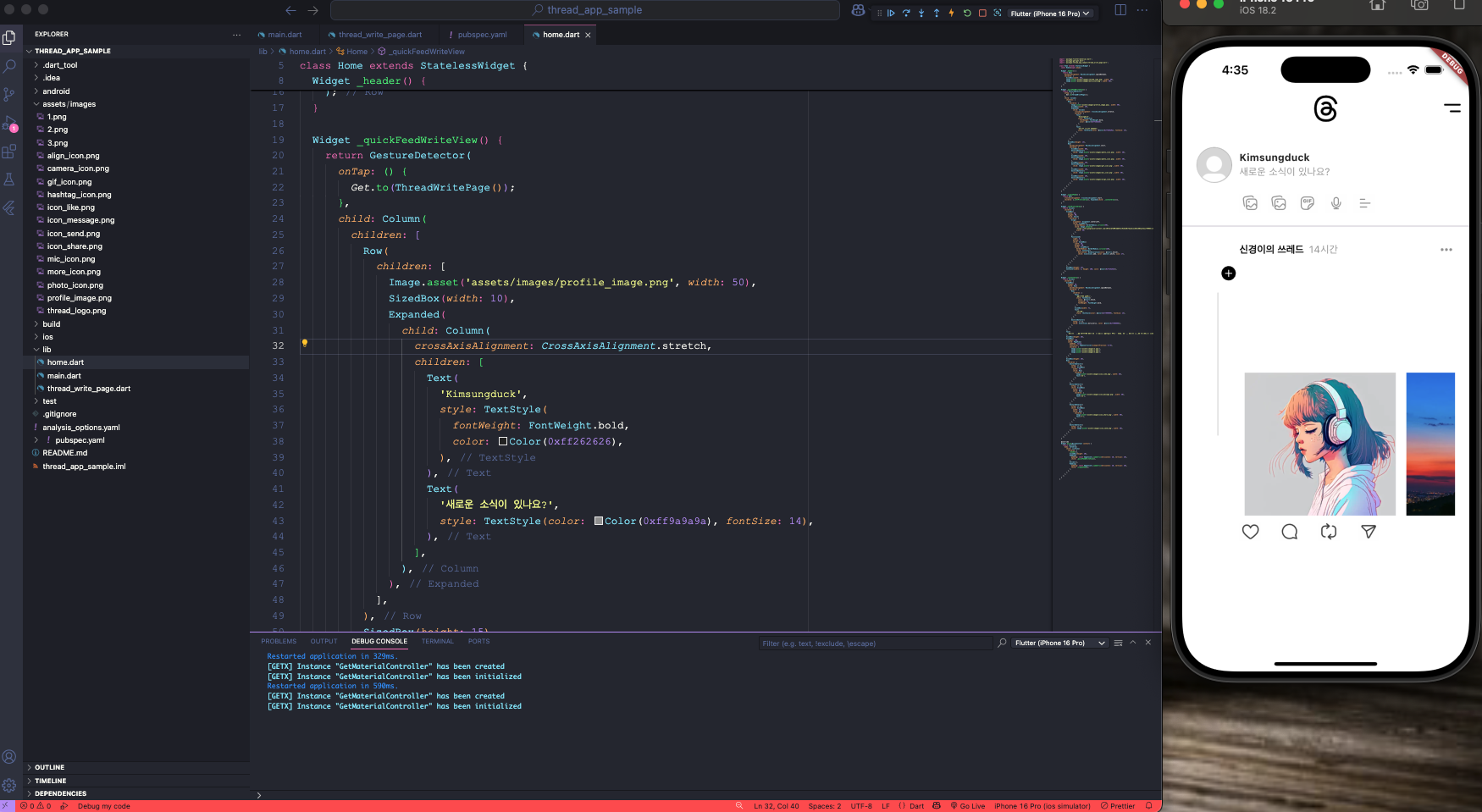
15. 스페드 등록페이지 route 설정 중, get route 방식을 통해 페이지 전환까지 했는데 페이지 전환이 안됩니다.
에뮬 새로 고침을 계속 해도 페이지 전환이 안됩니다. ㅠㅠ
import 'package:flutter/material.dart';
import 'package:get/get.dart';
import 'package:thread_app_sample/thread_write_page.dart';
class Home extends StatelessWidget {
const Home({super.key});
Widget _header() {
return Row(
mainAxisAlignment: MainAxisAlignment.spaceBetween,
children: [
SizedBox(width: 50),
Image.asset('assets/images/thread_logo.png', width: 50),
Image.asset('assets/images/more_icon.png', width: 50),
],
);
}
Widget _quickFeedWriteView() {
return GestureDetector(
onTap: () {
Get.to(ThreadWritePage());
},
child: Column(
children: [
Row(
children: [
Image.asset('assets/images/profile_image.png', width: 50),
SizedBox(width: 10),
Expanded(
child: Column(
crossAxisAlignment: CrossAxisAlignment.stretch,
children: [
Text(
'Kimsungduck',
style: TextStyle(
fontWeight: FontWeight.bold,
color: Color(0xff262626),
),
),
Text(
'새로운 소식이 있나요?',
style: TextStyle(color: Color(0xff9a9a9a), fontSize: 14),
),
],
),
),
],
),
SizedBox(height: 15),
Row(
mainAxisAlignment: MainAxisAlignment.start,
children: [
SizedBox(width: 60),
GestureDetector(
child: Image.asset('assets/images/photo_icon.png', width: 30),
),
SizedBox(width: 10),
GestureDetector(
child: Image.asset('assets/images/photo_icon.png', width: 30),
),
SizedBox(width: 10),
GestureDetector(
child: Image.asset('assets/images/gif_icon.png', width: 30),
),
SizedBox(width: 10),
GestureDetector(
child: Image.asset('assets/images/mic_icon.png', width: 30),
),
SizedBox(width: 10),
GestureDetector(
child: Image.asset('assets/images/align_icon.png', width: 30),
),
],
),
],
),
);
}
Widget _singleFeed() {
return Row(
crossAxisAlignment: CrossAxisAlignment.start,
children: [_leftProfileArea(), Expanded(child: _contentArea())],
);
}
Widget _leftProfileArea() {
return Column(
children: [
SizedBox(
width: 60,
height: 60,
child: Stack(
children: [
Align(
alignment: Alignment.centerLeft,
child: ClipRRect(
borderRadius: BorderRadius.circular(50),
child: Image.network(
width: 50,
),
),
),
Positioned(
right: 5,
bottom: 2,
child: SizedBox(
width: 20,
height: 20,
child: ClipRRect(
borderRadius: BorderRadius.circular(20),
child: Container(
decoration: BoxDecoration(color: Colors.black),
child: Icon(Icons.add, color: Colors.white, size: 17),
),
),
),
),
],
),
),
SizedBox(height: 15),
Container(width: 2, height: 200, color: Color(0xffe5e5e5)),
],
);
}
Widget _contentArea() {
return Column(
children: [
SizedBox(
height: 30,
child: Row(
mainAxisAlignment: MainAxisAlignment.spaceBetween,
children: [
Row(
children: [
Text(
'형규의 쓰레드',
style: TextStyle(
color: Colors.black,
fontSize: 14,
fontWeight: FontWeight.bold,
),
),
SizedBox(width: 7),
Text(
'14시간',
style: TextStyle(color: Color(0xff999999), fontSize: 14),
),
],
),
GestureDetector(
onTap: () {},
child: Icon(Icons.more_horiz, color: Color(0xff999999)),
),
],
),
),
Text(
'잘하고 싶다
..',
),
SizedBox(height: 10),
SizedBox(
height: 200,
child: PageView(
padEnds: false,
controller: PageController(viewportFraction: 0.75),
children: [
Image.asset('assets/images/2.png'),
Image.asset('assets/images/1.png'),
Image.asset('assets/images/3.png'),
],
),
),
SizedBox(height: 10),
Row(
children: [
GestureDetector(
onTap: () {},
child: SizedBox(
width: 55,
child: Row(
children: [
Image.asset('assets/images/icon_like.png', width: 30),
Text('24'),
],
),
),
),
GestureDetector(
onTap: () {},
child: SizedBox(
width: 55,
child: Row(
children: [
Image.asset('assets/images/icon_message.png', width: 30),
Text('14'),
],
),
),
),
GestureDetector(
onTap: () {},
child: SizedBox(
width: 55,
child: Row(
children: [
Image.asset('assets/images/icon_share.png', width: 30),
Text('7'),
],
),
),
),
GestureDetector(
onTap: () {},
child: Image.asset('assets/images/icon_send.png', width: 30),
),
],
),
],
);
}
@override
Widget build(BuildContext context) {
return Scaffold(
body: SafeArea(
child: ListView(
children: [
_header(),
SizedBox(height: 20),
Padding(
padding: const EdgeInsets.symmetric(horizontal: 20, vertical: 10),
child: _quickFeedWriteView(),
),
Divider(),
Padding(
padding: const EdgeInsets.symmetric(horizontal: 20, vertical: 10),
child: _singleFeed(),
),
],
),
),
);
}
}


