


* 겪고 있는 문제 상황을 최대한 자세하게 작성해주세요.
* 문제 해결을 위해 어떤 시도를 해보았는지 구체적으로 함께 알려주세요.
3-9강까지 수업 내용 따라했는데 home.dart에 에러가 생겼습니다
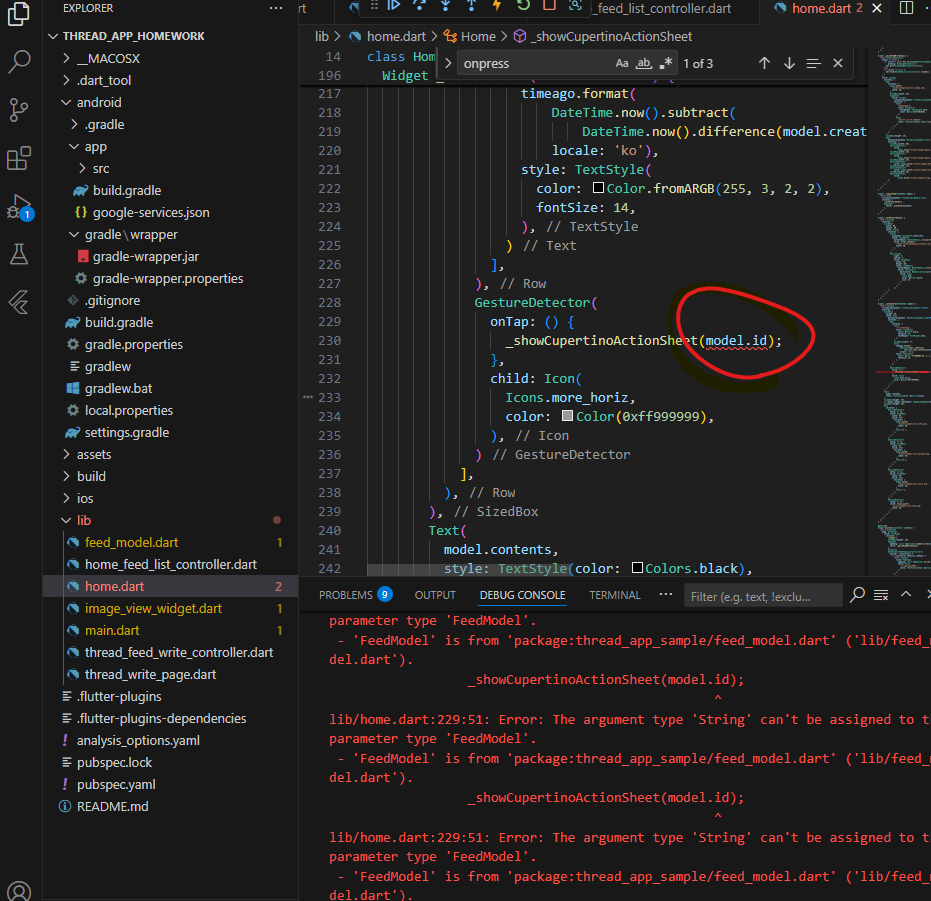
작성한 코드 및 에러 메세지
import 'package:flutter/cupertino.dart';
import 'package:flutter/gestures.dart';
import 'package:flutter/material.dart';
import 'package:flutter/rendering.dart';
import 'package:flutter/widgets.dart';
import 'package:get/get.dart';
import 'package:thread_app_sample/feed_model.dart';
import 'package:thread_app_sample/home_feed_list_controller.dart';
import 'package:thread_app_sample/image_view_widget.dart';
import 'package:thread_app_sample/thread_feed_write_controller.dart';
import 'package:thread_app_sample/thread_write_page.dart';
import 'package:timeago/timeago.dart' as timeago;
class Home extends StatelessWidget {
const Home({super.key});
void _showCupertinoActionSheet(FeedModel feedModel) {
showCupertinoModalPopup(
context: Get.context!,
builder: (BuildContext context) => CupertinoActionSheet(
actions: <CupertinoActionSheetAction>[
CupertinoActionSheetAction(
onPressed: () async {
var result = await Get.to<FeedModel?>(ThreadWritePage(),
binding: BindingsBuilder(() {
Get.put(ThreadFeedWriteController(editFeedModel: feedModel));
}));
Get.back(); // 추가
if (result != null) {
Get.find<HomeFeedListcontroller>().reload();
}
},
child: Text('수정'),
),
CupertinoActionSheetAction(
onPressed: () {
Navigator.pop(context);
Get.find<HomeFeedListcontroller>().removeFeed(feedModel.id);
},
isDestructiveAction: true,
child: Text('삭제'),
),
],
cancelButton: CupertinoActionSheetAction(
onPressed: () {
Navigator.pop(context);
},
child: Text('취소'),
),
),
);
}
Widget _header() {
return Row(
mainAxisAlignment: MainAxisAlignment.spaceBetween,
children: [
SizedBox(
width: 50,
),
Image.asset(
'assets/images/thread_logo.png',
width: 50,
),
Image.asset(
'assets/images/more_icon.png',
width: 50,
),
],
);
}
Widget _quickFeedWriteView() {
return GestureDetector(
onTap: () async {
var result = await Get.to<FeedModel?>(ThreadWritePage(),
binding: BindingsBuilder(() {
Get.put(ThreadFeedWriteController());
}));
if (result != null) {
Get.find<HomeFeedListcontroller>().reload();
}
},
child: Column(
children: [
Row(
children: [
Image.asset(
'assets/images/profile_image.png',
width: 50,
),
SizedBox(width: 10),
Expanded(
child: Column(
crossAxisAlignment: CrossAxisAlignment.stretch,
children: [
Text(
'Kimsungduck',
style: TextStyle(
fontWeight: FontWeight.bold,
color: Color(0xff262626),
),
),
Text(
'새로운 소식이 있나요?',
style: TextStyle(color: Color(0xff9a9a9a), fontSize: 14),
),
],
),
)
],
),
SizedBox(height: 15),
Row(
mainAxisAlignment: MainAxisAlignment.start,
children: [
SizedBox(width: 60),
GestureDetector(
child:
Image.asset('assets/images/photo_icon.png', width: 30)),
SizedBox(width: 10),
GestureDetector(
child:
Image.asset('assets/images/photo_icon.png', width: 30)),
SizedBox(width: 10),
GestureDetector(
child: Image.asset('assets/images/gif_icon.png', width: 30)),
SizedBox(width: 10),
GestureDetector(
child: Image.asset('assets/images/mic_icon.png', width: 30)),
SizedBox(width: 10),
GestureDetector(
child:
Image.asset('assets/images/align_icon.png', width: 30)),
],
)
],
),
);
}
Widget _singleFeed(FeedModel model) {
return Row(
crossAxisAlignment: CrossAxisAlignment.start,
children: [
_leftProfileArea(),
Expanded(
child: _contentArea(model),
),
],
);
}
Widget _leftProfileArea() {
return Column(
children: [
SizedBox(
width: 60,
height: 60,
child: Stack(
children: [
Align(
alignment: Alignment.centerLeft,
child: ClipRRect(
borderRadius: BorderRadius.circular(50),
child: Image.network(
width: 50,
),
),
),
Positioned(
right: 5,
bottom: 2,
child: SizedBox(
width: 20,
height: 20,
child: ClipRRect(
borderRadius: BorderRadius.circular(20),
child: Container(
decoration: BoxDecoration(color: Colors.black),
child: Icon(
Icons.add,
color: Colors.white,
size: 17,
),
),
),
))
],
),
),
],
);
}
Widget _contentArea(FeedModel model) {
return Column(
crossAxisAlignment: CrossAxisAlignment.stretch,
children: [
SizedBox(
height: 30,
child: Row(
mainAxisAlignment: MainAxisAlignment.spaceBetween,
children: [
Row(
children: [
Text(
'개발하는남자',
style: TextStyle(
color: Colors.black,
fontSize: 14,
fontWeight: FontWeight.bold,
),
),
SizedBox(width: 7),
Text(
timeago.format(
DateTime.now().subtract(
DateTime.now().difference(model.createdAt)),
locale: 'ko'),
style: TextStyle(
color: Color.fromARGB(255, 3, 2, 2),
fontSize: 14,
),
)
],
),
GestureDetector(
onTap: () {
_showCupertinoActionSheet(model.id);
},
child: Icon(
Icons.more_horiz,
color: Color(0xff999999),
),
)
],
),
),
Text(
model.contents,
style: TextStyle(color: Colors.black),
),
SizedBox(height: 10),
if (model.images.isNotEmpty) ImageViewWidget(images: model.images),
SizedBox(height: 10),
Row(
children: [
GestureDetector(
onTap: () {},
child: SizedBox(
width: 55,
child: Row(
children: [
Image.asset(
'assets/images/icon_like.png',
width: 30,
),
Text('24'),
],
),
),
),
GestureDetector(
onTap: () {},
child: SizedBox(
width: 55,
child: Row(
children: [
Image.asset(
'assets/images/icon_message.png',
width: 30,
),
Text('14'),
],
),
),
),
GestureDetector(
onTap: () {},
child: SizedBox(
width: 55,
child: Row(
children: [
Image.asset(
'assets/images/icon_share.png',
width: 30,
),
Text('7'),
],
),
),
),
GestureDetector(
onTap: () {},
child: Image.asset(
'assets/images/icon_send.png',
width: 30,
),
),
],
),
],
);
}
@override
Widget build(BuildContext context) {
return Scaffold(
body: SafeArea(
child: ListView(
children: [
_header(),
SizedBox(height: 20),
Padding(
padding: const EdgeInsets.symmetric(horizontal: 20, vertical: 10),
child: _quickFeedWriteView(),
),
Divider(),
GetBuilder<HomeFeedListcontroller>(
builder: (controller) {
if (controller.feedList.isEmpty) {
return Center(
child: Padding(
padding: const EdgeInsets.all(30.0),
child: Text(
'피드가 없습니다.',
style: TextStyle(color: Colors.black),
),
),
);
}
return Padding(
padding: const EdgeInsets.symmetric(horizontal: 15),
child: Column(
children: List.generate(
controller.feedList.length,
(index) => _singleFeed(controller.feedList[index]),
)),
);
},
),
],
),
),
);
}
}
오류 발생 시, 작성한 코드 전체와 에러 메시지를 첨부해 주세요.
Tip 1) </> 아이콘을 눌러 코드박스를 만들어 보세요.
Tip 2) Ctrl+A(맥의 경우 Command+A) 단축키로 코드를 한 번에 선택할 수 있어요!


