


* 겪고 있는 문제 상황을 최대한 자세하게 작성해주세요.
* 문제 해결을 위해 어떤 시도를 해보았는지 구체적으로 함께 알려주세요.
크롬 가상화면에서 "로봇이 아닙니다"라는 창이 뜨며 결과값이 나오지 않습니다
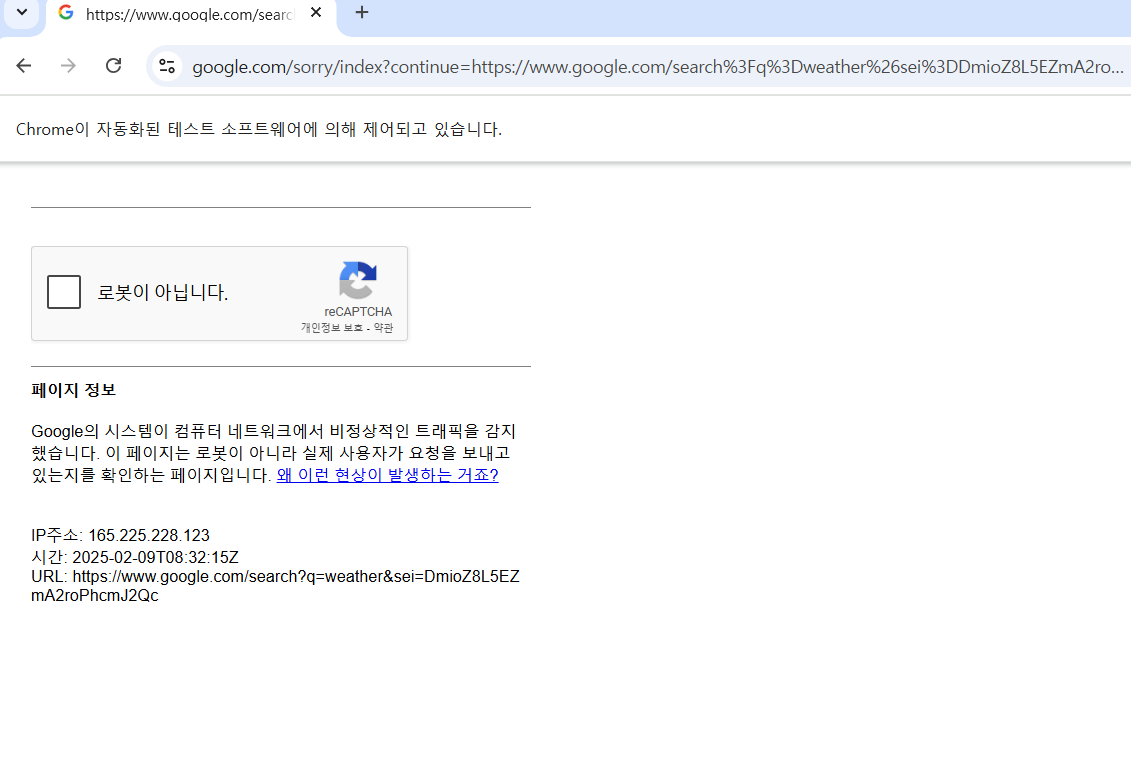
작성한 코드 및 에러 메세지
from selenium import webdriver
from selenium.webdriver.chrome.options import Options
from selenium.webdriver.common.by import By


chrome_options = Options()
chrome_options.add_experimental_option("detach", True)
chrome_options.add_experimental_option("excludeSwitches", ["enable-logging"])
driver = webdriver.Chrome(options=chrome_options)


# 예시로 Google의 날씨 정보 페이지로 이동
driver.get("https://www.google.com/search?q=weather")


# CSS 선택자를 사용하여 원하는 클래스를 가진 웹 요소에 접근
element = driver.find_element(By.ID, 'wob_tm').text
loc = driver.find_element(By.CSS_SELECTOR, 'span.BBwThe').text


print("="*30)
print(f'현재 {loc} 온도는 --> {element}도!')
print("="*30)


driver.quit()
오류화면
>>> from selenium import webdriver
>>> from selenium.webdriver.chrome.options import Options
>>> from selenium.webdriver.common.by import By
>>> chrome_options = Options()
>>> chrome_options.add_experimental_option("detach", True)
>>> chrome_options.add_experimental_option("excludeSwitches", ["enable-logging"])
>>> driver = webdriver.Chrome(options=chrome_options)
>>> # 예시로 Google의 날씨 정보 페이지로 이동
>>>
>>> driver.get("https://www.google.com/search?q=weather")
>>> # CSS 선택자를 사용하여 원하는 클래스를 가진 웹 요소에 접근
>>>
>>> element = driver.find_element(By.ID, 'wob_tm').text
Traceback (most recent call last):
File "<python-input-122>", line 1, in <module>
element = driver.find_element(By.ID, 'wob_tm').text
~~~~~~~~~~~~~~~~~~~^^^^^^^^^^^^^^^^^
File "C:\Users\amore\python\SPARTA\.venv\Lib\site-packages\selenium\webdriver\remote\webdriver.py", line 738, in find_element
return self.execute(Command.FIND_ELEMENT, {"using": by, "value": value})["value"]
~~~~~~~~~~~~^^^^^^^^^^^^^^^^^^^^^^^^^^^^^^^^^^^^^^^^^^^^^^^^^^^^^
File "C:\Users\amore\python\SPARTA\.venv\Lib\site-packages\selenium\webdriver\remote\webdriver.py", line 344, in execute
self.error_handler.check_response(response)
~~~~~~~~~~~~~~~~~~~~~~~~~~~~~~~~~^^^^^^^^^^
File "C:\Users\amore\python\SPARTA\.venv\Lib\site-packages\selenium\webdriver\remote\errorhandler.py", line 229, in check_response
raise exception_class(message, screen, stacktrace)
selenium.common.exceptions.NoSuchElementException: Message: no such element: Unable to locate element: {"method":"css selector","selector":"[id="wob_tm"]"}
(Session info: chrome=132.0.6834.160); For documentation on this error, please visit: https://www.selenium.dev/documentation/webdriver/troubleshooting/errors#no-such-element-exception
Stacktrace:
GetHandleVerifier [0x00007FF75B3902F5+28725]
(No symbol) [0x00007FF75B2F2AE0]
(No symbol) [0x00007FF75B18510A]
(No symbol) [0x00007FF75B1D93D2]
(No symbol) [0x00007FF75B1D95FC]
(No symbol) [0x00007FF75B223407]
(No symbol) [0x00007FF75B1FFFEF]
(No symbol) [0x00007FF75B220181]
(No symbol) [0x00007FF75B1FFD53]
(No symbol) [0x00007FF75B1CA0E3]
(No symbol) [0x00007FF75B1CB471]
GetHandleVerifier [0x00007FF75B6BF30D+3366989]
GetHandleVerifier [0x00007FF75B6D12F0+3440688]
GetHandleVerifier [0x00007FF75B6C78FD+3401277]
GetHandleVerifier [0x00007FF75B45AAAB+858091]
(No symbol) [0x00007FF75B2FE74F]
(No symbol) [0x00007FF75B2FA304]
(No symbol) [0x00007FF75B2FA49D]
(No symbol) [0x00007FF75B2E8B69]
BaseThreadInitThunk [0x00007FF81184E8D7+23]
RtlUserThreadStart [0x00007FF81293FBCC+44]
>>> loc = driver.find_element(By.CSS_SELECTOR, 'span.BBwThe').text
Traceback (most recent call last):
File "<python-input-123>", line 1, in <module>
loc = driver.find_element(By.CSS_SELECTOR, 'span.BBwThe').text
~~~~~~~~~~~~~~~~~~~^^^^^^^^^^^^^^^^^^^^^^^^^^^^^^^^
File "C:\Users\amore\python\SPARTA\.venv\Lib\site-packages\selenium\webdriver\remote\webdriver.py", line 738, in find_element
return self.execute(Command.FIND_ELEMENT, {"using": by, "value": value})["value"]
~~~~~~~~~~~~^^^^^^^^^^^^^^^^^^^^^^^^^^^^^^^^^^^^^^^^^^^^^^^^^^^^^
File "C:\Users\amore\python\SPARTA\.venv\Lib\site-packages\selenium\webdriver\remote\webdriver.py", line 344, in execute
self.error_handler.check_response(response)
~~~~~~~~~~~~~~~~~~~~~~~~~~~~~~~~~^^^^^^^^^^
File "C:\Users\amore\python\SPARTA\.venv\Lib\site-packages\selenium\webdriver\remote\errorhandler.py", line 229, in check_response
raise exception_class(message, screen, stacktrace)
selenium.common.exceptions.NoSuchElementException: Message: no such element: Unable to locate element: {"method":"css selector","selector":"span.BBwThe"}
(Session info: chrome=132.0.6834.160); For documentation on this error, please visit: https://www.selenium.dev/documentation/webdriver/troubleshooting/errors#no-such-element-exception
Stacktrace:
GetHandleVerifier [0x00007FF75B3902F5+28725]
(No symbol) [0x00007FF75B2F2AE0]
(No symbol) [0x00007FF75B18510A]
(No symbol) [0x00007FF75B1D93D2]
(No symbol) [0x00007FF75B1D95FC]
(No symbol) [0x00007FF75B223407]
(No symbol) [0x00007FF75B1FFFEF]
(No symbol) [0x00007FF75B220181]
(No symbol) [0x00007FF75B1FFD53]
(No symbol) [0x00007FF75B1CA0E3]
(No symbol) [0x00007FF75B1CB471]
GetHandleVerifier [0x00007FF75B6BF30D+3366989]
GetHandleVerifier [0x00007FF75B6D12F0+3440688]
GetHandleVerifier [0x00007FF75B6C78FD+3401277]
GetHandleVerifier [0x00007FF75B45AAAB+858091]
(No symbol) [0x00007FF75B2FE74F]
(No symbol) [0x00007FF75B2FA304]
(No symbol) [0x00007FF75B2FA49D]
(No symbol) [0x00007FF75B2E8B69]
BaseThreadInitThunk [0x00007FF81184E8D7+23]
RtlUserThreadStart [0x00007FF81293FBCC+44]
>>> print("="*30)
==============================
>>> print(f'현재 {loc} 온도는 --> {element}도!')
Traceback (most recent call last):
File "<python-input-125>", line 1, in <module>
print(f'현재 {loc} 온도는 --> {element}도!')
^^^
NameError: name 'loc' is not defined
>>> print("="*30)
==============================
>>> driver.quit()
>>>
생 시, 작성한 코드 전체와 에러 메시지를 첨부해 주세요.
Tip 1) </> 아이콘을 눌러 코드박스를 만들어 보세요.
Tip 2) Ctrl+A(맥의 경우 Command+A) 단축키로 코드를 한 번에 선택할 수 있어요


