커뮤니티

포인트
쿠폰
내 강의실
국비 신청 내역
증명서
계정
로그아웃
학습 질문
개발 일지
나의 활동
답변 완료
1주차 숙제 어려움 이슈 문의...
[왕초보] 플러터(Flutter)로 시작하는 앱개발 종합반
1주차


김*경
댓글
20
・
추천
0
・
조회수
37
조회수
37
답변 완료
안녕하세요, 1주차 숙제를 하고있는 중인데, 1주차 힌트 코드를 보고 거기 있는 함수 코드를 그대로 붙여넣었어요.
그런데 에뮬레이터를 키면 flutter 어플이 켜지지도 않아요... 그냥 폰 홈화면이에요.
그리고 분명히 힌트 코드를 똑같이 넣은 것 같은데, 제 코딩 파일에는 오류 메세지가 생깁니다.
그리고 강의에서는 '1차 숙제 첨부파일'을 다운받아서, 그 파일로 숙제를 하라고 하신 것 같은데, 그렇게 하면 빨간 오류 메세지가 주루루룩 뜨더라구요.
이유가 궁금해요. 폴더명이 한글이라서 그런걸까요?
혹시 파일 위치를 바꿔야 하나 해서 원래 1주차 강의 때 제공해주신 flutter-memory-mathing-game 폴더에 있던 원래 파일과 바꿔서 넣었습니다.
그래도 되나요?
강의를 다시 보면서 강사님의 코딩을 따라 써봐도 잘 안되어서, 도와주셨으면 좋겠습니다...
코드의 전체화면은 아니지만, home.dart 파일에 오류가 4개 있고, card_boards.dart파일에 경고(?)메세지가 하나있습니다.
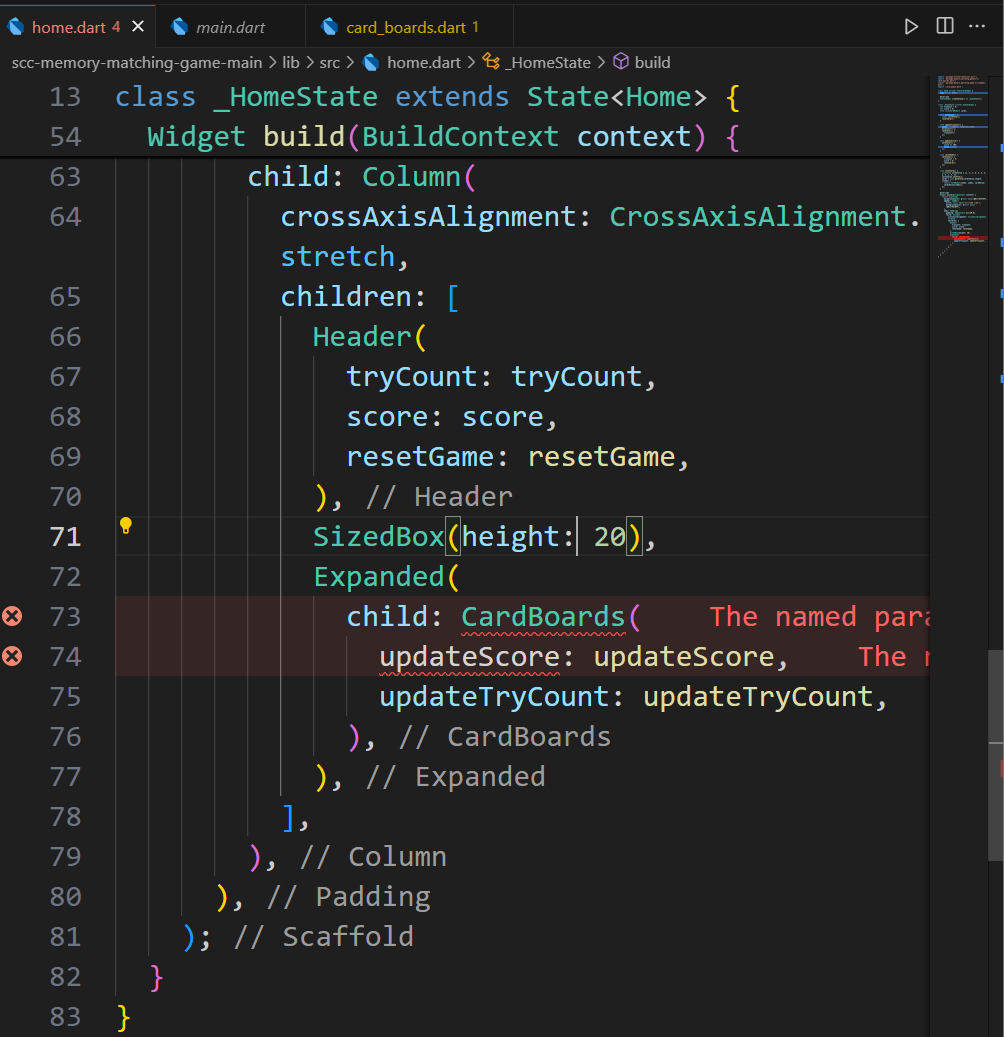
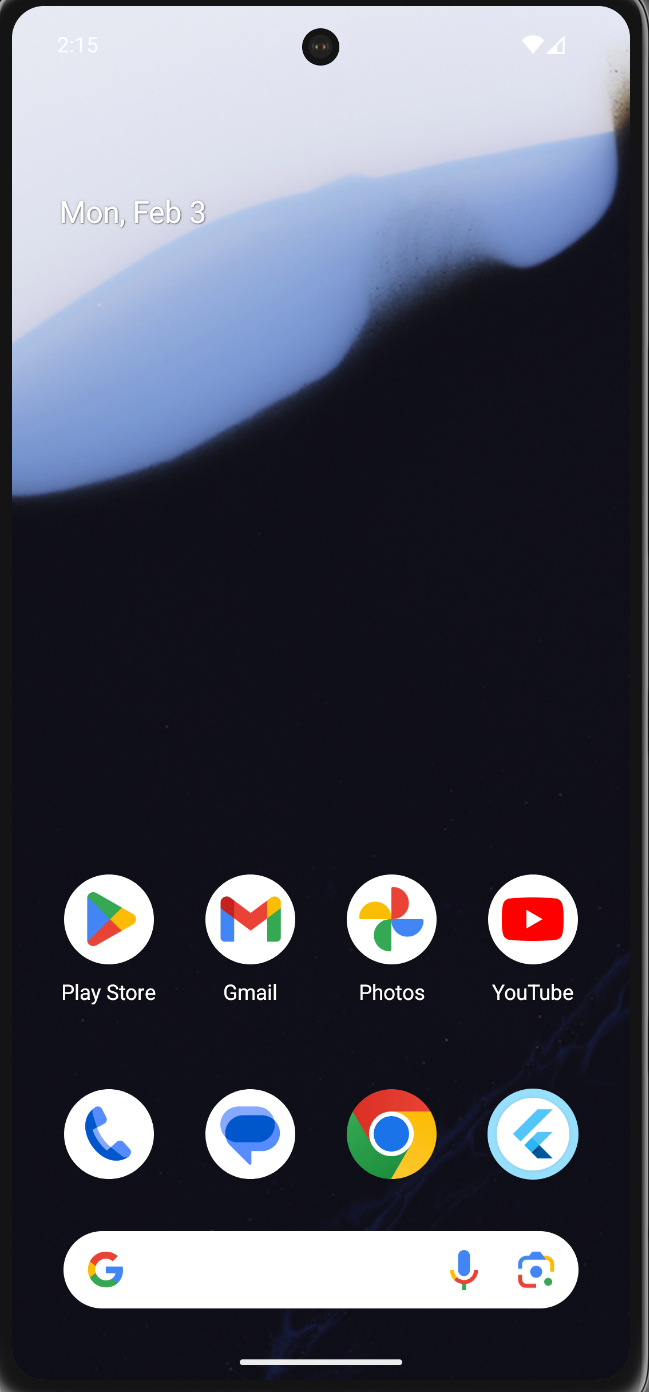
작성한 코드 및 에러 메세지
1.
home.dart에 생긴 에러메세지
The named parameter 'score' is required, but there's no corresponding argument.
Try adding the required argument.

The named parameter 'tryCount' is required, but there's no corresponding argument.
Try adding the required argument.

The named parameter 'updateScore' isn't defined.
Try correcting the name to an existing named parameter's name, or defining a named parameter with the name 'updateScore'.

2 positional arguments expected by 'CardBoards.new', but 0 found.
Try adding the missing arguments.
에러메세지가 뜬 home.dart의 코드
import 'package:flutter/material.dart';
import 'package:memory_matching_game/src/card_boards.dart';
import 'package:memory_matching_game/src/header.dart';
import 'card_model.dart';


class Home extends StatefulWidget {
  Home({super.key});


  @override
  State<Home> createState() => _HomeState();
}


class _HomeState extends State<Home> {
  int tryCount = 0;
  int score = 0;
  late List<CardModel> cards;


  void initState() {
    super.initState();
    resetCard();
  }


  void updateTryCount() {
    print("시도횟수를 업데이트합니다. $tryCount회");
    setState(() {
      tryCount++;
    });
  }


  void updateScore() {
    setState(() {
      score += 100;
      print(score);
    });
  }


  void resetGame() {
    setState(() {
      tryCount = 0;
      score = 0;
      resetCard();
    });
  }


  void resetCard() {
    List<int> cardsValue = [1, 5, 2, 6, 3, 4, 3, 2, 6, 1, 4, 5];
    cardsValue.shuffle();
    cards = List.generate(cardsValue.length, (index) {
      return CardModel(index: index, cardValue: cardsValue[index]);
    });
  }


  @override
  Widget build(BuildContext context) {
    return Scaffold(
      backgroundColor: const Color(0xffECE7E4),
      appBar: AppBar(
        title: const Text('짝맞추기 게임'),
        backgroundColor: const Color(0xff92CBFF),
      ),
      body: Padding(
        padding: EdgeInsets.all(20.0),
        child: Column(
          crossAxisAlignment: CrossAxisAlignment.stretch,
          children: [
            Header(
              tryCount: tryCount,
              score: score,
              resetGame: resetGame,
            ),
            SizedBox(height: 20),
            Expanded(
              child: CardBoards(
                updateScore: updateScore,
                updateTryCount: updateTryCount,
              ),
            ),
          ],
        ),
      ),
    );
  }
}
2.
card_baords.dart파일의 오류메세지
This class (or a class that this class inherits from) is marked as '@immutable', but one or more of its instance fields aren't final: CardBoards.cards
card_board.dart파일의 코드
import 'package:flutter/material.dart';
import 'package:memory_matching_game/src/card.dart';
import 'package:memory_matching_game/src/card_model.dart';


class CardBoards extends StatefulWidget {
  final Function() updateTryCount;
  final Function() updateScore;
  List<int> cards = [1, 5, 2, 6, 3, 4, 3, 2, 6, 1, 4, 5];
  //상수를 선언.


  CardBoards(
    this.updateScore,
    this.cards, {
    super.key,
    required this.updateTryCount,
    required void Function() score,
    required void Function() tryCount,
  });


  @override
  State<CardBoards> createState() => _CardBoardsState();
}


class _CardBoardsState extends State<CardBoards> {
  late List<CardModel> cards;
  @override
  void initState() {
    super.initState();
    List<int> cardsValue = [1, 5, 2, 6, 3, 4, 3, 2, 6, 1, 4, 5];
    cardsValue.shuffle();
    cards = List.generate(cardsValue.length, (index) {
      return CardModel(index: index, cardValue: cardsValue[index]);
    });
  }


  CardModel? instantFirstCard;


  void onTapCard(int cardIndex) {
    print('$cardIndex 번째 카드를 선택하셨습니다.');
    if (instantFirstCard == null) {
      instantFirstCard = cards[cardIndex];
    } else {
      // 두번째 카드가 선택되었을때 로직 추가
      widget.updateTryCount();
      var firstCard = instantFirstCard;
      var secondCard = cards[cardIndex];
      if (firstCard!.cardValue == secondCard.cardValue) {
        print('짝이 맞았습니다.');
        instantFirstCard = null;
      } else {
        resetInstantCards(instantFirstCard!, secondCard);
      }
    }
    setState(() {
      cards[cardIndex].setFlipped(true);
    });
  }


  void resetInstantCards(CardModel firstCard, CardModel secondCard) async {
    await Future.delayed(Duration(seconds: 2));
    setState(() {
      firstCard.setFlipped(false);
      secondCard.setFlipped(false);
    });
    instantFirstCard = null;
    return;
  }


  @override
  Widget build(BuildContext context) {
    return SingleChildScrollView(
      child: Wrap(
        spacing: 4,
        runSpacing: 4,
        children: [
          for (var i = 0; i < cards.length; i++)
            CardWidget(
              card: cards[i],
              onTap: () {
                onTapCard(i);
              },
            ),
        ],
      ),
    );
  }
}


댓글 알림
