커뮤니티

포인트
쿠폰
내 강의실
국비 신청 내역
증명서
계정
로그아웃
학습 질문
개발 일지
나의 활동
답변 완료
'05. 셀레니움으로 오늘의 날씨 가져오기 ' 수업에서 출력이 제대로 되지 않는 경우 대처
[왕초보] 칼퇴를 부르는 파이썬 업무 자동화
0주차


김*진
댓글
5
・
추천
0
・
조회수
18
조회수
18
답변 완료
* 겪고 있는 문제 상황을 최대한 자세하게 작성해주세요.
* 문제 해결을 위해 어떤 시도를 해보았는지 구체적으로 함께 알려주세요.
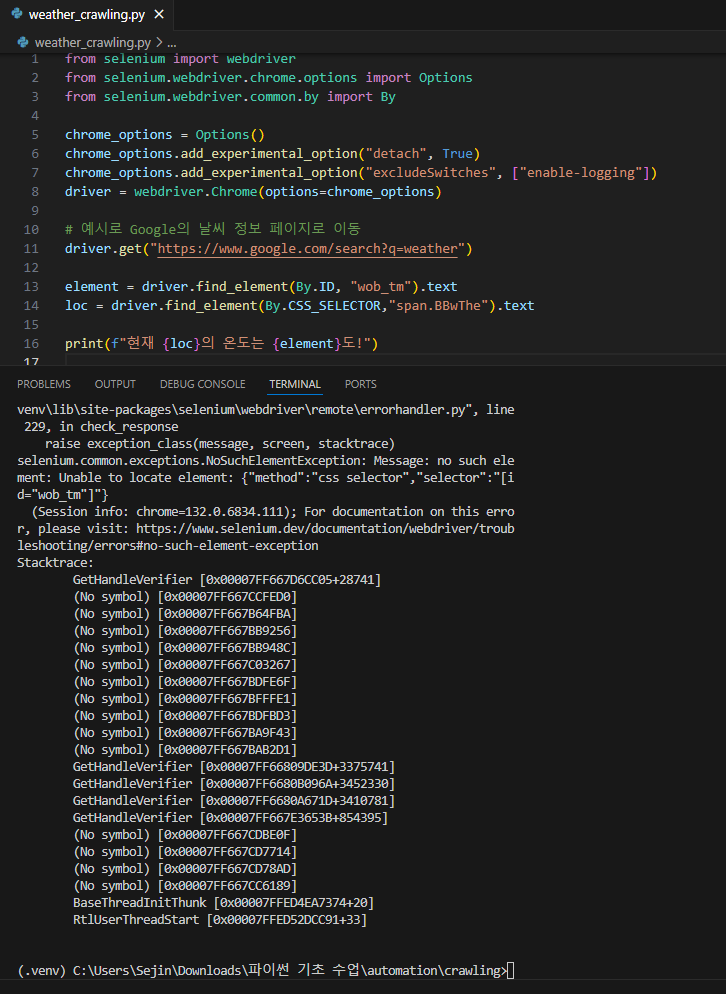
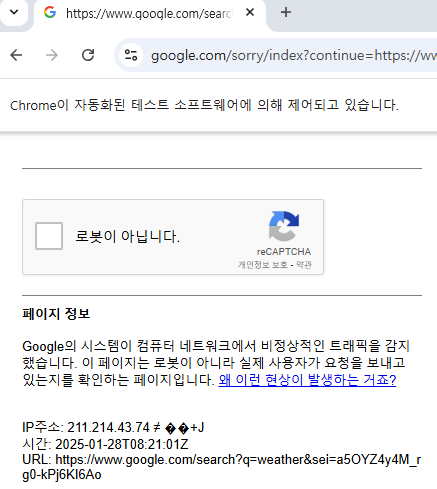
'05. 셀레니움으로 오늘의 날씨 가져오기 ' 수업에서 구글 검색 접근이 자동화 감지된 후 출력이 제대로 되지 않고 있습니다.
바로 이전 "'05. 셀레니움으로 오늘의 날씨 가져오기 ' 수업에서 구글 검색 접근이 자동화 감지된 경우 대처"질문의 추가 질문 사항입니다!
보고
계신 화면 전체를 캡처해 주시면, 튜터님들이 빠르게 상황을 이해할 수 있어요.
작성한 코드 및 에러 메세지
from selenium import webdriver
from selenium.webdriver.chrome.options import Options
from selenium.webdriver.common.by import By


chrome_options = Options()
chrome_options.add_experimental_option("detach", True)
chrome_options.add_experimental_option("excludeSwitches", ["enable-logging"])
driver = webdriver.Chrome(options=chrome_options)


# 예시로 Google의 날씨 정보 페이지로 이동
driver.get("https://www.google.com/search?q=weather")


element = driver.find_element(By.ID, "wob_tm").text
loc = driver.find_element(By.CSS_SELECTOR,"span.BBwThe").text


print(f"현재 {loc}의 온도는 {element}도!")

---------------------------------------------------------------------------------------------
#터미널 출력 사항
(.venv) C:\Users\Sejin\Downloads\파이
썬 기초 수업\automation\crawling>"c:/Users/Sejin/Downloads/파이썬 기초 수
업/automation/crawling/.venv/Scripts/python.exe" "c:/Users/Sejin/Downloads/파이썬 기초 수업/automation/crawling/weather_crawling.py"
Traceback (most recent call last):
  File "c:\Users\Sejin\Downloads\파이
썬 기초 수업\automation\crawling\weather_crawling.py", line 13, in <module>
    element = driver.find_element(By.ID, "wob_tm").text
  File "c:\Users\Sejin\Downloads\파이
썬 기초 수업\automation\crawling\.venv\lib\site-packages\selenium\webdriver\remote\webdriver.py", line 738, in
find_element
    return self.execute(Command.FIND_ELEMENT, {"using": by, "value": value})["value"]
  File "c:\Users\Sejin\Downloads\파이
썬 기초 수업\automation\crawling\.venv\lib\site-packages\selenium\webdriver\remote\webdriver.py", line 344, in
execute
    self.error_handler.check_response(response)
  File "c:\Users\Sejin\Downloads\파이
썬 기초 수업\automation\crawling\.venv\lib\site-packages\selenium\webdriver\remote\errorhandler.py", line 229,
in check_response
    raise exception_class(message, screen, stacktrace)
selenium.common.exceptions.NoSuchElementException: Message: no such element: Unable to locate element: {"method":"css selector","selector":"[id="wob_tm"]"}
  (Session info: chrome=132.0.6834.111); For documentation on this error,
please visit: https://www.selenium.dev/documentation/webdriver/troubleshooting/errors#no-such-element-exceptionStacktrace:
        GetHandleVerifier [0x00007FF667D6CC05+28741]
        (No symbol) [0x00007FF667CCFED0]
        (No symbol) [0x00007FF667B64FBA]
        (No symbol) [0x00007FF667BB9256]
        (No symbol) [0x00007FF667BB948C]
        (No symbol) [0x00007FF667C03267]
        (No symbol) [0x00007FF667BDFE6F]
        (No symbol) [0x00007FF667BFFFE1]
        (No symbol) [0x00007FF667BDFBD3]
        (No symbol) [0x00007FF667BA9F43]
        (No symbol) [0x00007FF667BAB2D1]
        GetHandleVerifier [0x00007FF66809DE3D+3375741]
        GetHandleVerifier [0x00007FF6680B096A+3452330]
        GetHandleVerifier [0x00007FF6680A671D+3410781]
        GetHandleVerifier [0x00007FF667E3653B+854395]
        (No symbol) [0x00007FF667CDBE0F]
        (No symbol) [0x00007FF667CD7714]
        (No symbol) [0x00007FF667CD78AD]
        (No symbol) [0x00007FF667CC6189]
        BaseThreadInitThunk [0x00007FFED4EA7374+20]
        RtlUserThreadStart [0x00007FFED52DCC91+33]
Tip 2) Ctrl+A(맥의 경우 Command+A) 단축키로 코드를 한 번에 선택할 수 있어요!


댓글 알림
