


* 겪고 있는 문제 상황을 최대한 자세하게 작성해주세요.
* 문제 해결을 위해 어떤 시도를 해보았는지 구체적으로 함께 알려주세요.
해당 강의 2분 16초 쯤에 검색창 클릭 코드가 하단과 같이 설명 하셨는데,
search = driver.find_element( By.CSS_SELECTOR, "input._searchInput_search_text_3CUDs")
현제 네이버 쇼핑 사이트의 코드가 좀 바뀐거 같습니다.
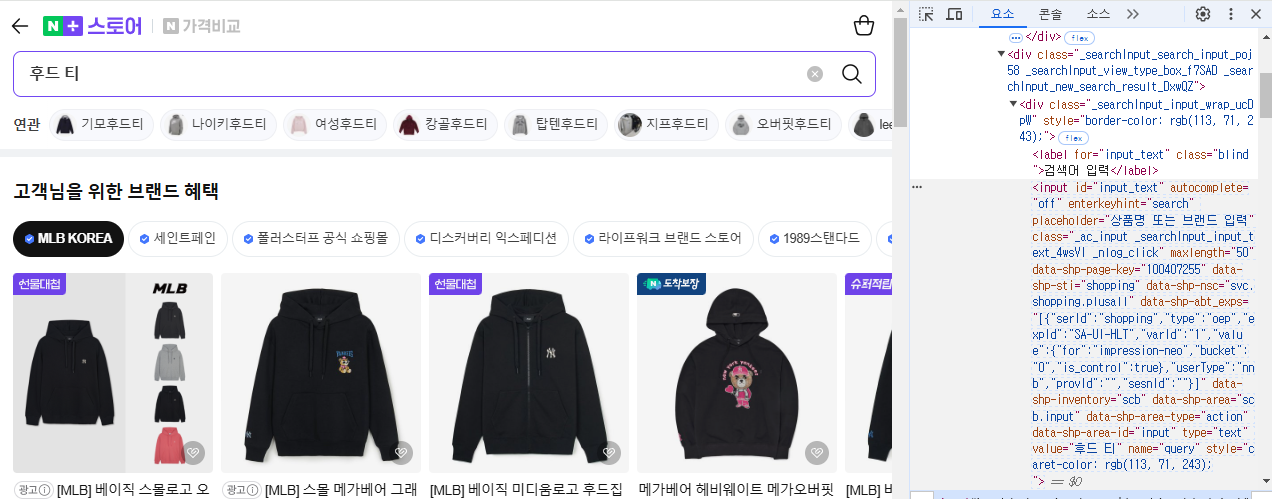
현재 해당 사이트에선 해당 검색창의 검사 코드가 하단과 같이 나옵니다.
<input id="input_text" autocomplete="off" enterkeyhint="search" placeholder="상품명 또는 브랜드 입력" class="_ac_input _searchInput_input_text_4wsVI _nlog_click" maxlength="50" data-shp-page-key="100407255" data-shp-sti="shopping" data-shp-nsc="svc.shopping.plusall" data-shp-abt_exps="[{"serId":"shopping","type":"oep","expId":"SA-UI-HLT","varId":"1","value":{"for":"impression-neo","bucket":"0","is_control":true},"userType":"nnb","provId":"","sesnId":""}]" data-shp-inventory="scb" data-shp-area="scb.input" data-shp-area-type="action" data-shp-area-id="input" type="text" value="후드 티" name="query" style="caret-color: rgb(113, 71, 243);">
어떻게 수정해야 할까요?
보고 계신 화면 전체를
캡처해 주시면, 튜터님들이 빠르게 상황을 이해할 수 있어요.
TERMINAL Error Message
(.venv) D:\Pri\Education\Python\automation\crawling>D:/Pri/Education/Python/automation/crawling/.venv/Scripts/python.exe d:/Pri/Education/Python/automation/crawling/crawling_naver.py
Traceback (most recent call last):
File "d:\Pri\Education\Python\automation\crawling\crawling_naver.py", line 27, in <module>
search = driver.find_element(By.CSS_SELECTOR, "input._ac_input._searchInput_input_text_4wsVI._nlog_click")
File "D:\Pri\Education\Python\automation\crawling\.venv\lib\site-packages\selenium\webdriver\remote\webdriver.py", line 738, in find_element
return self.execute(Command.FIND_ELEMENT, {"using": by, "value": value})["value"]
File "D:\Pri\Education\Python\automation\crawling\.venv\lib\site-packages\selenium\webdriver\remote\webdriver.py", line 344, in execute
self.error_handler.check_response(response)
File "D:\Pri\Education\Python\automation\crawling\.venv\lib\site-packages\selenium\webdriver\remote\errorhandler.py", line 229, in check_response
raise exception_class(message, screen, stacktrace)
selenium.common.exceptions.NoSuchElementException: Message: no such element: Unable to locate element: {"method":"css selector","selector":"input._ac_input._searchInput_input_text_4wsVI._nlog_click"}
(Session info: chrome=131.0.6778.265); For documentation on this error, please visit: https://www.selenium.dev/documentation/webdriver/troubleshooting/errors#no-such-element-exception
Stacktrace:
GetHandleVerifier [0x00007FF7F51780D5+2992373]
(No symbol) [0x00007FF7F4E0BFD0]
(No symbol) [0x00007FF7F4CA590A]
(No symbol) [0x00007FF7F4CF926E]
(No symbol) [0x00007FF7F4CF955C]
(No symbol) [0x00007FF7F4D427D7]
(No symbol) [0x00007FF7F4D1F3AF]
(No symbol) [0x00007FF7F4D3F584]
(No symbol) [0x00007FF7F4D1F113]
(No symbol) [0x00007FF7F4CEA918]
(No symbol) [0x00007FF7F4CEBA81]
GetHandleVerifier [0x00007FF7F51D6A2D+3379789]
GetHandleVerifier [0x00007FF7F51EC32D+3468109]
GetHandleVerifier [0x00007FF7F51E0043+3418211]
GetHandleVerifier [0x00007FF7F4F6C78B+847787]
(No symbol) [0x00007FF7F4E1757F]
(No symbol) [0x00007FF7F4E12FC4]
(No symbol) [0x00007FF7F4E1315D]
(No symbol) [0x00007FF7F4E02979]
BaseThreadInitThunk [0x00007FFD58D7E8D7+23]
RtlUserThreadStart [0x00007FFD5A99FBCC+44]
(.venv) D:\Pri\Education\Python\automation\crawling>


