


* 겪고 있는 문제 상황을 최대한 자세하게 작성해주세요.
* 문제 해결을 위해 어떤 시도를 해보았는지 구체적으로 함께 알려주세요.
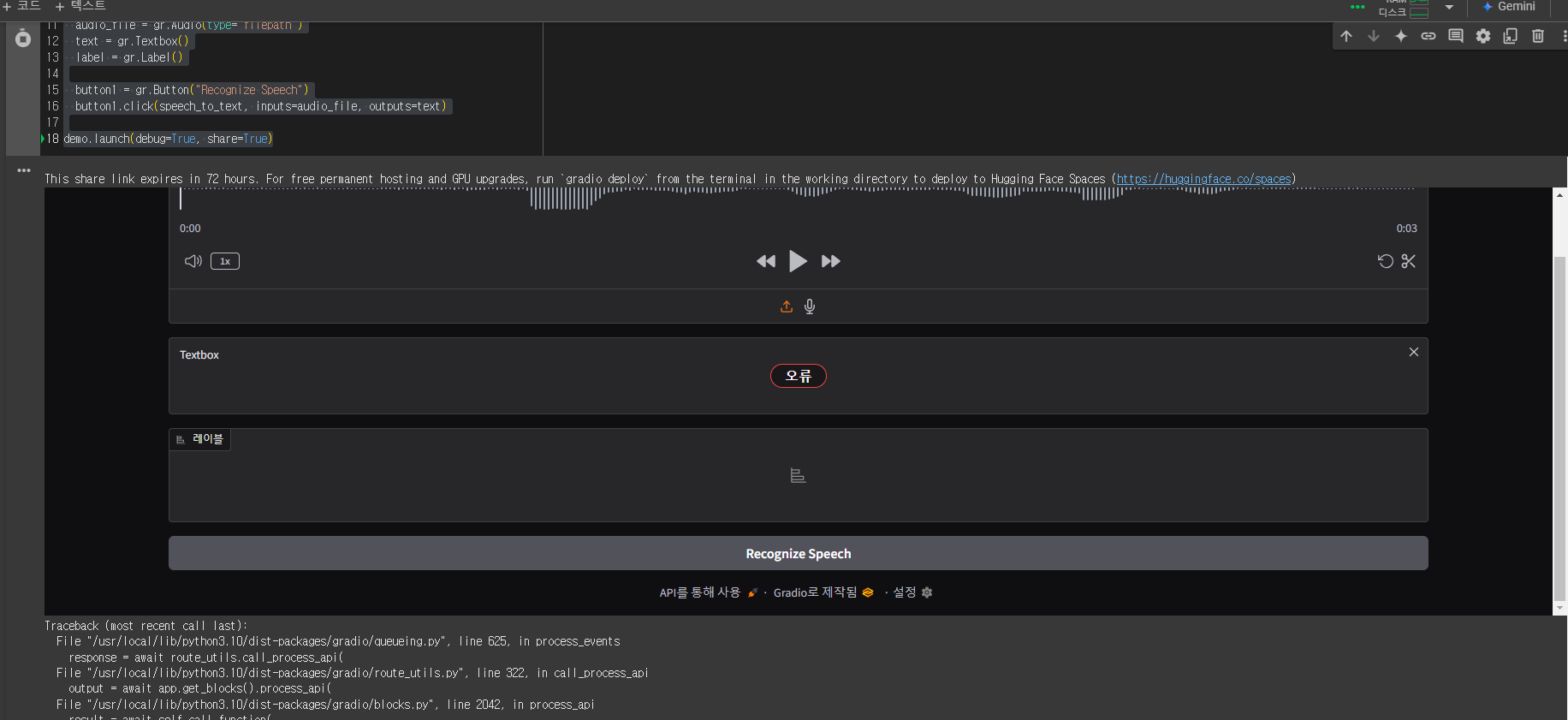
음성인공지능 2-7 강의를 듣고 있는데 아래와 같이 오류가 납니다. 음성파일은 코드 스니펫에 부정영어 브라우저에 복사-붙여넣기하고 다운로드해서 사용했습니다. 확인 부탁드립니다.
코드
from transformers import pipeline
import gradio as gr
pipe = pipeline("automatic-speech-recognition", model="facebook/wav2vec2-base-960h")
def speech_to_text(speech):
text = pipe(speech)["text"]
return text
with gr.Blocks() as demo:
audio_file = gr.Audio(type="filepath")
text = gr.Textbox()
label = gr.Label()
button1 = gr.Button("Recognize Speech")
button1.click(speech_to_text, inputs=audio_file, outputs=text)
demo.launch(debug=True, share=True)
(debug=True) 해서 나온 에러
Traceback (most recent call last):
File "/usr/local/lib/python3.10/dist-packages/gradio/queueing.py", line 625, in process_events
response = await route_utils.call_process_api(
File "/usr/local/lib/python3.10/dist-packages/gradio/route_utils.py", line 322, in call_process_api
output = await app.get_blocks().process_api(
File "/usr/local/lib/python3.10/dist-packages/gradio/blocks.py", line 2042, in process_api
result = await self.call_function(
File "/usr/local/lib/python3.10/dist-packages/gradio/blocks.py", line 1589, in call_function
prediction = await anyio.to_thread.run_sync( # type: ignore
File "/usr/local/lib/python3.10/dist-packages/anyio/to_thread.py", line 33, in run_sync
return await get_asynclib().run_sync_in_worker_thread(
File "/usr/local/lib/python3.10/dist-packages/anyio/_backends/_asyncio.py", line 877, in run_sync_in_worker_thread
return await future
File "/usr/local/lib/python3.10/dist-packages/anyio/_backends/_asyncio.py", line 807, in run
result = context.run(func, *args)
File "/usr/local/lib/python3.10/dist-packages/gradio/utils.py", line 883, in wrapper
response = f(*args, **kwargs)
File "<ipython-input-37-ad1083a78de2>", line 7, in speech_to_text
text = pipe(speech)["text"]
File "/usr/local/lib/python3.10/dist-packages/transformers/pipelines/automatic_speech_recognition.py", line 283, in __call__
return super().__call__(inputs, **kwargs)
File "/usr/local/lib/python3.10/dist-packages/transformers/pipelines/base.py", line 1293, in __call__
return next(
File "/usr/local/lib/python3.10/dist-packages/transformers/pipelines/pt_utils.py", line 124, in __next__
item = next(self.iterator)
File "/usr/local/lib/python3.10/dist-packages/transformers/pipelines/pt_utils.py", line 269, in __next__
processed = self.infer(next(self.iterator), **self.params)
File "/usr/local/lib/python3.10/dist-packages/torch/utils/data/dataloader.py", line 701, in __next__
data = self._next_data()
File "/usr/local/lib/python3.10/dist-packages/torch/utils/data/dataloader.py", line 757, in _next_data
data = self._dataset_fetcher.fetch(index) # may raise StopIteration
File "/usr/local/lib/python3.10/dist-packages/torch/utils/data/_utils/fetch.py", line 33, in fetch
data.append(next(self.dataset_iter))
File "/usr/local/lib/python3.10/dist-packages/transformers/pipelines/pt_utils.py", line 186, in __next__
processed = next(self.subiterator)
File "/usr/local/lib/python3.10/dist-packages/transformers/pipelines/automatic_speech_recognition.py", line 364, in preprocess
inputs = ffmpeg_read(inputs, self.feature_extractor.sampling_rate)
File "/usr/local/lib/python3.10/dist-packages/transformers/pipelines/audio_utils.py", line 41, in ffmpeg_read
raise ValueError(
ValueError: Soundfile is either not in the correct format or is malformed. Ensure that the soundfile has a valid audio file extension (e.g. wav, flac or mp3) and is not corrupted. If reading from a remote URL, ensure that the URL is the full address to **download** the audio file.
캡쳐화면
해결
wav 파일 따로 녹음해서 사용하니까 되네요. m4a 파일을 인식 못 하는것 같습니다.


