


* 겪고 있는 문제 상황을 최대한 자세하게 작성해주세요.
* 문제 해결을 위해 어떤 시도를 해보았는지 구체적으로 함께 알려주세요.
안녕하세요.
firebase create Project가 안됩니다.
어느부분을 잘못했는지 알수가 없네요.
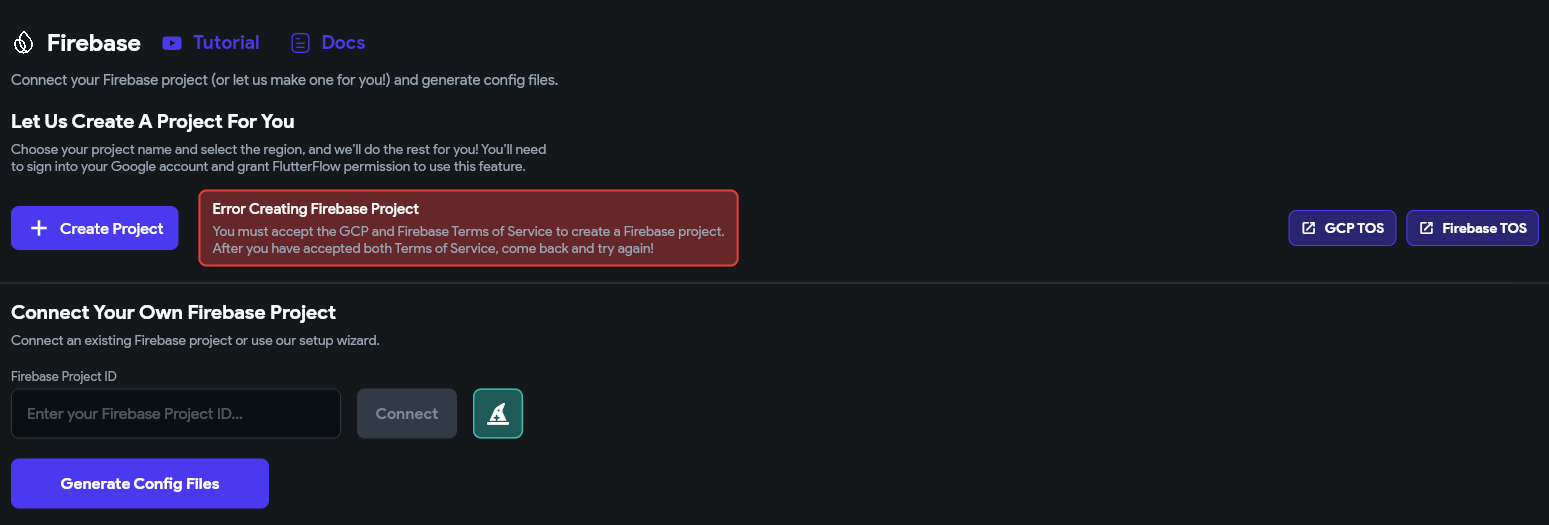
GCP TOS는 눌러서 동의 했는데
우측에 Firebase TOS는 누르면 아래와 같은 에러가 발생합니다.
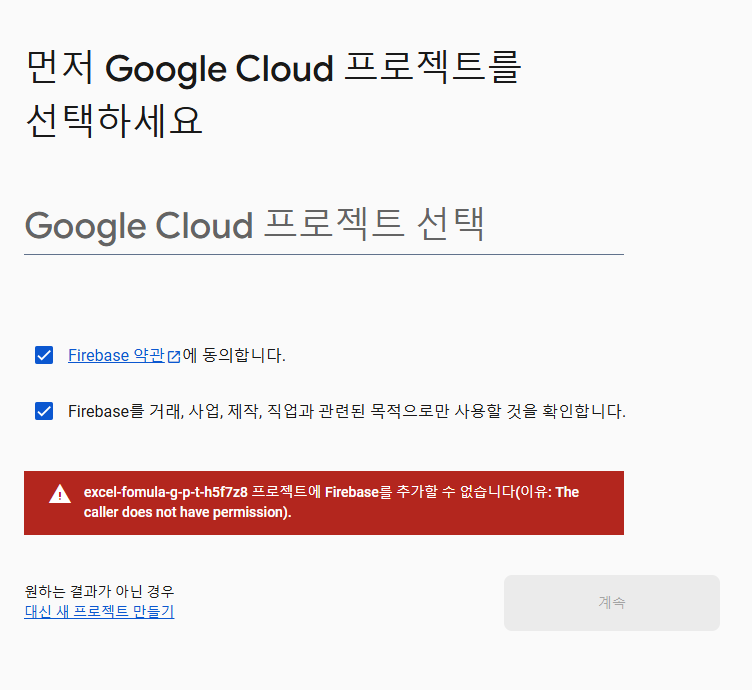
excel-fomula-g-p-t-h5f7z8 프로젝트에 Firebase를 추가할 수 없습니다(이유: The caller does not have permission).
작성한 코드 및 에러 메세지
import '/flutter_flow/flutter_flow_theme.dart';
import '/flutter_flow/flutter_flow_util.dart';
import '/flutter_flow/flutter_flow_widgets.dart';
import 'dart:ui';
import 'package:flutter/material.dart';
import 'package:google_fonts/google_fonts.dart';
import 'package:provider/provider.dart';
import 'home_model.dart';
export 'home_model.dart';
class HomeWidget extends StatefulWidget {
const HomeWidget({super.key});
@override
State<HomeWidget> createState() => _HomeWidgetState();
}
class _HomeWidgetState extends State<HomeWidget> {
late HomeModel _model;
final scaffoldKey = GlobalKey<ScaffoldState>();
@override
void initState() {
super.initState();
_model = createModel(context, () => HomeModel());
_model.textController1 ??= TextEditingController();
_model.textFieldFocusNode1 ??= FocusNode();
_model.textController2 ??= TextEditingController();
_model.textFieldFocusNode2 ??= FocusNode();
}
@override
void dispose() {
_model.dispose();
super.dispose();
}
@override
Widget build(BuildContext context) {
return GestureDetector(
onTap: () {
FocusScope.of(context).unfocus();
FocusManager.instance.primaryFocus?.unfocus();
},
child: Scaffold(
key: scaffoldKey,
backgroundColor: FlutterFlowTheme.of(context).primaryBackground,
drawer: Drawer(
elevation: 16,
child: Padding(
padding: EdgeInsetsDirectional.fromSTEB(0, 64, 0, 0),
child: Column(
mainAxisSize: MainAxisSize.max,
children: [
InkWell(
splashColor: Colors.transparent,
focusColor: Colors.transparent,
hoverColor: Colors.transparent,
highlightColor: Colors.transparent,
onTap: () async {
context.pushNamed('Home');
},
child: Material(
color: Colors.transparent,
child: ListTile(
title: Text(
'Home',
style: FlutterFlowTheme.of(context).titleLarge.override(
fontFamily: 'Pretendard',
letterSpacing: 0.0,
useGoogleFonts: false,
),
),
trailing: Icon(
Icons.arrow_forward_ios_rounded,
color: FlutterFlowTheme.of(context).secondaryText,
size: 24,
),
tileColor:
FlutterFlowTheme.of(context).secondaryBackground,
dense: false,
contentPadding:
EdgeInsetsDirectional.fromSTEB(12, 0, 12, 0),
shape: RoundedRectangleBorder(
borderRadius: BorderRadius.circular(8),
),
),
),
),
InkWell(
splashColor: Colors.transparent,
focusColor: Colors.transparent,
hoverColor: Colors.transparent,
highlightColor: Colors.transparent,
onTap: () async {
context.pushNamed('History');
},
child: Material(
color: Colors.transparent,
child: ListTile(
title: Text(
'History',
style: FlutterFlowTheme.of(context).titleLarge.override(
fontFamily: 'Pretendard',
letterSpacing: 0.0,
useGoogleFonts: false,
),
),
trailing: Icon(
Icons.arrow_forward_ios_rounded,
color: FlutterFlowTheme.of(context).secondaryText,
size: 24,
),
tileColor:
FlutterFlowTheme.of(context).secondaryBackground,
dense: false,
contentPadding:
EdgeInsetsDirectional.fromSTEB(12, 0, 12, 0),
shape: RoundedRectangleBorder(
borderRadius: BorderRadius.circular(8),
),
),
),
),
].addToStart(SizedBox(height: 64)),
),
),
),
appBar: AppBar(
backgroundColor: FlutterFlowTheme.of(context).primary,
automaticallyImplyLeading: true,
title: Text(
'Home',
style: FlutterFlowTheme.of(context).headlineMedium.override(
fontFamily: 'Pretendard',
color: Colors.white,
fontSize: 22,
letterSpacing: 0.0,
useGoogleFonts: false,
),
),
actions: [],
centerTitle: false,
elevation: 2,
),
body: SafeArea(
top: true,
child: Padding(
padding: EdgeInsetsDirectional.fromSTEB(16, 0, 16, 0),
child: Column(
mainAxisSize: MainAxisSize.max,
children: [
Align(
alignment: AlignmentDirectional(-1, -1),
child: Text(
'입력하기',
style: FlutterFlowTheme.of(context).titleLarge.override(
fontFamily: 'Pretendard',
letterSpacing: 0.0,
useGoogleFonts: false,
),
),
),
Container(
width: MediaQuery.sizeOf(context).width,
child: TextFormField(
controller: _model.textController1,
focusNode: _model.textFieldFocusNode1,
autofocus: false,
obscureText: false,
decoration: InputDecoration(
isDense: true,
labelStyle:
FlutterFlowTheme.of(context).labelMedium.override(
fontFamily: 'Pretendard',
letterSpacing: 0.0,
useGoogleFonts: false,
),
hintText: '만들고 싶은 식',
hintStyle:
FlutterFlowTheme.of(context).labelMedium.override(
fontFamily: 'Pretendard',
letterSpacing: 0.0,
useGoogleFonts: false,
),
enabledBorder: OutlineInputBorder(
borderSide: BorderSide(
color: FlutterFlowTheme.of(context).tertiary,
width: 1,
),
borderRadius: BorderRadius.circular(8),
),
focusedBorder: OutlineInputBorder(
borderSide: BorderSide(
color: Color(0x00000000),
width: 1,
),
borderRadius: BorderRadius.circular(8),
),
errorBorder: OutlineInputBorder(
borderSide: BorderSide(
color: FlutterFlowTheme.of(context).error,
width: 1,
),
borderRadius: BorderRadius.circular(8),
),
focusedErrorBorder: OutlineInputBorder(
borderSide: BorderSide(
color: FlutterFlowTheme.of(context).error,
width: 1,
),
borderRadius: BorderRadius.circular(8),
),
filled: true,
fillColor: FlutterFlowTheme.of(context).alternate,
),
style: FlutterFlowTheme.of(context).bodyMedium.override(
fontFamily: 'Pretendard',
letterSpacing: 0.0,
useGoogleFonts: false,
),
textAlign: TextAlign.start,
maxLines: 5,
cursorColor: FlutterFlowTheme.of(context).primaryText,
validator:
_model.textController1Validator.asValidator(context),
),
),
Align(
alignment: AlignmentDirectional(-1, -1),
child: FFButtonWidget(
onPressed: () {
print('Button pressed ...');
},
text: '제출',
options: FFButtonOptions(
height: 40,
padding: EdgeInsetsDirectional.fromSTEB(16, 0, 16, 0),
iconPadding: EdgeInsetsDirectional.fromSTEB(0, 0, 0, 0),
color: FlutterFlowTheme.of(context).primary,
textStyle:
FlutterFlowTheme.of(context).titleSmall.override(
fontFamily: 'Pretendard',
color: Colors.white,
letterSpacing: 0.0,
useGoogleFonts: false,
),
elevation: 0,
borderRadius: BorderRadius.circular(8),
),
),
),
Row(
mainAxisSize: MainAxisSize.max,
mainAxisAlignment: MainAxisAlignment.spaceBetween,
children: [
Text(
'출력결과',
style: FlutterFlowTheme.of(context).titleLarge.override(
fontFamily: 'Pretendard',
letterSpacing: 0.0,
useGoogleFonts: false,
),
),
Row(
mainAxisSize: MainAxisSize.max,
children: [
Text(
'복사하기',
style:
FlutterFlowTheme.of(context).bodyMedium.override(
fontFamily: 'Pretendard',
letterSpacing: 0.0,
useGoogleFonts: false,
),
),
Icon(
Icons.content_copy,
color: FlutterFlowTheme.of(context).primaryText,
size: 24,
),
],
),
],
),
Container(
width: MediaQuery.sizeOf(context).width,
child: TextFormField(
controller: _model.textController2,
focusNode: _model.textFieldFocusNode2,
autofocus: false,
obscureText: false,
decoration: InputDecoration(
isDense: true,
labelStyle:
FlutterFlowTheme.of(context).labelMedium.override(
fontFamily: 'Pretendard',
letterSpacing: 0.0,
useGoogleFonts: false,
),
hintText: '결과값',
hintStyle:
FlutterFlowTheme.of(context).labelMedium.override(
fontFamily: 'Pretendard',
letterSpacing: 0.0,
useGoogleFonts: false,
),
enabledBorder: OutlineInputBorder(
borderSide: BorderSide(
color: FlutterFlowTheme.of(context).tertiary,
width: 1,
),
borderRadius: BorderRadius.circular(8),
),
focusedBorder: OutlineInputBorder(
borderSide: BorderSide(
color: Color(0x00000000),
width: 1,
),
borderRadius: BorderRadius.circular(8),
),
errorBorder: OutlineInputBorder(
borderSide: BorderSide(
color: FlutterFlowTheme.of(context).error,
width: 1,
),
borderRadius: BorderRadius.circular(8),
),
focusedErrorBorder: OutlineInputBorder(
borderSide: BorderSide(
color: FlutterFlowTheme.of(context).error,
width: 1,
),
borderRadius: BorderRadius.circular(8),
),
filled: true,
fillColor: FlutterFlowTheme.of(context).alternate,
),
style: FlutterFlowTheme.of(context).bodyMedium.override(
fontFamily: 'Pretendard',
letterSpacing: 0.0,
useGoogleFonts: false,
),
maxLines: 5,
cursorColor: FlutterFlowTheme.of(context).primaryText,
validator:
_model.textController2Validator.asValidator(context),
),
),
].divide(SizedBox(height: 16)).addToStart(SizedBox(height: 32)),
),
),
),
),
);
}
}
오류 발생 시, 작성한 코드 전체와 에러 메시지를 첨부해 주세요.
Tip 1) </> 아이콘을 눌러 코드박스를 만들어 보세요.
Tip 2) Ctrl+A(맥의 경우 Command+A) 단축키로 코드를 한 번에 선택할 수 있어요!


