커뮤니티

포인트
쿠폰
내 강의실
국비 신청 내역
증명서
계정
로그아웃
학습 질문
개발 일지
나의 활동
스스로 해결
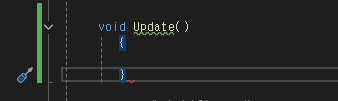
}가 필요합니다. 오류
게임 개발이 처음이어도 쉽게 배우는 모바일 게임 개발
1주차


박*주
댓글
1
・
추천
0
・
조회수
16
조회수
16
스스로 해결
* 겪고 있는 문제 상황을 최대한 자세하게 작성해주세요.
* 문제 해결을 위해 어떤 시도를 해보았는지 구체적으로 함께 알려주세요.
똑같이 따라한 것 같은데 왜 이런 오류가 나올까요...? ㅠㅠ
보고 계신 화면 전
체를 캡처해 주시면, 튜터님들이 빠르게 상황을 이해할 수 있어요.
작성한 코드 및 에러 메세지
using UnityEngine;


public class Rain : MonoBehaviour
{
    float size = 1.0f;
    int score = 1;


    SpriteRenderer renderer;


    // Start is called once before the first execution of Update after the MonoBehaviour is created
    void Start()
    {
        renderer = GetComponent<SpriteRenderer>();


        float x = Random.Range(-2.4f, 2.4f);
        float y = Random.Range(3.0f, 5.0f);


        transform.position = new Vector3(x, y, 0);


        int type = Random.Range(1, 4);


        if (type == 1)
        {
            size = 0.8f;
            score = 1;
            renderer.color = new Color(100 / 255f, 100 / 255f, 1f, 1f);
        }


        else if (type == 2)
        {
            size = 1.0f;
            score = 2;
            renderer.color = new Color(130 / 255f, 130 / 255f, 1f, 1f);
        }


        else if (type == 3)
        {
            size = 1.2f;
            score = 3;
            renderer.color = new Color(150 / 255f, 150 / 255f, 1f, 1f);
        }


        transform.localScale = new Vector3(size, size, 0);


        // Update is called once per frame

     void Update()
        {


        }


    private void OnCollisionEnter2D(Collision2D collision)
    {
        if (collision.gameObject.CompareTag("Ground"))
        {
            Destroy(this.gameObject);
        }
    }
}
Tip 1) </> 아이콘을 눌러 코드박스를 만들어 보세요.
Tip 2) Ctrl+A(맥의 경우 Command+A) 단축키로 코드를 한 번에 선택할 수 있어요!


댓글 알림
