


* 겪고 있는 문제 상황을 최대한 자세하게 작성해주세요.
* 문제 해결을 위해 어떤 시도를 해보았는지 구체적으로 함께 알려주세요.
vscode에 가상장치 연결을 하고, 실행을 하면 적용이 안됩니다.
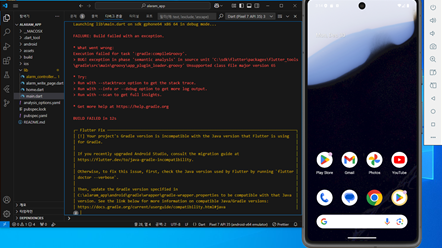
작성한 코드 및 에러 메세지
Launching lib\main.dart on sdk gphone64 x86 64 in debug mode...
FAILURE: Build failed with an exception.
* What went wrong:
Execution failed for task ':gradle:compileGroovy'.
> BUG! exception in phase 'semantic analysis' in source unit 'C:\sdk\flutter\packages\flutter_tools\gradle\src\main\groovy\app_plugin_loader.groovy' Unsupported class file major version 65
* Try:
> Run with --stacktrace option to get the stack trace.
> Run with --info or --debug option to get more log output.
> Run with --scan to get full insights.
* Get more help at https://help.gradle.org
BUILD FAILED in 12s
┌─ Flutter Fix ───────────────────────────────────────────────────────────────────────────────────┐
│ [!] Your project's Gradle version is incompatible with the Java version that Flutter is using │
│ for Gradle. │
│ │
│ If you recently upgraded Android Studio, consult the migration guide at │
│ https://flutter.dev/to/java-gradle-incompatibility. │
│ │
│ Otherwise, to fix this issue, first, check the Java version used by Flutter by running `flutter │
│ doctor --verbose`. │
│ │
│ Then, update the Gradle version specified in │
│ C:\alaram_app\android\gradle\wrapper\gradle-wrapper.properties to be compatible with that Java │
│ version. See the link below for more information on compatible Java/Gradle versions: │
│ https://docs.gradle.org/current/userguide/compatibility.html#java │
오류 발생 시, 작성한 코드 전체와 에러 메시지를 첨부해 주세요.
Tip 1) </> 아이콘을 눌러 코드박스를 만들어 보세요.
Tip 2) Ctrl+A(맥의 경우 Command+A) 단축키로 코드를 한 번에 선택할 수 있어요!


