커뮤니티

포인트
쿠폰
내 강의실
국비 신청 내역
증명서
계정
로그아웃
학습 질문
개발 일지
나의 활동
답변 완료
케러셀 기능이 안되요.
[왕초보] 플러터(Flutter)로 시작하는 앱개발 종합반
2주차


윤*승
댓글
2
・
추천
0
・
조회수
5
조회수
5
답변 완료
* 겪고 있는 문제 상황을 최대한 자세하게 작성해주세요.
* 문제 해결을 위해 어떤 시도를 해보았는지 구체적으로 함께 알려주세요.
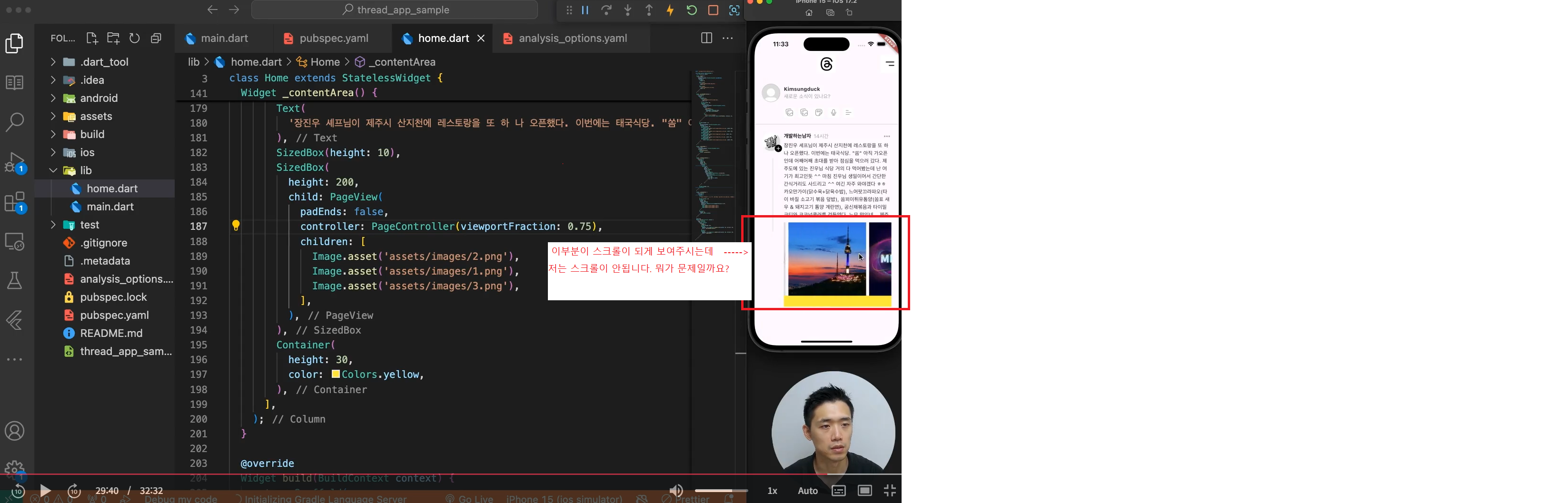
강의 내용에는 케러셀 기능이 있는걸로 설명하시는데 저는 안되네요? 안되는게 맞나요?
작성한 코드 및 에러 메세지
오류 발생 시, 작성한 코드 전체와 에러 메시지를 첨부해 주세요.
import 'package:flutter/material.dart';


class Home extends StatelessWidget {
  const Home({super.key});


  Widget _header() {
    return Row(
      mainAxisAlignment: MainAxisAlignment.spaceBetween,
      children: [
        SizedBox(
          width: 50,
        ),
        Image.asset(
          'assets/images/thread_logo.png',
          width: 50,
        ),
        Image.asset(
          'assets/images/more_icon.png',
          width: 50,
        ),
      ],
    );
  }


  Widget _quickFeedWriteView() {
    return Column(
      children: [
        Row(
          children: [
            Image.asset(
              'assets/images/profile_image.png',
              width: 50,
            ),
            SizedBox(width: 10),
            Expanded(
              child: Column(
                crossAxisAlignment: CrossAxisAlignment.stretch,
                children: [
                  Text(
                    'Kimsungduck',
                    style: TextStyle(
                      fontWeight: FontWeight.bold,
                      color: Color(0xff262626),
                    ),
                  ),
                  Text(
                    '새로운 소식이 있나요?',
                    style: TextStyle(color: Color(0xff9a9a9a), fontSize: 14),
                  ),
                ],
              ),
            )
          ],
        ),
        SizedBox(height: 15),
        Row(
          mainAxisAlignment: MainAxisAlignment.start,
          children: [
            SizedBox(width: 60),
            GestureDetector(
                child: Image.asset('assets/images/photo_icon.png', width: 30)),
            SizedBox(width: 10),
            GestureDetector(
                child: Image.asset('assets/images/photo_icon.png', width: 30)),
            SizedBox(width: 10),
            GestureDetector(
                child: Image.asset('assets/images/gif_icon.png', width: 30)),
            SizedBox(width: 10),
            GestureDetector(
                child: Image.asset('assets/images/mic_icon.png', width: 30)),
            SizedBox(width: 10),
            GestureDetector(
                child: Image.asset('assets/images/align_icon.png', width: 30)),
          ],
        )
      ],
    );
  }


Widget _singleFeed() {
  return Row(
    crossAxisAlignment: CrossAxisAlignment.start,
    children: [
      _leftProfileArea(),
      Expanded(
        child: _contentArea(),
      ),
    ],
  );
}


Widget _leftProfileArea() {
  return Column(
    children: [
      SizedBox(
        width: 60,
        height: 60,
        child: Stack(
          children: [
            Align(
              alignment: Alignment.centerLeft,
              child: ClipRRect(
                borderRadius: BorderRadius.circular(50),
                child: Image.network(
                  'https://yt3.googleusercontent.com/CRfIeldfkRMlZQDIFjl9JOiO0vfbaoAcozOXhxOWSupfmajfSMBBEcs3_2axkGeaiToUt-Ry=s900-c-k-c0x00ffffff-no-rj',
                  width: 50,
                ),
              ),
            ),
            Positioned(
                right: 5,
                bottom: 2,
                child: SizedBox(
                  width: 20,
                  height: 20,
                  child: ClipRRect(
                    borderRadius: BorderRadius.circular(20),
                    child: Container(
                      decoration: BoxDecoration(color: Colors.black),
                      child: Icon(
                        Icons.add,
                        color: Colors.white,
                        size: 17,
                      ),
                    ),
                  ),
                ))
          ],
        ),
      ),
      SizedBox(height: 15),
      Container(
        width: 2,
        height: 200,
        color: Color(0xffe5e5e5),
      ),
    ],
  );
}


Widget _contentArea() {
    return Column(
      children: [
        SizedBox(
          height: 30,
          child: Row(
            mainAxisAlignment: MainAxisAlignment.spaceBetween,
            children: [
              Row(
                children: [
                  Text(
                    '개발하는남자',
                    style: TextStyle(
                      color: Colors.black,
                      fontSize: 14,
                      fontWeight: FontWeight.bold,
                    ),
                  ),
                  SizedBox(width: 7),
                  Text(
                    '14시간',
                    style: TextStyle(
                      color: Color(0xff999999),
                      fontSize: 14,
                    ),
                  )
                ],
              ),
              GestureDetector(
                onTap: () {},
                child: Icon(
                  Icons.more_horiz,
                  color: Color(0xff999999),
                ),
              )
            ],
          ),
        ),
        Text(
          '장진우 셰프님이 제주시 산지천에 레스토랑을 또 하 나 오픈했다. 이번에는 태국식당. "쏨" 아직 가오픈 인데 어째어째 초대를 받아 점심을 먹으러 갔다. 제 주도에 있는 진우님 식당 거의 다 먹어봤는데 난 여 기가 최고인듯 ^^ 마침 진우님 생일이어서 간단한 간식거리도 사드리고 ^^ 여긴 자주 와야겠다 ㅎㅎ 카오만가이(닭수육+닭육수밥), 느어팟끄라파오(타이 바질 소고기 볶음 덮밥), 쏨꾀이튀유톰양(쏨표 새 우 & 돼지고기 톰양 계란면), 공신채볶음과 타이밀 크티와 코코넛쿨러를 것들였다. 느므 맛있네... 제주',
        ),
        SizedBox(height: 10),
        SizedBox(
          height: 200,
          child: PageView(
            padEnds: false,
            controller: PageController(viewportFraction: 0.75),
            children: [
              Image.asset('assets/images/2.png'),
              Image.asset('assets/images/1.png'),
              Image.asset('assets/images/3.png'),
            ],
          ),
        ),
        SizedBox(height: 10),
        Row(
          children: [
            GestureDetector(
              onTap: () {},
              child: SizedBox(
                width: 55,
                child: Row(
                  children: [
                    Image.asset(
                      'assets/images/icon_like.png',
                      width: 30,
                    ),
                    Text('24'),
                  ],
                ),
              ),
            ),
            GestureDetector(
              onTap: () {},
              child: SizedBox(
                width: 55,
                child: Row(
                  children: [
                    Image.asset(
                      'assets/images/icon_message.png',
                      width: 30,
                    ),
                    Text('14'),
                  ],
                ),
              ),
            ),
            GestureDetector(
              onTap: () {},
              child: SizedBox(
                width: 55,
                child: Row(
                  children: [
                    Image.asset(
                      'assets/images/icon_share.png',
                      width: 30,
                    ),
                    Text('7'),
                  ],
                ),
              ),
            ),
            GestureDetector(
              onTap: () {},
              child: Image.asset(
                'assets/images/icon_send.png',
                width: 30,
              ),
            ),
          ],
        ),
      ],
    );
  }
@override
Widget build(BuildContext context) {
  return Scaffold(
    body: SafeArea(
      child: ListView(
        children: [
          _header(),
          SizedBox(height: 20),
          Padding(
            padding: const EdgeInsets.symmetric(horizontal: 20, vertical: 10),
            child: _quickFeedWriteView(),
          ),
          Divider(),
          Padding(
            padding: const EdgeInsets.symmetric(horizontal: 20, vertical: 10),
            child: _singleFeed(),
          ),
        ],
      ),
    ),
  );
}
}
Tip 2) Ctrl+A(맥의 경우 Command+A) 단축키로 코드를 한 번에 선택할 수 있어요!


댓글 알림
