


* 겪고 있는 문제 상황을 최대한 자세하게 작성해주세요.
* 문제 해결을 위해 어떤 시도를 해보았는지 구체적으로 함께 알려주세요.
test와 run모드에서 입력하기 -> 제출하기 -> 결과물 출력이 안됩니다. 어떻게 해결해야 할 지 조언 부탁 드립니다.
보고 계신 화면 전체를
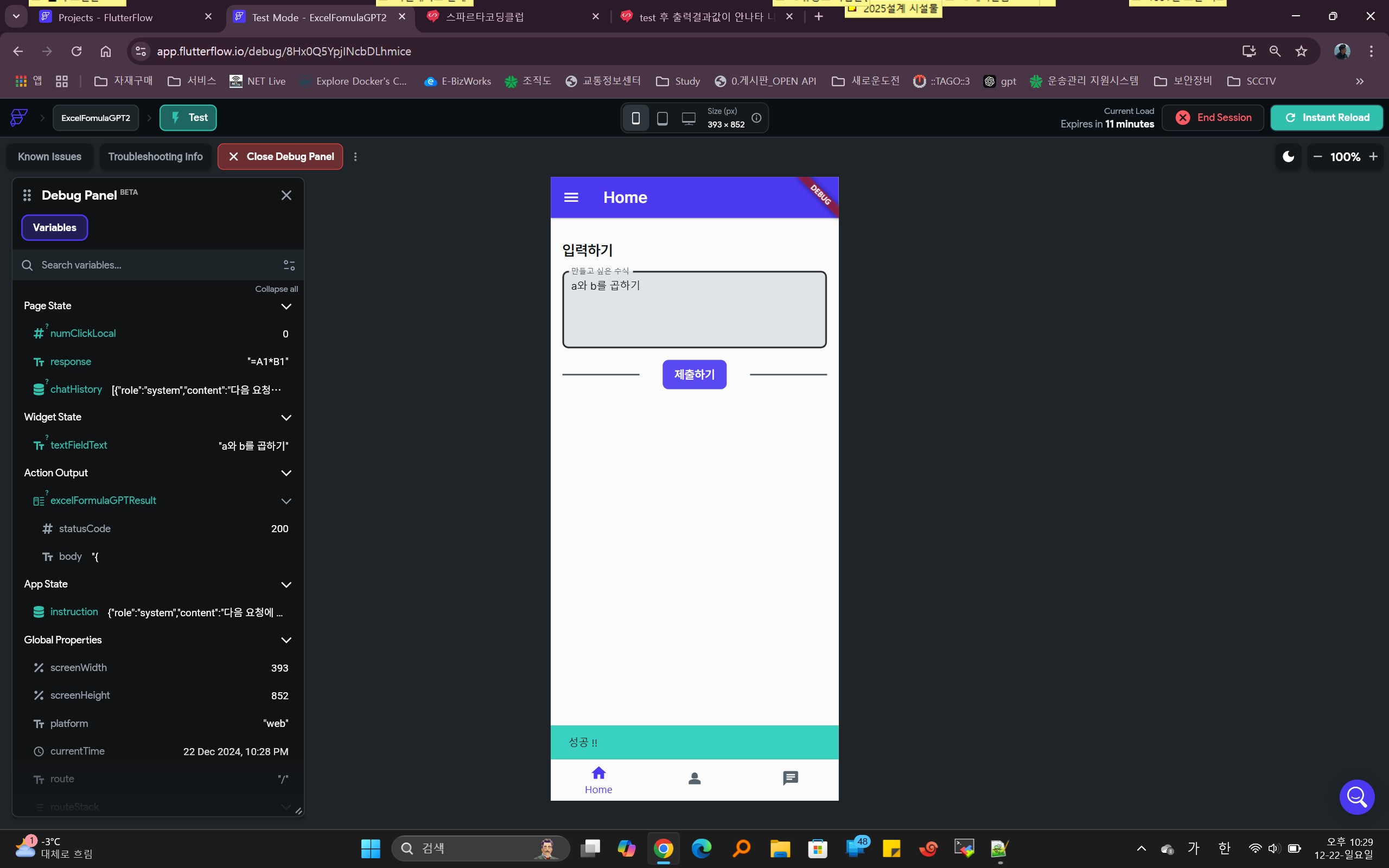
캡처해 주시면, 튜터님들이 빠르게 상황을 이해할 수 있어요.
작성한 코드 및 에러 메세지
오류 발생 시, 작성한 코드 전체와 에러 메시지를 첨부해 주세요.
Tip 1) </>제출하기 소스코드
// Generated code for this Button Widget...
Padding(
padding: EdgeInsetsDirectional.fromSTEB(32, 0, 32, 0),
child: FFButtonWidget(
onPressed: () async {
logFirebaseEvent('HOME_PAGE_PAGE__BTN_ON_TAP');
logFirebaseEvent('Button_update_page_state');
_model.chatHistory = functions.saveChatHistory(_model.chatHistory,
functions.convertToJSON(_model.textController.text));
safeSetState(() {});
logFirebaseEvent('Button_backend_call');
_model.excelFormulaGPTResult =
await OpenAIChatGPTGroup.sendFullPromptCall.call(
apiKey:
'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',
promptJson: _model.chatHistory,
);
if ((_model.excelFormulaGPTResult?.succeeded ?? true)) {
logFirebaseEvent('Button_show_snack_bar');
ScaffoldMessenger.of(context).showSnackBar(
SnackBar(
content: Text(
'성공 !!',
style: TextStyle(
color: FlutterFlowTheme.of(context).primaryText,
),
),
duration: Duration(milliseconds: 4000),
backgroundColor: FlutterFlowTheme.of(context).secondary,
),
);
logFirebaseEvent('Button_update_page_state');
_model.chatHistory = functions.saveChatHistory(
_model.chatHistory,
functions.convertToJSON(OpenAIChatGPTGroup.sendFullPromptCall
.message(
(_model.excelFormulaGPTResult?.jsonBody ?? ''),
)
.toString()));
_model.response = OpenAIChatGPTGroup.sendFullPromptCall.content(
(_model.excelFormulaGPTResult?.jsonBody ?? ''),
)!;
safeSetState(() {});
logFirebaseEvent('Button_backend_call');
await FormulaHistoryRecord.collection
.doc()
.set(createFormulaHistoryRecordData(
requestFormula: _model.textController.text,
responseFormula: OpenAIChatGPTGroup.sendFullPromptCall.content(
(_model.excelFormulaGPTResult?.jsonBody ?? ''),
),
user: currentUserReference,
createdTime: getCurrentTimestamp,
));
} else {
logFirebaseEvent('Button_show_snack_bar');
ScaffoldMessenger.of(context).showSnackBar(
SnackBar(
content: Text(
'실패 !!',
style: TextStyle(
color: FlutterFlowTheme.of(context).primaryText,
),
),
duration: Duration(milliseconds: 4000),
backgroundColor: FlutterFlowTheme.of(context).secondary,
),
);
}
safeSetState(() {});
},
text: '제출하기',
options: FFButtonOptions(
height: 40,
padding: EdgeInsetsDirectional.fromSTEB(16, 0, 16, 0),
iconPadding: EdgeInsetsDirectional.fromSTEB(0, 0, 0, 0),
color: valueOrDefault<Color>(
_model.textController.text != null && _model.textController.text != ''
? FlutterFlowTheme.of(context).primary
: FlutterFlowTheme.of(context).secondaryText,
FlutterFlowTheme.of(context).secondaryText,
),
textStyle: FlutterFlowTheme.of(context).titleSmall.override(
fontFamily: 'Pretendard',
color: Colors.white,
letterSpacing: 0.0,
useGoogleFonts: false,
),
elevation: 0,
borderRadius: BorderRadius.circular(8),
),
),
)


