커뮤니티

포인트
쿠폰
내 강의실
국비 신청 내역
증명서
계정
로그아웃
학습 질문
개발 일지
나의 활동
답변 완료
5주차 9강 5주차 끝& 숙제설명 파트에서 코드 입력하니 결과가 오류라고 떠요
undefined주차


박*윤
댓글
14
・
추천
0
・
조회수
19
조회수
19
답변 완료
* 겪고 있는 문제 상황을 최대한 자세하게 작성해주세요.
* 문제 해결을 위해 어떤 시도를 해보았는지 구체적으로 함께 알려주세요.
5주차 9강 5주차 끝& 숙제설명 파트에서
코드니스펫 - 여기서 부터 시작하기 < 코드 복사해서 붙여넣으니까
결과가 오류라고 떠서요
왜 그런거죠?
전체 화면 캡처
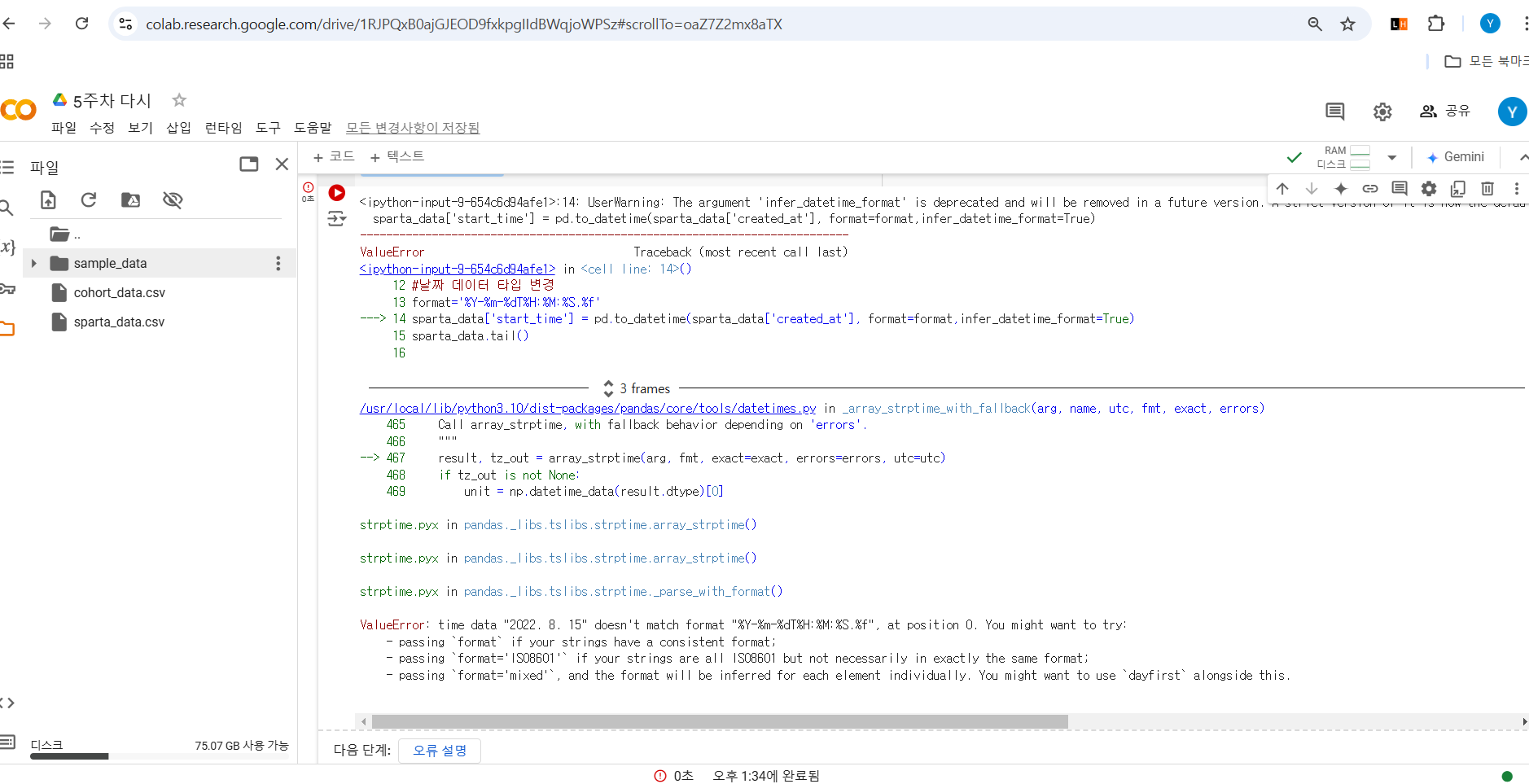
시면, 튜터님들이 빠르게 상황을 이해할 수 있어요.
작성한 코드 및 에러 메세지
#라이브러리 불러오기
import pandas as pd
import seaborn as sns
import matplotlib.pyplot as plt
plt.rc('font', family='NanumBarunGothic')


# 한글깨짐 방지
plt.rc('font', family='NanumBarunGothic')
sparta_data = pd.read_table('/content/cohort_data.csv',sep=',')
sparta_data.tail()


#날짜 데이터 타입 변경
format='%Y-%m-%dT%H:%M:%S.%f'
sparta_data['start_time'] = pd.to_datetime(sparta_data['created_at'], format=format,infer_datetime_format=True)
sparta_data.tail()


#시작 week 구하기
sparta_data['start_week']= sparta_data['start_time'].dt.isocalendar().week
sparta_data.tail()


#시작 주 범위 알기
category_range = set(sparta_data['start_week'])
category_range


# 범주화 하기
#번주화할 데이터
progress_rate = list(sparta_data['progress_rate'])
progress_rate


#범주를 구분하는 기준 bins
bins = [0,4.11,26.03,41.10,61.64,80.82,100]


#구분한 범주의 라벨 labels
labes=[0,1,2,3,4,5]


#범주화에 사용하는 함수 pd.cut
cuts = pd.cut(progress_rate,bins, right=True,include_lowest=True, labels=labes)
cuts
cuts = pd.DataFrame(cuts)
cuts.tail()


# 표 합치기
sparta_data = pd.concat([sparta_data,cuts],axis=1, join='inner')
sparta_data.head()


#표 인덱스 변경하기
sparta_data.columns=['created_at','user_id','name','progress_rate','start_time','start_week',"week"]
sparta_data.head()


#시작주와, 수강 주차별 기준으로 표 grouping 하기
grouping = sparta_data.groupby(['start_week','week'])
grouping.head()


#시작주와, 수강 주차별에 해당하는 수강생 수 구하기
cohort_data = grouping['user_id'].apply(pd.Series.nunique)
cohort_data = pd.DataFrame(cohort_data)
cohort_data.head(10)


#각 주차별 수강한 수강생 총 합 구하기
k=31
for i in range(6):
  for j in range(5, 0, -1):
    cohort_data.at[(k,j-1), 'user_id'] = int(cohort_data.at[(k,j),'user_id']) +  int(cohort_data.at[(k,j-1),'user_id'])
  k=k+1
cohort_data = cohort_data.reset_index()
cohort_data.head()


cohort_counts = cohort_data.pivot(index="start_week",
                                  columns="week",
                                  values="user_id")
cohort_counts


# 앞서 만든 피벗 테이블을 retention 변수에 저장하기
retention = cohort_counts
#각 주(week) 별 최초 수강생 수만 가져오기
cohort_sizes = cohort_counts.iloc[:,0]
cohort_sizes.head()


# 최초 수강생 수를 각 데이터에 나눠주기
retention = cohort_counts.divide(cohort_sizes, axis=0)
retention


#각 수치 퍼센트로 변경하기
retention.round(3)*100오류 발생 시, 작성한 코드 전체와 에러 메시지를 첨부해 주세요.
Tip 1) </> 아이콘을 눌러 코드박스를 만들어 보세요.
결과 에러
Tip 2) Ctrl+A(맥의 경우 Command+A) 단축키로 코드를 한 번에 선택할 수 있어요!
<ipython-input-9-654c6d94afe1>:14: UserWarning: The argument 'infer_datetime_format' is deprecated and will be removed in a future version. A strict version of it is now the default, see https://pandas.pydata.org/pdeps/0004-consistent-to-datetime-parsing.html. You can safely remove this argument.
  sparta_data['start_time'] = pd.to_datetime(sparta_data['created_at'], format=format,infer_datetime_format=True)

---------------------------------------------------------------------------
ValueError                                Traceback (most recent call last)
<ipython-input-9-654c6d94afe1> in <cell line: 14>()
     12 #날짜 데이터 타입 변경13 format='%Y-%m-%dT%H:%M:%S.%f'
---> 14 sparta_data['start_time'] = pd.to_datetime(sparta_data['created_at'], format=format,infer_datetime_format=True)
     15 sparta_data.tail()
     16


3 frames
/usr/local/lib/python3.10/dist-packages/pandas/core/tools/datetimes.py in _array_strptime_with_fallback(arg, name, utc, fmt, exact, errors)
    465     Call array_strptime, with fallback behavior depending on 'errors'.
    466     """
--> 467     result, tz_out = array_strptime(arg, fmt, exact=exact, errors=errors, utc=utc)
    468     if tz_out is not None:
    469         unit = np.datetime_data(result.dtype)[0]

strptime.pyx in pandas._libs.tslibs.strptime.array_strptime()

strptime.pyx in pandas._libs.tslibs.strptime.array_strptime()

strptime.pyx in pandas._libs.tslibs.strptime._parse_with_format()

ValueError: time data "2022. 8. 15" doesn't match format "%Y-%m-%dT%H:%M:%S.%f", at position 0. You might want to try:
    - passing `format` if your strings have a consistent format;
    - passing `format='ISO8601'` if your strings are all ISO8601 but not necessarily in exactly the same format;
    - passing `format='mixed'`, and the format will be inferred for each element individually. You might want to use `dayfirst` alongside this.


댓글 알림
