커뮤니티

포인트
쿠폰
내 강의실
국비 신청 내역
증명서
계정
로그아웃
학습 질문
개발 일지
나의 활동
답변 완료
파이프라인이 계속 실패합니다..
[스킬업] Docker 기반 CI/CD 파이프라인 구축하기
0주차


김*선
댓글
1
・
추천
0
・
조회수
22
조회수
22
답변 완료
* 겪고 있는 문제 상황을 최대한 자세하게 작성해주세요.
* 문제 해결을 위해 어떤 시도를 해보았는지 구체적으로 함께 알려주세요.
2-9 강의 마지막에 Makefile 등 수정사항 push 하면 파이프라인이 잘 될거라 하셨는데
build, push 스크립트 실행 중 계속 실패 하고 있습니다.
가상머신에서 실습중이고 gitlab-runner, docker 잘 실행, 설치 되어있는것 확인했습니다.
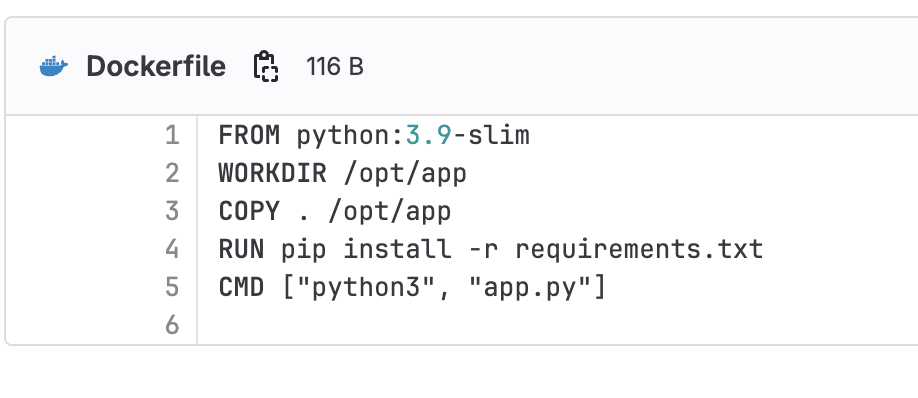
아래 화면 캡처들은 오류 화면과 제 코드들입니다. gitlab-ci.yaml은 강사님 것 복붙했습니다.
첨부되지않은 requirements.txt엔 flask만 있습니다.
docker, aws cli 관련 해서 추가로 설정해야할게 있을까요?
aws cli도 설치 해서 IAM 키 설정도 할 수 있었습니다..
로컬에서 직접 make 명령어 실행했을 땐 잘 됐습니다.



stages:          # List of stages for jobs, and their order of execution
  - build
  - test
  - deploy


build-job:       # This job runs in the build stage, which runs first.
  stage: build
  script:
    - echo "Docker build start"
    - make build
    - echo "Docker build complete."


push-job:       # This job runs in the build stage, which runs first.
  stage: build
  script:
    - echo "Docker push start"
    - make push
    - echo "Docker push complete."


unit-test-job:   # This job runs in the test stage.
  stage: test    # It only starts when the job in the build stage completes successfully.
  script:
    - echo "Running unit tests."
    - sleep 5
    - echo "Unit tests complete."


lint-test-job:   # This job also runs in the test stage.
  stage: test    # It can run at the same time as unit-test-job (in parallel).
  script:
    - echo "Linting code... This will take about 10 seconds."
    - sleep 5
    - echo "No lint issues found."


deploy-job:      # This job runs in the deploy stage.
  stage: deploy  # It only runs when *both* jobs in the test stage complete successfully.
  environment: production
  script:
    - echo "Deploying application..."
    - make deploy
    - echo "Application successfully deployed."
작성한 코드 및 에러 메세지
오류 발생 시, 작성한 코드 전체
와 에러 메시지를 첨부해 주세요.
Tip 1) </> 아이콘을 눌러 코드박스를 만들어 보세요.
Tip 2) Ctrl+A(맥의 경우 Command+A) 단축키로 코드를 한 번에 선택할 수 있어요!


댓글 알림
