


* 겪고 있는 문제 상황을 최대한 자세하게 작성해주세요.
* 문제 해결을 위해 어떤 시도를 해보았는지 구체적으로 함께 알려주세요.
직접 하면서 가로스크롤바 만들엇는데 스크롤바가 밑에까지 내려가잇어서 다음 이미지랑 텍스트가 맨밑에 가잇는데 왜그런건가요
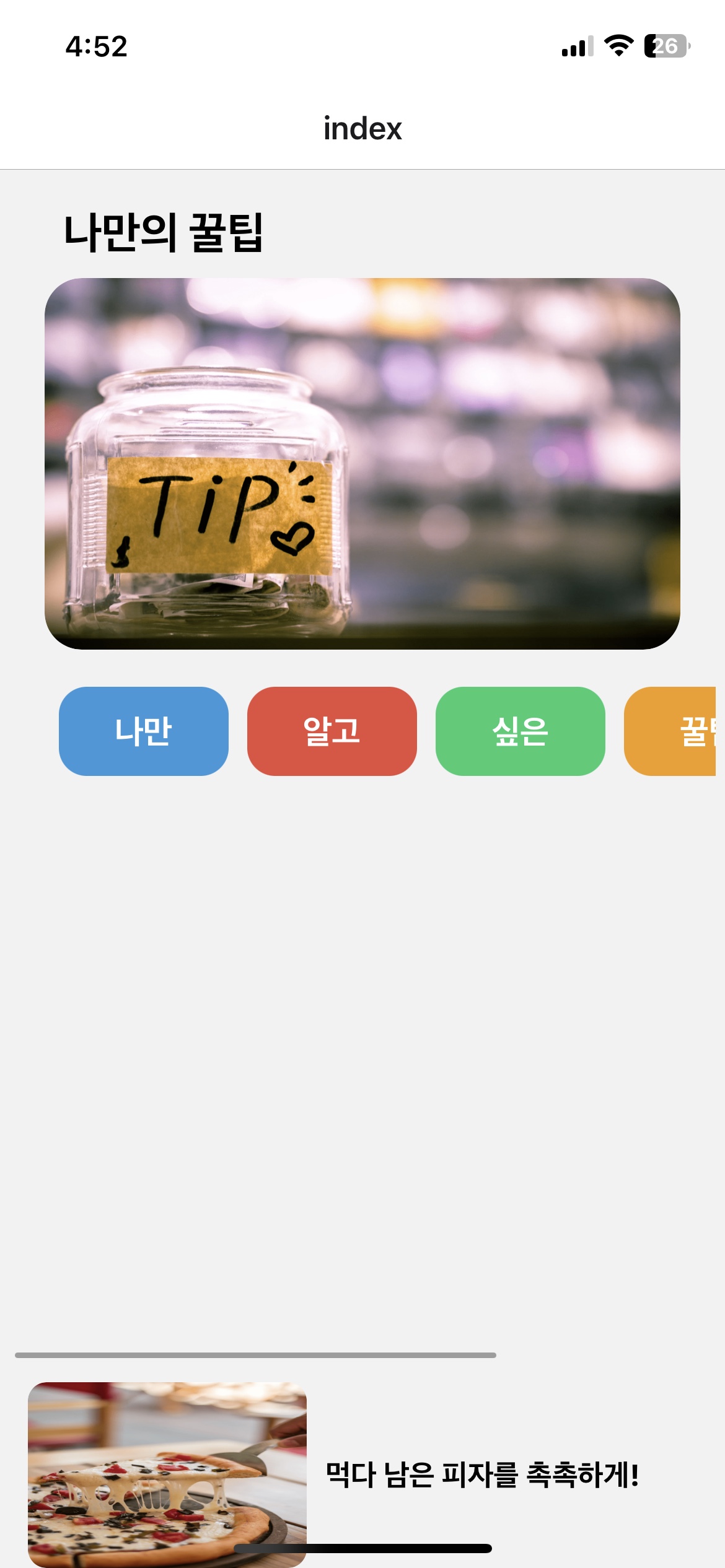
작성한 코드 및 에러 메세지
import React from 'react';
import { StyleSheet, Text, View, Image, TouchableOpacity, ScrollView } from 'react-native';
export default function App() {
return (
<View style={styles.container}>
<Text style={styles.text}>나만의 꿀팁</Text>
<Image
source={{ uri: 'https://storage.googleapis.com/sparta-image.appspot.com/lecture/main.png' }}
style={styles.image}
resizeMode="stretch"
/>
<ScrollView horizontal contentContainerStyle={styles.scrollContainer}>
<View style={{ flexDirection: 'row' }}>
{['나만', '알고', '싶은', '꿀팁', '모음'].map((buttonText, index) => (
<TouchableOpacity
key={index}
style={[styles.button, { backgroundColor: ['#3498db', '#e74c3c', '#2ecc71', '#f39c12', '#9b59b6'][index] }]}>
<Text style={styles.buttonText}>{buttonText}</Text>
</TouchableOpacity>
))}
</View>
</ScrollView>
<View style={styles.imageContainer}>
<View style={styles.imageRow}>
<Image
source={{ uri: 'https://storage.googleapis.com/sparta-image.appspot.com/lecture/pizza.png' }}
style={styles.secondImage}
resizeMode="stretch"
/>
<Text style={styles.imageText}>먹다 남은 피자를 촉촉하게!</Text>
</View>
</View>
</View>
);
}
const styles = StyleSheet.create({
container: {
flex: 1,
justifyContent: 'flex-start',
alignItems: 'center',
paddingHorizontal: 5,
},
image: {
width: '90%',
height: 200,
marginTop: 10,
marginBottom: 0,
borderRadius: 20,
},
text: {
marginTop: 20,
paddingLeft: 10,
fontSize: 24,
color: '#000000',
fontWeight: 'bold',
textAlign: 'left',
width: '90%',
},
scrollContainer: {
flexDirection: 'row',
justifyContent: 'center',
alignItems: 'flex-start',
paddingTop: 20,
},
button: {
backgroundColor: '#3498db',
marginHorizontal: 5,
paddingVertical: 15,
paddingHorizontal: 30,
borderRadius: 15,
justifyContent: 'center',
alignItems: 'center',
},
buttonText: {
color: '#fff',
fontSize: 18,
fontWeight: 'bold',
},
secondImage: {
width: 150,
height: 100,
borderRadius: 10,
},
imageContainer: {
alignItems: 'flex-start',
width: '100%',
paddingLeft: 10,
marginTop: 10, // 버튼과 10px 정도 떨어지도록 설정
},
imageRow: {
flexDirection: 'row', // 이미지와 텍스트를 가로로 배치
alignItems: 'center', // 세로로 정렬
},
imageText: {
marginLeft: 10, // 이미지와 텍스트 사이에 여백
fontSize: 16,
fontWeight: 'bold',
},
});


