


* 겪고 있는 문제 상황을 최대한 자세하게 작성해주세요.
* 문제 해결을 위해 어떤 시도를 해보았는지 구체적으로 함께 알려주세요.
1-4 언리얼 기본 예제로 공부해보기 를 수강하고 연습해 볼려고 언리얼에서 프로젝트를 생성하는 순간 다음 과 같이 오류가 뜨면서 실행이 안되고 있습니다.
보고 계신 화면 전체를 캡처해 주시
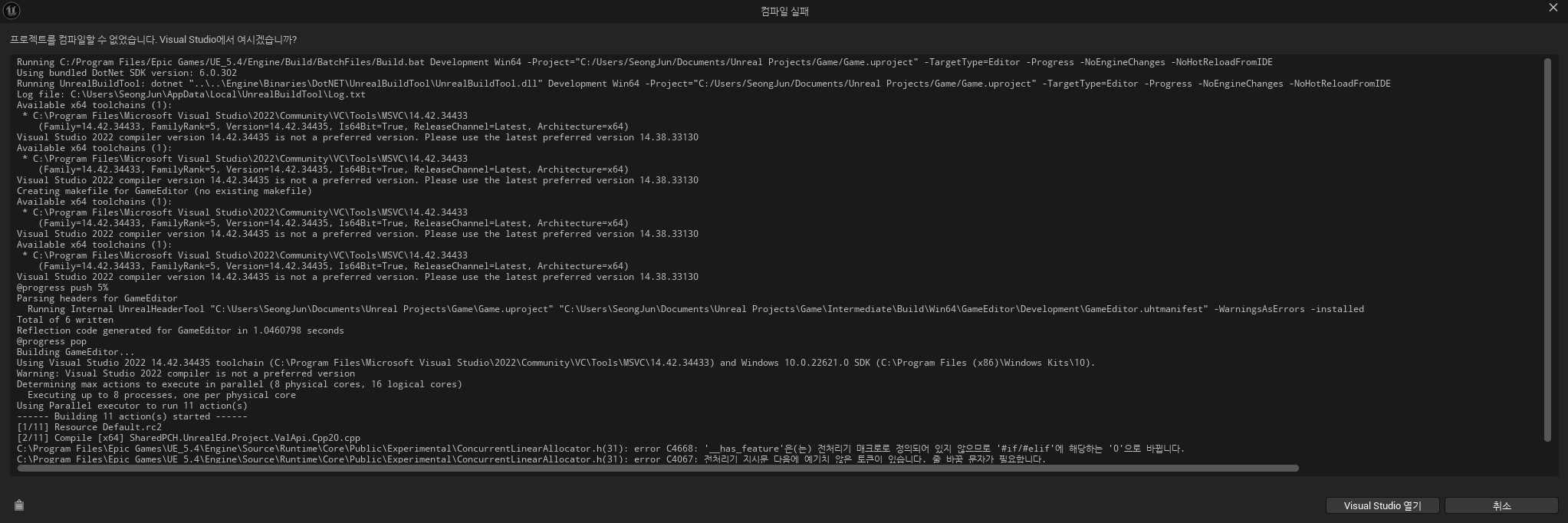
Running C:/Program Files/Epic Games/UE_5.4/Engine/Build/BatchFiles/Build.bat Development Win64 -Project="C:/Users/SeongJun/Documents/Unreal Projects/Game/Game.uproject" -TargetType=Editor -Progress -NoEngineChanges -NoHotReloadFromIDE
Using bundled DotNet SDK version: 6.0.302
Running UnrealBuildTool: dotnet "..\..\Engine\Binaries\DotNET\UnrealBuildTool\UnrealBuildTool.dll" Development Win64 -Project="C:/Users/SeongJun/Documents/Unreal Projects/Game/Game.uproject" -TargetType=Editor -Progress -NoEngineChanges -NoHotReloadFromIDE
Log file: C:\Users\SeongJun\AppData\Local\UnrealBuildTool\Log.txt
Available x64 toolchains (1):
* C:\Program Files\Microsoft Visual Studio\2022\Community\VC\Tools\MSVC\14.42.34433
(Family=14.42.34433, FamilyRank=5, Version=14.42.34435, Is64Bit=True, ReleaseChannel=Latest, Architecture=x64)
Visual Studio 2022 compiler version 14.42.34435 is not a preferred version. Please use the latest preferred version 14.38.33130
Available x64 toolchains (1):
* C:\Program Files\Microsoft Visual Studio\2022\Community\VC\Tools\MSVC\14.42.34433
(Family=14.42.34433, FamilyRank=5, Version=14.42.34435, Is64Bit=True, ReleaseChannel=Latest, Architecture=x64)
Visual Studio 2022 compiler version 14.42.34435 is not a preferred version. Please use the latest preferred version 14.38.33130
Creating makefile for GameEditor (no existing makefile)
Available x64 toolchains (1):
* C:\Program Files\Microsoft Visual Studio\2022\Community\VC\Tools\MSVC\14.42.34433
(Family=14.42.34433, FamilyRank=5, Version=14.42.34435, Is64Bit=True, ReleaseChannel=Latest, Architecture=x64)
Visual Studio 2022 compiler version 14.42.34435 is not a preferred version. Please use the latest preferred version 14.38.33130
Available x64 toolchains (1):
* C:\Program Files\Microsoft Visual Studio\2022\Community\VC\Tools\MSVC\14.42.34433
(Family=14.42.34433, FamilyRank=5, Version=14.42.34435, Is64Bit=True, ReleaseChannel=Latest, Architecture=x64)
Visual Studio 2022 compiler version 14.42.34435 is not a preferred version. Please use the latest preferred version 14.38.33130
@progress push 5%
Parsing headers for GameEditor
Running Internal UnrealHeaderTool "C:\Users\SeongJun\Documents\Unreal Projects\Game\Game.uproject" "C:\Users\SeongJun\Documents\Unreal Projects\Game\Intermediate\Build\Win64\GameEditor\Development\GameEditor.uhtmanifest" -WarningsAsErrors -installed
Total of 6 written
Reflection code generated for GameEditor in 1.0460798 seconds
@progress pop
Building GameEditor...
Using Visual Studio 2022 14.42.34435 toolchain (C:\Program Files\Microsoft Visual Studio\2022\Community\VC\Tools\MSVC\14.42.34433) and Windows 10.0.22621.0 SDK (C:\Program Files (x86)\Windows Kits\10).
Warning: Visual Studio 2022 compiler is not a preferred version
Determining max actions to execute in parallel (8 physical cores, 16 logical cores)
Executing up to 8 processes, one per physical core
Using Parallel executor to run 11 action(s)
------ Building 11 action(s) started ------
[1/11] Resource Default.rc2
[2/11] Compile [x64] SharedPCH.UnrealEd.Project.ValApi.Cpp20.cpp
C:\Program Files\Epic Games\UE_5.4\Engine\Source\Runtime\Core\Public\Experimental\ConcurrentLinearAllocator.h(31): error C4668: '__has_feature'은(는) 전처리기 매크로로 정의되어 있지 않으므로 '#if/#elif'에 해당하는 '0'으로 바뀝니다.
C:\Program Files\Epic Games\UE_5.4\Engine\Source\Runtime\Core\Public\Experimental\ConcurrentLinearAllocator.h(31): error C4067: 전처리기 지시문 다음에 예기치 않은 토큰이 있습니다. 줄 바꿈 문자가 필요합니다.
C:\Program Files\Epic Games\UE_5.4\Engine\Source\Runtime\Engine\Classes\Engine\SkeletalMesh.h(930): warning C4996: 'FBoneMirrorInfo': FBoneMirrorInfo is deprecated. Please use UMirrorDataTable for mirroring support. Please update your code to the new API before upgrading to the next release, otherwise your project will no longer compile.
Total time in Parallel executor: 27.90 seconds
Total execution time: 41.57 seconds
프로그램 재설치와 파일경로에 한글이 있는지 없는지도 확인 해봤지만 해결이 안됐습니다.
도와주세요 ㅠㅠ


