


* 겪고 있는 문제 상황을 최대한 자세하게 작성해주세요.
* 문제 해결을 위해 어떤 시도를 해보았는지 구체적으로 함께 알려주세요.
ㅁ 왼쪽 margin은 0으로 정상적 으로 되나 다만 로고 이미지의 상단 margin이 0이 적용 되지 않습니다
ㅁ 채팅창의 배경을 이미지 첨부로 하고 싶으나 따로 분리가 되어 일단 다시 빈 창으로 돌려 놓았습니다 이 부분에 대해서 조언 부탁 드립니다
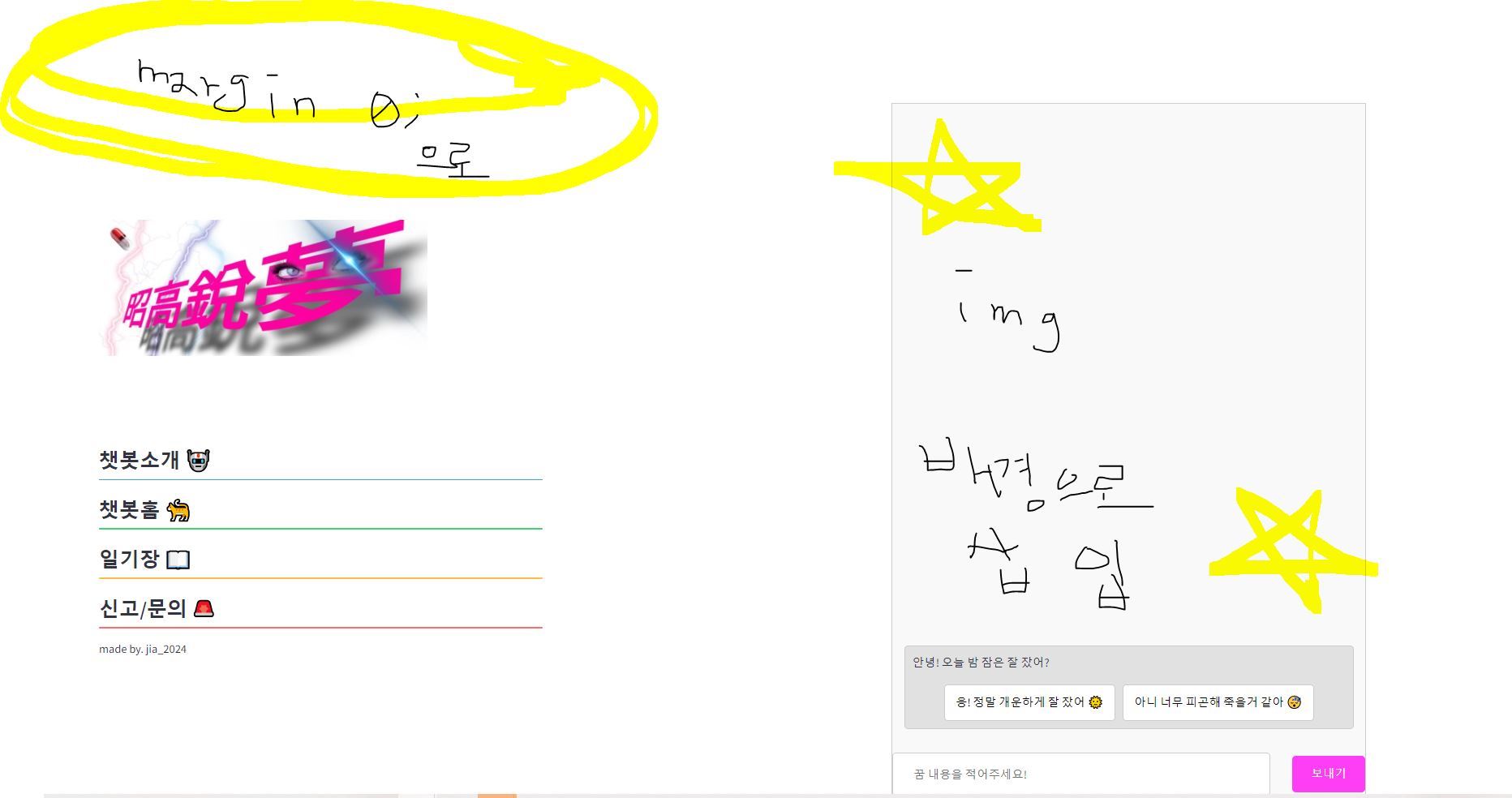
// 채팅창 부분
with col2:
st.markdown("""
<div class="chatbox">
<div class="message-box">
<div class="chat-message">
<p>안녕! 오늘 밤 잠은 잘 잤어?</p>
</div>
<div class="btn-container">
<button class="btn-kibun">응! 정말 개운하게 잘 잤어 🌞</button>
<button class="btn-kibun">아니 너무 피곤해 죽을거 같아 😴</button>
</div>
</div>
<div class="input-wrapper">
<input type="text" class="chat-input" placeholder="꿈 내용을 적어주세요!">
<button class="send-button">보내기</button>
</div>
</div>
""", unsafe_allow_html=True)
// CSS 코드
<style>
.chatbox {
width: 650px;
height: 950px;
border: 1px solid #ccc;
overflow-y: auto;
background-color: #f9f9f9;
background-image: url('imgs/조고예몽_채팅창.jpg');
background-size: cover;
background-position: center;
background-repeat: no-repeat;
display: flex;
flex-direction: column;
justify-content: flex-end;
margin: 0 auto;
position: relative;
}
.message-box {
width: 95%;
border: 1px solid #ccc;
background-color: rgba(190, 190, 190, 0.4);
border-radius: 5px;
padding: 10px;
margin: 15px auto;
display: flex;
flex-direction: column;
align-items: center;
}
.chat-message {
text-align: left;
width: 100%;
margin: 0;
padding: 0;
}
.btn-container {
display: flex;
gap: 10px;
}
.btn-kibun {
height: 50px;
padding: 0 15px;
font-size: 16px;
background-color: #ffffff;
color: black;
border: 1px solid #ccc;
border-radius: 5px;
cursor: pointer;
text-align: center;
display: flex;
align-items: center;
justify-content: center;
}
.input-wrapper {
display: flex;
justify-content: space-between;
align-items: center;
margin-top: 18px;
}
.chat-input {
flex-grow: 1;
height: 50px;
padding: 28px;
font-size: 16px;
border: 1px solid #ccc;
background-color: #ffffff;
border-radius: 5px;
box-sizing: border-box;
margin-right: 30px;
}
.send-button {
height: 50px;
padding: 0 20px;
font-size: 16px;
background-color: #fe3ef4;
border: 1px solid #ccc;
color: white;
border: none;
border-radius: 5px;
cursor: pointer;
width: 100px;
white-space: nowrap;
text-align: center;
}
</style>


