


* 겪고 있는 문제 상황을 최대한 자세하게 작성해주세요.
* 문제 해결을 위해 어떤 시도를 해보았는지 구체적으로 함께 알려주세요.
5-6 광고붙이기
game id 를 발급받은 후에 적용을 해보았는데 오류가 발생합니다
혹시 이 resolving android dependencies 와 연관이 있을까요 (이 것도 0%에서 움직이지 않습니다)
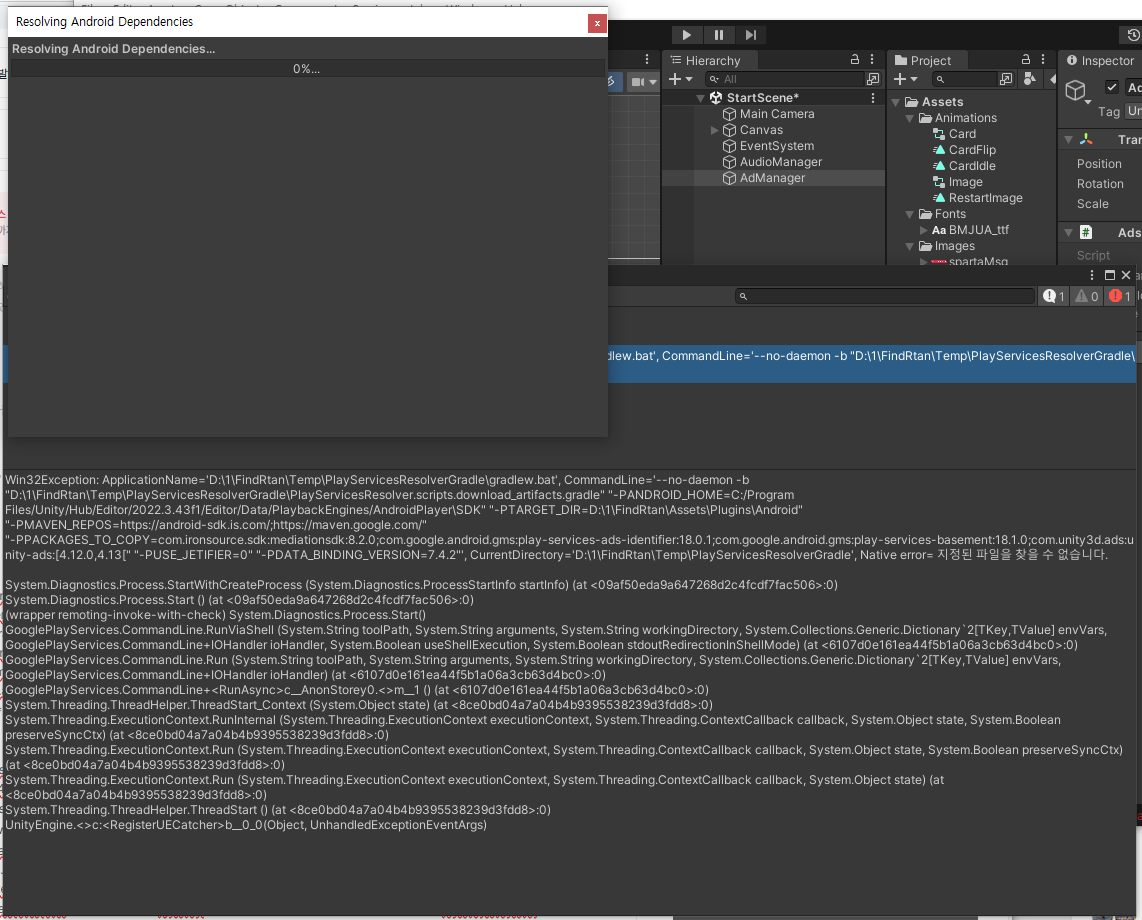
작성한 코드 및 에러 메세지
Win32Exception: ApplicationName='D:\1\FindRtan\Temp\PlayServicesResolverGradle\gradlew.bat', CommandLine='--no-daemon -b "D:\1\FindRtan\Temp\PlayServicesResolverGradle\PlayServicesResolver.scripts.download_artifacts.gradle" "-PANDROID_HOME=C:/Program Files/Unity/Hub/Editor/2022.3.43f1/Editor/Data/PlaybackEngines/AndroidPlayer\SDK" "-PTARGET_DIR=D:\1\FindRtan\Assets\Plugins\Android" "-PMAVEN_REPOS=https://android-sdk.is.com/;https://maven.google.com/" "-PPACKAGES_TO_COPY=com.ironsource.sdk:mediationsdk:8.2.0;com.google.android.gms:play-services-ads-identifier:18.0.1;com.google.android.gms:play-services-basement:18.1.0;com.unity3d.ads:unity-ads:[4.12.0,4.13[" "-PUSE_JETIFIER=0" "-PDATA_BINDING_VERSION=7.4.2"', CurrentDirectory='D:\1\FindRtan\Temp\PlayServicesResolverGradle', Native error= 지정된 파일을 찾을 수 없습니다.
System.Diagnostics.Process.StartWithCreateProcess (System.Diagnostics.ProcessStartInfo startInfo) (at <09af50eda9a647268d2c4fcdf7fac506>:0)
System.Diagnostics.Process.Start () (at <09af50eda9a647268d2c4fcdf7fac506>:0)
(wrapper remoting-invoke-with-check) System.Diagnostics.Process.Start()
GooglePlayServices.CommandLine.RunViaShell (System.String toolPath, System.String arguments, System.String workingDirectory, System.Collections.Generic.Dictionary`2[TKey,TValue] envVars, GooglePlayServices.CommandLine+IOHandler ioHandler, System.Boolean useShellExecution, System.Boolean stdoutRedirectionInShellMode) (at <6107d0e161ea44f5b1a06a3cb63d4bc0>:0)
GooglePlayServices.CommandLine.Run (System.String toolPath, System.String arguments, System.String workingDirectory, System.Collections.Generic.Dictionary`2[TKey,TValue] envVars, GooglePlayServices.CommandLine+IOHandler ioHandler) (at <6107d0e161ea44f5b1a06a3cb63d4bc0>:0)
GooglePlayServices.CommandLine+<RunAsync>c__AnonStorey0.<>m__1 () (at <6107d0e161ea44f5b1a06a3cb63d4bc0>:0)
System.Threading.ThreadHelper.ThreadStart_Context (System.Object state) (at <8ce0bd04a7a04b4b9395538239d3fdd8>:0)
System.Threading.ExecutionContext.RunInternal (System.Threading.ExecutionContext executionContext, System.Threading.ContextCallback callback, System.Object state, System.Boolean preserveSyncCtx) (at <8ce0bd04a7a04b4b9395538239d3fdd8>:0)
System.Threading.ExecutionContext.Run (System.Threading.ExecutionContext executionContext, System.Threading.ContextCallback callback, System.Object state, System.Boolean preserveSyncCtx) (at <8ce0bd04a7a04b4b9395538239d3fdd8>:0)
System.Threading.ExecutionContext.Run (System.Threading.ExecutionContext executionContext, System.Threading.ContextCallback callback, System.Object state) (at <8ce0bd04a7a04b4b9395538239d3fdd8>:0)
System.Threading.ThreadHelper.ThreadStart () (at <8ce0bd04a7a04b4b9395538239d3fdd8>:0)
UnityEngine.<>c:<RegisterUECatcher>b__0_0(Object, UnhandledExceptionEventArgs)
오류 발생 시, 작성한 코드 전체와 에러 메시지를 첨부해 주세요.
Tip 1) </> 아이콘을 눌러 코드박스를 만들어 보세요.
Tip 2) Ctrl+A(맥의 경우 Command+A) 단축키로 코드를 한 번에 선택할 수 있어요!


