


* 겪고 있는 문제 상황을 최대한 자세하게 작성해주세요.
* 문제 해결을 위해 어떤 시도를 해보았는지 구체적으로 함께 알려주세요.
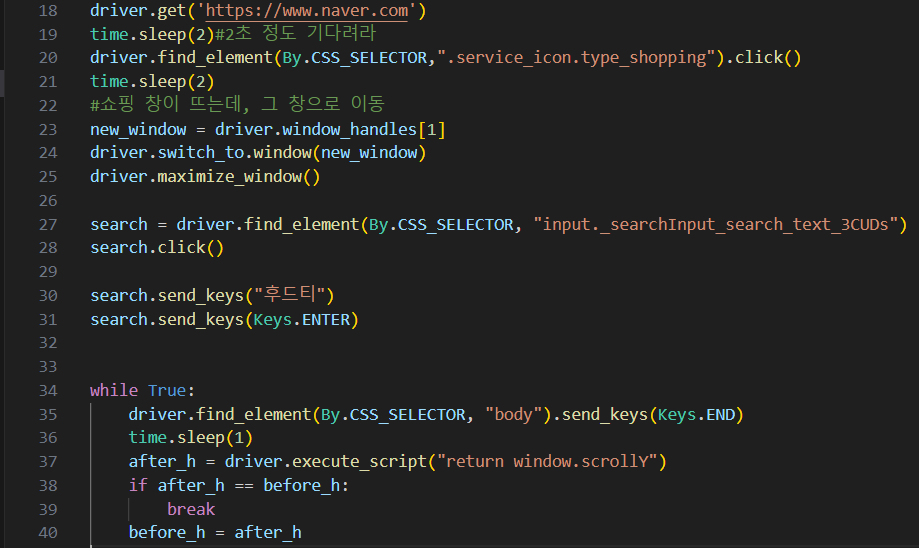
search.send_keys("후드티")
search.send_keys(Keys.ENTER)
입력 후 크롤링한 결과 후드티가 검색이 되지 않습니다.
보고
계신 화면 전체를 캡처해 주시면, 튜터님들이 빠르게 상황을 이해할 수 있어요.
작성한 코드 및 에러 메세지
(.venv) C:\Users\heaha\Desktop\automation\python_pratice>c:/Users/heaha/Desktop/automation/python_pratice/.venv/Scripts/python.exe c:/Users/heaha/Desktop/automation/python_pratice/crawling/crawing_naver.py
Traceback (most recent call last):
File "c:\Users\heaha\Desktop\automation\python_pratice\crawling\crawing_naver.py", line 28, in <module>
search.click()
File "c:\Users\heaha\Desktop\automation\python_pratice\.venv\lib\site-packages\selenium\webdriver\remote\webelement.py", line 93, in click
self._execute(Command.CLICK_ELEMENT)
File "c:\Users\heaha\Desktop\automation\python_pratice\.venv\lib\site-packages\selenium\webdriver\remote\webelement.py", line 394, in _execute
return self._parent.execute(command, params)
File "c:\Users\heaha\Desktop\automation\python_pratice\.venv\lib\site-packages\selenium\webdriver\remote\webdriver.py", line 344, in execute
self.error_handler.check_response(response)
File "c:\Users\heaha\Desktop\automation\python_pratice\.venv\lib\site-packages\selenium\webdriver\remote\errorhandler.py", line 229, in check_response
raise exception_class(message, screen, stacktrace)
selenium.common.exceptions.ElementClickInterceptedException: Message: element click intercepted: Element <input type="text" class="_searchInput_search_text_3CUDs" title="검색어 입력" value=""> is not clickable at point (441, 69). Other element would receive the click: <div class="_layerWrapper_layer_20FCu">...</div>
(Session info: chrome=127.0.6533.89)
Stacktrace:
GetHandleVerifier [0x00007FF664309632+30946]
(No symbol) [0x00007FF6642BE3C9]
(No symbol) [0x00007FF6641B6FDA]
(No symbol) [0x00007FF66420FEEE]
(No symbol) [0x00007FF66420D962]
(No symbol) [0x00007FF66420AE7B]
(No symbol) [0x00007FF66420A095]
(No symbol) [0x00007FF6641FC271]
(No symbol) [0x00007FF66422CA6A]
(No symbol) [0x00007FF6641FBBB6]
(No symbol) [0x00007FF66422CC80]
(No symbol) [0x00007FF66424B041]
(No symbol) [0x00007FF66422C813]
(No symbol) [0x00007FF6641FA6E5]
(No symbol) [0x00007FF6641FB021]
GetHandleVerifier [0x00007FF66443F83D+1301229]
GetHandleVerifier [0x00007FF66444BDB7+1351783]
GetHandleVerifier [0x00007FF664442A03+1313971]
GetHandleVerifier [0x00007FF66433DD06+245686]
(No symbol) [0x00007FF6642C758F]
(No symbol) [0x00007FF6642C3804]
(No symbol) [0x00007FF6642C3992]
(No symbol) [0x00007FF6642BA3EF]
BaseThreadInitThunk [0x00007FFFBEDA7374+20]
RtlUserThreadStart [0x00007FFFBF9BCC91+33]오류 발생 시, 작성한 코드 전체와 에러 메시지를 첨부해 주세요.
Tip 1) </> 아이콘을 눌러 코드박스를 만들어 보세요.
Tip 2) Ctrl+A(맥의 경우 Command+A) 단축키로 코드를 한 번에 선택할 수 있어요!


