


* 겪고 있는 문제 상황을 최대한 자세하게 작성해주세요.
* 문제 해결을 위해 어떤 시도를 해보았는지 구체적으로 함께 알려주세요.
스파르타코딩클럽 아이콘 삽입위해
<div class="header"> <img src="https://s3.ap-northeast-2.amazonaws.com/materials.spartacodingclub.kr/chatgpt300%25/week5/image.png" alt="Logo" class="logo"> <div class="icons"> <img src="icon1.png"> <img src="icon2.png"> </div> </div>
코드를
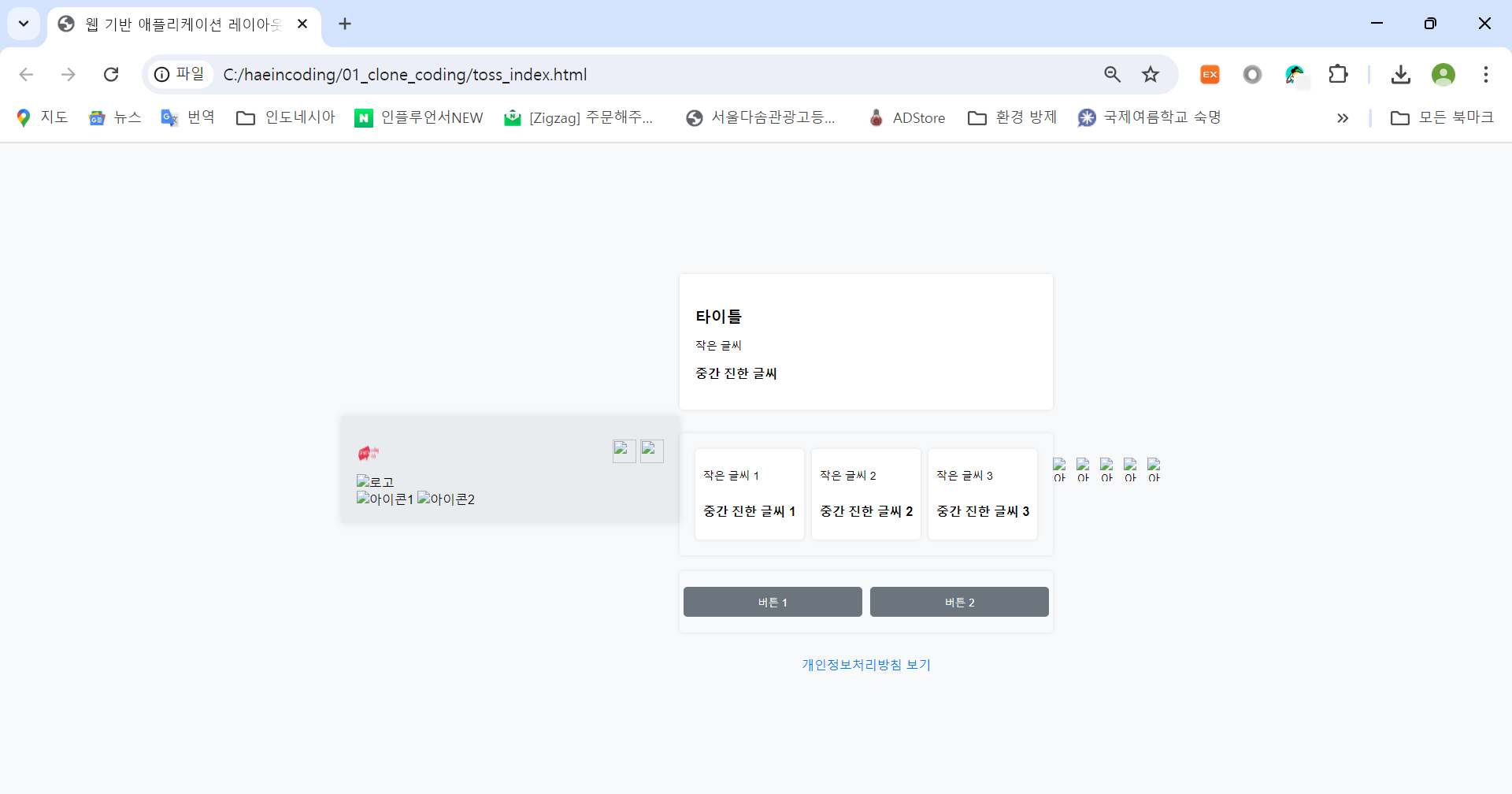
153째 줄 <header> 로 시작하는 부분에 넣었는데 화면이 이렇게 되었습니다!
왜 이렇게 되었을지 궁금합니다.
<!DOCTYPE html>
<html lang="ko-KR">
<head>
<meta charset="UTF-8">
<meta name="viewport" content="width=device-width, initial-scale=1.0">
<title>웹 기반 애플리케이션 레이아웃</title>
<style>
body {
margin: 0;
padding: 0;
font-family: Arial, sans-serif;
background-color: #f8f9fa;
display: flex;
justify-content: center;
align-items: center;
height: 100vh;
}
.container {
width: 390px;
background-color: #e9ecef;
padding: 20px;
box-shadow: 0 0 10px rgba(0, 0, 0, 0.1);
}
.header,
.footer {
display: flex;
justify-content: space-between;
align-items: center;
padding: 10px 0;
}
.header img,
.footer img {
width: 30px;
height: 30px;
}
.main {
display: flex;
flex-direction: column;
gap: 10px;
padding: 10px 0;
}
.box {
background-color: #fff;
padding: 20px;
border-radius: 5px;
box-shadow: 0 0 5px rgba(0, 0, 0, 0.1);
}
.box1 {
padding: 20px;
margin: 10px 0;
border-radius: 5px;
background-color: #fff;
}
.box1 .title {
font-size: 1.25rem;
margin-bottom: 10px;
}
.box1 .small-text {
font-size: 0.875rem;
margin-bottom: 10px;
}
.box1 .medium-bold-text {
font-size: 1rem;
font-weight: bold;
}
.box1 p, .box1 .title {
text-align: left;
}
.box2 {
display: flex;
justify-content: space-between;
padding: 20px;
margin: 10px 0;
background-color: transparent;
height: auto;
}
.card {
background-color: #fff;
padding: 10px;
border-radius: 5px;
box-shadow: 0 0 5px rgba(0, 0, 0, 0.1);
flex: 1;
margin: 0 5px;
display: flex;
flex-direction: column;
align-items: flex-start;
}
.card:first-child {
margin-left: 0;
}
.card:last-child {
margin-right: 0;
}
.card .small-text {
font-size: 0.875rem;
margin-bottom: 10px;
}
.card .medium-bold-text {
font-size: 1rem;
font-weight: bold;
}
.box3 {
display: flex;
justify-content: space-between;
padding: 20px 0;
background-color: transparent;
height: auto;
}
.box3 .btn {
background-color: #6c757d;
color: white;
border: none;
padding: 10px 20px;
border-radius: 5px;
cursor: pointer;
margin: 0 5px;
flex: 1;
text-align: center;
}
.privacy-policy {
text-align: center;
margin-top: 20px;
color: #007bff;
cursor: pointer;
}
.footer {
justify-content: space-around;
}
</style>
</head>
<body>
<div class="container">
<div class="header">
<img src="https://s3.ap-northeast-2.amazonaws.com/materials.spartacodingclub.kr/chatgpt300%25/week5/image.png"
alt="Logo" class="logo">
<div class="icons">
<img src="icon1.png">
<img src="icon2.png">
</div>
</div>
<img src="logo.png" alt="로고">
<div>
<img src="icon1.png" alt="아이콘1">
<img src="icon2.png" alt="아이콘2">
</div>
</div>
<div class="main">
<div class="box box1">
<h3 class="title">타이틀</h3>
<p class="small-text">작은 글씨</p>
<p class="medium-bold-text">중간 진한 글씨</p>
</div>
<div class="box box2">
<div class="card">
<p class="small-text">작은 글씨 1</p>
<p class="medium-bold-text">중간 진한 글씨 1</p>
</div>
<div class="card">
<p class="small-text">작은 글씨 2</p>
<p class="medium-bold-text">중간 진한 글씨 2</p>
</div>
<div class="card">
<p class="small-text">작은 글씨 3</p>
<p class="medium-bold-text">중간 진한 글씨 3</p>
</div>
</div>
<div class="box box3">
<button class="btn">버튼 1</button>
<button class="btn">버튼 2</button>
</div>
<div class="privacy-policy">개인정보처리방침 보기</div>
</div>
<div class="footer">
<img src="icon3.png" alt="아이콘3">
<img src="icon4.png" alt="아이콘4">
<img src="icon5.png" alt="아이콘5">
<img src="icon6.png" alt="아이콘6">
<img src="icon7.png" alt="아이콘7">
</div>
</div>
</body>
</html>


