커뮤니티

포인트
쿠폰
내 강의실
국비 신청 내역
증명서
계정
로그아웃
학습 질문
개발 일지
나의 활동
답변 완료
배운 걸 바탕으로 'Work24'에서 '(국민취업)일경험프로그램'을 크롤링하려고 하는데 뭔가 잘 안됩니다.
undefined주차


최*영
댓글
6
・
추천
0
・
조회수
24
조회수
24
답변 완료
* 겪고 있는 문제 상황을 최대한 자세하게 작성해주세요.
* 문제 해결을 위해 어떤 시도를 해보았는지 구체적으로 함께 알려주세요.
<https://www.work24.go.kr/ua/i/a/1100/selectJobEtprs.do?pageIndex=1&pageUnit=0¤tPageNo=1>;
고용24인지 뭔지 일경험 사이트 HTML 구조가 쓰레기라서, 더러워서 제가 크롤링해서 보려고 했습니다. 그런데 뭔가 결과가 잘 안나옵니다. 크롤링은 되는데, 목차가 '참여유형', '프로그램정보', '운영기관' 으로 삼분할 되어있어서 그런지, 주요 정보는 '프로그램정보'에 다 꼬라박아서 크롤링 결과가 괴이하게 나옵니다.
일단 할만큼 해보고 마는 코드로 어거지로 찾아보기는 하는데, 스스로 코드 개선이 잘 안되서 답답합니다.
작성된 코드 보시고 확인 부탁드립니다.
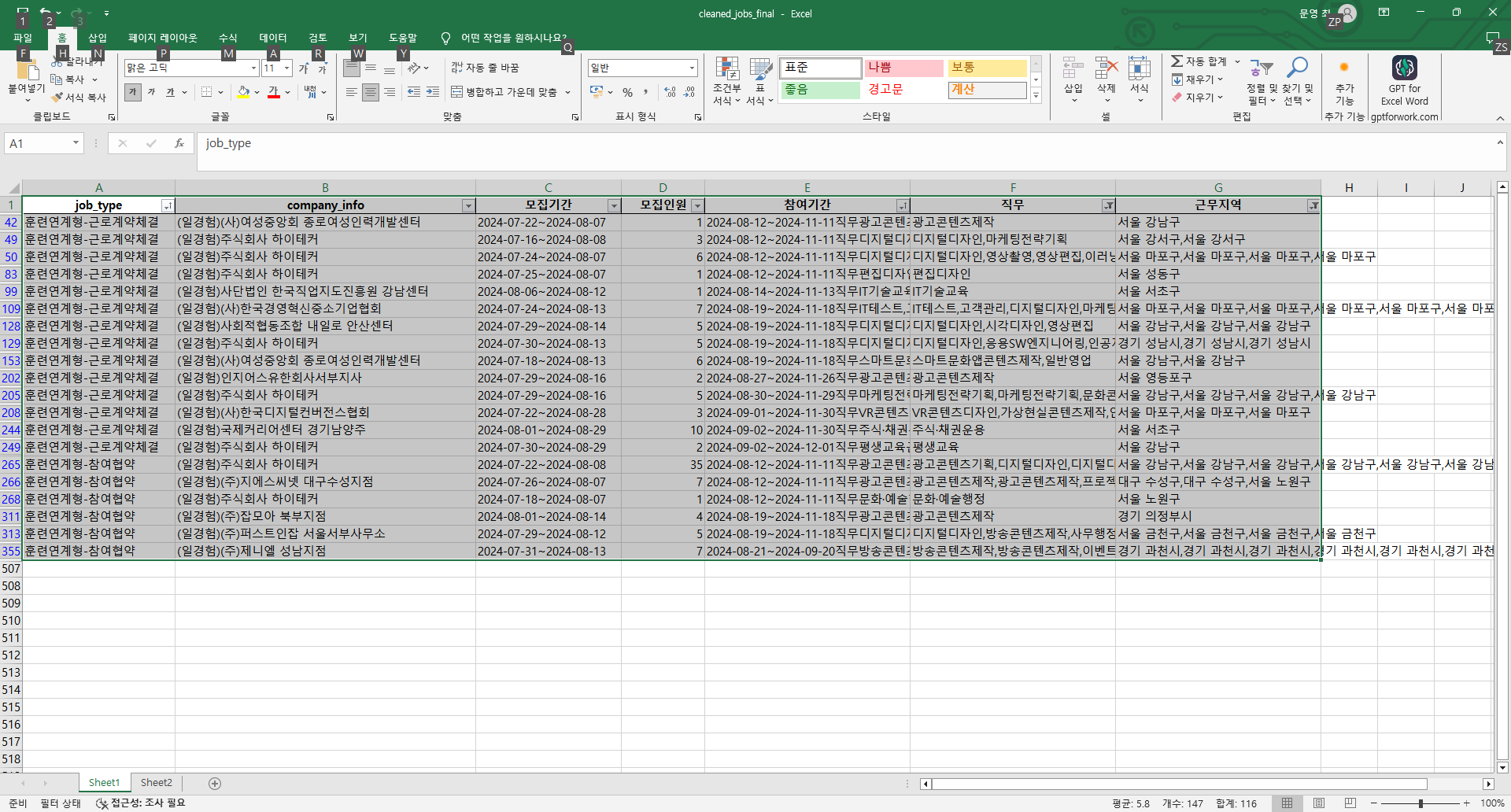
작성은 VS code로 하고, 엑셀 정리는 필터를 사용했습니다.
코드 1 (크롤링 코드)
import requests
from bs4 import BeautifulSoup
import csv
import pandas as pd


# 주어진 URL
base_url = "https://www.work24.go.kr/ua/i/a/1100/selectJobEtprs.do"


# 페이지 내용을 가져오는 함수
def fetch_page(url, params):
    try:
        response = requests.get(url, params=params)
        response.raise_for_status()  # HTTP 오류가 발생하면 예외 발생
        return response.content
    except requests.RequestException as e:
        print(f"Error fetching page {params['pageIndex']}: {e}")
        return None


# 페이지 내용에서 직업 정보를 추출하는 함수
def extract_job_info(html_content):
    try:
        soup = BeautifulSoup(html_content, "html.parser")

        table = soup.find("table", class_="box_table")
        if not table:
            return []


        job_elements = table.find_all("tr")[1:]  # 첫 번째 행은 헤더이므로 제외


        jobs = []
        for job_element in job_elements:
            cols = job_element.find_all("td")
            job_info = {
                "job_type": cols[0].get_text(strip=True) if len(cols) > 0 else "N/A",
                "job_info": cols[1].get_text(strip=True) if len(cols) > 1 else "N/A",
                "company_info": cols[2].get_text(strip=True) if len(cols) > 2 else "N/A",
            }

            jobs.append(job_info)

        return jobs
    except Exception as e:
        print(f"Error extracting job info: {e}")
        return []


# 여러 페이지를 크롤링하는 함수
def crawl_job_listings(base_url, max_pages):
    job_listings = []
    page_index = 1

    while page_index <= max_pages:
        params = {"pageIndex": page_index, "pageUnit": 0, "currentPageNo": page_index}
        html_content = fetch_page(base_url, params)
        if not html_content:
            break

        jobs = extract_job_info(html_content)
        if not jobs:
            print(f"No jobs found on page {page_index}. Terminating loop.")
            break

        job_listings.extend(jobs)
        page_index += 1

    return job_listings


# 직업 정보를 CSV 파일로 저장하는 함수
def save_to_csv(job_listings, filename="extracted_jobs.csv"):
    if not job_listings:
        print("No job listings found.")
        return


    fieldnames = job_listings[0].keys()
    try:
        with open(filename, "w", newline='', encoding="utf-8") as file:
            writer = csv.DictWriter(file, fieldnames=fieldnames)
            writer.writeheader()
            writer.writerows(job_listings)
        print(f"Job information extracted and saved to {filename}")
    except IOError as e:
        print(f"Error saving to CSV: {e}")


# 데이터 정리 및 추가 필드 추출 함수
def parse_job_info(job_info):
    if not isinstance(job_info, str):
        return "N/A", "N/A", "N/A"

    모집기간 = "N/A"
    모집인원 = "N/A"
    참여기간 = "N/A"

    try:
        parts = job_info.split("모집기간")
        if len(parts) > 1:
            기간 = parts[1].split("모집인원")
            모집기간 = 기간[0].strip() if len(기간) > 0 else "N/A"
            인원 = 기간[1].split("참여기간") if len(기간) > 1 else ["N/A", "N/A"]
            모집인원 = 인원[0].strip() if len(인원) > 0 else "N/A"
            참여기간 = 인원[1].strip() if len(인원) > 1 else "N/A"
    except Exception as e:
        print(f"Error parsing job info: {e}")

    return 모집기간, 모집인원, 참여기간


def parse_participation_info(participation_info):
    if not isinstance(participation_info, str):
        return "N/A", "N/A"

    직무 = "N/A"
    근무지역 = "N/A"

    try:
        parts = participation_info.split("직무")
        if len(parts) > 1:
            직무_지역 = parts[1].split("근무지역")
            직무 = 직무_지역[0].strip() if len(직무_지역) > 0 else "N/A"
            근무지역 = 직무_지역[1].strip() if len(직무_지역) > 1 else "N/A"
    except Exception as e:
        print(f"Error parsing participation info: {e}")

    return 직무, 근무지역


# 전체 데이터 크롤링 및 정리
job_listings = crawl_job_listings(base_url, max_pages=100)  # 필요한 페이지 수 설정
save_to_csv(job_listings, "extracted_jobs.csv")


# 데이터 정리 및 추가 필드 추출
job_listings = pd.read_csv("extracted_jobs.csv")


job_listings[["모집기간", "모집인원", "참여기간"]] = job_listings.apply(
    lambda row: pd.Series(parse_job_info(row["job_info"])), axis=1)


job_listings[["직무", "근무지역"]] = job_listings.apply(
    lambda row: pd.Series(parse_participation_info(row["참여기간"])), axis=1)


# 필요 없는 열 제거
job_listings.drop(columns=["job_info"], inplace=True)


# 정리된 데이터를 새로운 CSV 파일로 저장
cleaned_csv_file_path = "cleaned_jobs_final.csv"
job_listings.to_csv(cleaned_csv_file_path, index=False, encoding="utf-8")


print(f"Cleaned job information has been saved to {cleaned_csv_file_path}")
코드 2(CSV => XLSX 변환)
import pandas as pd


# CSV 파일 경로
csv_file_path = "cleaned_jobs_final.csv"


# CSV 파일 읽기
job_listings = pd.read_csv(csv_file_path)


# Excel 파일로 저장
excel_file_path = "cleaned_jobs_final.xlsx"
job_listings.to_excel(excel_file_path, index=False)


print(f"Cleaned job information has been saved to {excel_file_path}")


댓글 알림
