


* 겪고 있는 문제 상황을 최대한 자세하게 작성해주세요.
* 문제 해결을 위해 어떤 시도를 해보았는지 구체적으로 함께 알려주세요.
Colab에서 ChatGPT가 작성해준 코드로 메일을 전송할 때 전송이 제대로 안되는 현상이 있었습니다.
메일 보내기 함수는 정상적으로 작동하였지만, 시간대를 설정하면서부터 전송이 안되기 시작했는데요.
ChatGPT가 알려준 다양한 원인들을 살펴 보았지만 아무런 문제가 없었습니다.
(심지어 강의 때 코드를 써도 메일 전송이 안되더군요!)
아무리 봐도 지정한 시간대에 메일을 보내는 것에 문제가 생긴 것으로 보였고 이 부분을 ChatGPT에게 물어보다가
print("Current system time:", datetime.now())
print("Current Seoul time:", get_seoul_time())
이런 코드를 받아서 실행시켜보았는데요.
Current system time: 2024-07-31 17:16:46.358774
Current Seoul time: 2024-08-01 02:16:46.360498+09:00
시스템 시간과 실제 시간이 다른 것을 확인하게 되었습니다.
VS Code로 코드를 옮겨서 실행을 하니 코드가 제대로 작동하더군요.
이런 경우는 왜 발생하고 어떻게 해결 해야할지 궁금합니다.
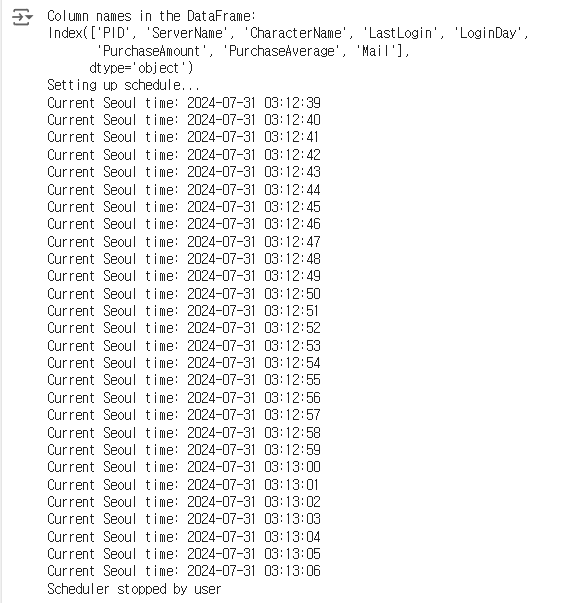
작성한 코드 및 에러 메세지
import pandas as pd
import smtplib
from email.mime.multipart import MIMEMultipart
from email.mime.text import MIMEText
import schedule
import time
from datetime import datetime
import pytz
# 엑셀 파일에서 데이터 읽기
file_path = 'customers_data_Homework.xlsm'
df = pd.read_excel(file_path, sheet_name='Best_User')
# 열 이름 출력 (디버깅용)
print("Column names in the DataFrame:")
print(df.columns)
# SMTP 서버 설정
smtp_server = 'smtp.gmail.com'
smtp_port = 587
smtp_username = 'your_mail@example.com' # 실제 코드에서는 정상적으로 메일 전송이 되던 본인 메일
smtp_password = 'your_password' # 실제 코드에서는 정상적으로 메일 전송이 되던 패스워드
# 이메일 발송 함수
def send_email(to_address, subject, body):
msg = MIMEMultipart()
msg['From'] = smtp_username
msg['To'] = to_address
msg['Subject'] = subject
msg.attach(MIMEText(body, 'plain', 'utf-8'))
try:
with smtplib.SMTP(smtp_server, smtp_port) as server:
server.set_debuglevel(1) # 디버그 출력을 활성화
server.starttls()
server.login(smtp_username, smtp_password)
server.sendmail(smtp_username, to_address, msg.as_string())
print(f"Email sent to {to_address}")
except smtplib.SMTPAuthenticationError as e:
print(f"SMTP Authentication Error: {e.smtp_code} - {e.smtp_error.decode('utf-8')}")
except Exception as e:
print(f"Failed to send email to {to_address}: {e}")
# 이메일 내용 설정
subject = '꾸준한 이용에 감사드립니다!'
body_template = """
{CharacterName} 고객님께,
MarkeMarke를 꾸준히 이용해주셔서 진심으로 감사드립니다. 최근까지 100일 이상 접속하며 꾸준한 결제를 해주신 것에 대해 깊은 감사를 드립니다. 이에 저희는 감사의 의미로 특별한 선물을 준비하였습니다.
앞으로도 MarkeMarke에서 다양한 혜택과 이벤트를 만나보실 수 있으니, 지속적인 관심과 사랑 부탁드립니다.
감사합니다.
MarkeMarke 팀 드림
"""
# 모든 고객에게 이메일 보내기
def send_bulk_emails():
print("Starting email sending process...")
for index, row in df.iterrows():
name = row['CharacterName'] # CharacterName 칼럼에서 고객 이름 가져오기
email = row['Mail'] # Mail 칼럼에서 고객 이메일 가져오기
body = body_template.format(CharacterName=name)
send_email(email, subject, body)
print("All emails have been sent.")
# 대한민국 서울 시간 기준으로 현재 시간을 가져오는 함수
def get_seoul_time():
seoul_tz = pytz.timezone('Asia/Seoul')
return datetime.now(seoul_tz)
# 스케줄러 설정
def setup_schedule():
print("Setting up schedule...")
schedule.clear() # 기존의 스케줄러를 모두 제거
schedule.every().day.at("03:13").do(send_bulk_emails) # 매일 오전 3시 13분에 이메일 발송
def run_schedule():
setup_schedule()
while True:
try:
now = get_seoul_time()
print(f"Current Seoul time: {now.strftime('%Y-%m-%d %H:%M:%S')}")
schedule.run_pending()
time.sleep(1)
except KeyboardInterrupt:
print("Scheduler stopped by user")
break
# 스케줄러 실행
run_schedule()


