


1주차 숙제에서 Listview.builder 사용할 때, 빨간 동그라미 부분처럼 변수를 context, index로 받았는데 이 형식은 이렇게 정해져 있는 건가요? context와index 변수이름 자체로 기능을 하고있는건가요? ㅠ
그리고 아래 전체 코딩에서 정확히 context와 index는 무엇을 가리키고 있는지요? 이 것들이 return 값을 출력할 때 어떤 식으로 작용되고 있는지요? 아 헷갈려요 ㅠㅠㅠㅠ
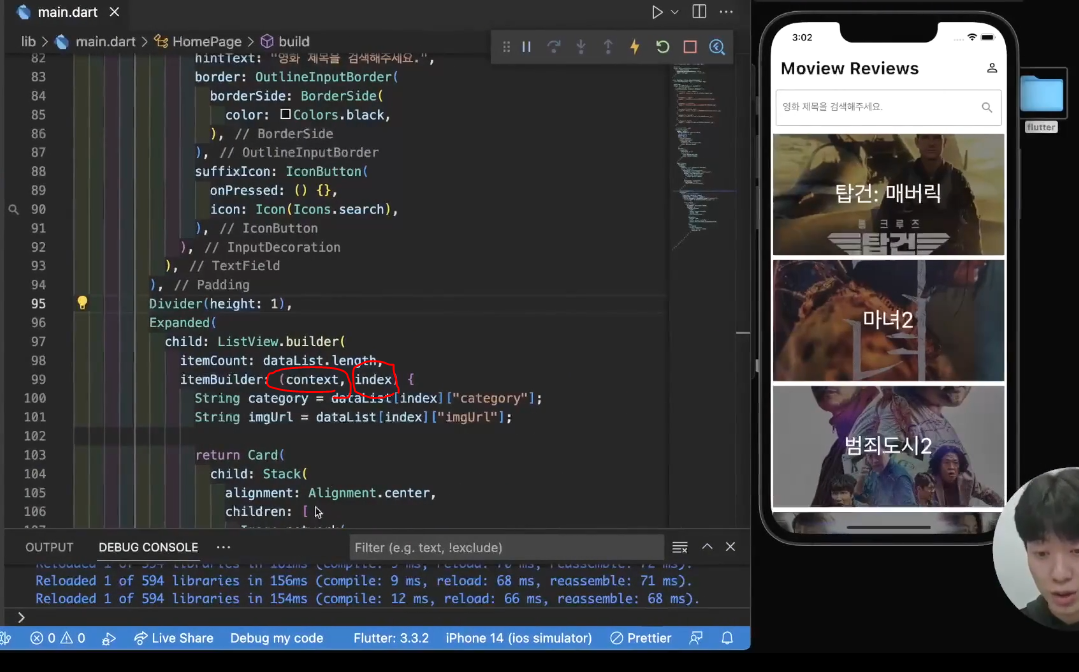
*전체코드*
import 'package:flutter/material.dart';
void main() {
runApp(MyApp());
}
class MyApp extends StatelessWidget {
const MyApp({Key? key}) : super(key: key);
@override
Widget build(BuildContext context) {
return MaterialApp(
debugShowCheckedModeBanner: false,
home: HomePage(), // 홈페이지 보여주기
);
}
}
class HomePage extends StatelessWidget {
const HomePage({Key? key}) : super(key: key);
@override
Widget build(BuildContext context) {
// 영화 제목, 사진 데이터
List<Map<String, dynamic>> dataList = [
{
"category": "탑건: 매버릭",
"imgUrl": "https://i.ibb.co/sR32PN3/topgun.jpg",
},
{
"category": "마녀2",
"imgUrl": "https://i.ibb.co/CKMrv91/The-Witch.jpg",
},
{
"category": "범죄도시2",
"imgUrl": "https://i.ibb.co/2czdVdm/The-Outlaws.jpg",
},
{
"category": "헤어질 결심",
"imgUrl": "https://i.ibb.co/gM394CV/Decision-to-Leave.jpg",
},
{
"category": "브로커",
"imgUrl": "https://i.ibb.co/MSy1XNB/broker.jpg",
},
{
"category": "문폴",
"imgUrl": "https://i.ibb.co/4JYHHtc/Moonfall.jpg",
},
];
// 화면에 보이는 영역
return Scaffold(
appBar: AppBar(
elevation: 0,
backgroundColor: Colors.white,
centerTitle: false,
iconTheme: IconThemeData(color: Colors.black),
title: Text(
"Movie Reviews",
style: TextStyle(
color: Colors.black,
fontSize: 28,
fontWeight: FontWeight.bold,
),
),
actions: [
IconButton(
onPressed: () {},
icon: Icon(Icons.person_outline),
)
],
),
body: Column(
children: [
Padding(
padding: const EdgeInsets.all(8.0),
child: TextField(
decoration: InputDecoration(
hintText: "영화 제목을 검색해주세요.",
border: OutlineInputBorder(
borderSide: BorderSide(color: Colors.black),
),
suffixIcon: IconButton(
icon: Icon(Icons.search),
onPressed: () {},
),
),
),
),
Divider(height: 1),
Expanded(
child: ListView.builder(
itemCount: dataList.length,
itemBuilder: (context, index) {
String category = dataList[index]['category'];
String imgUrl = dataList[index]['imgUrl'];
return Card(
child: Stack(
alignment: Alignment.center,
children: [
Image.network(
imgUrl,
width: double.infinity,
height: 200,
fit: BoxFit.cover,
),
Container(
width: double.infinity,
height: 200,
color: Colors.black.withOpacity(0.5),
),
Text(
category,
style: TextStyle(
color: Colors.white,
fontSize: 36,
),
),
],
),
);
},
),
),
],
),
);
}
}


