


* 겪고 있는 문제 상황을 최대한 자세하게 작성해주세요.
* 문제 해결을 위해 어떤 시도를 해보았는지 구체적으로 함께 알려주세요.
다시 질문 드립니다! 글자 수정을 했는데도 간격과 두께가 다릅니다 !
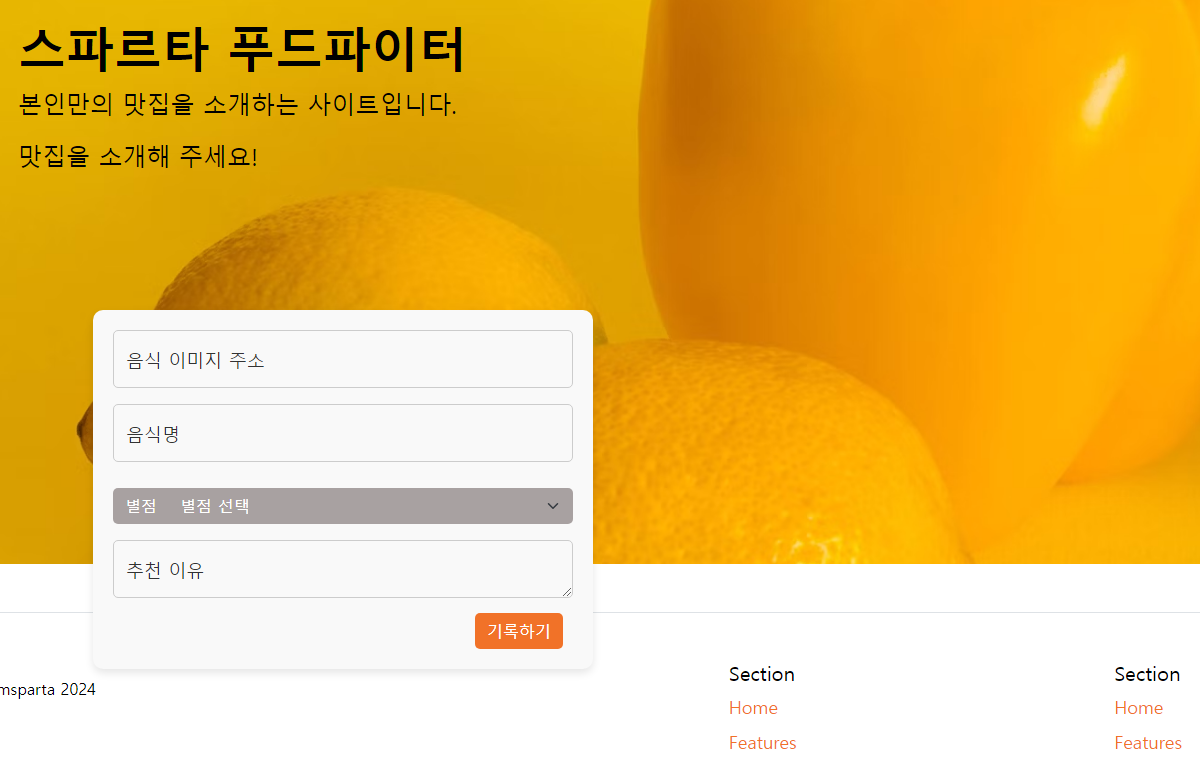
작성한 코드 및 에러 메세지
<!doctype html>
<html lang="en">
<head>
<meta charset="utf-8">
<meta name="viewport" content="width=device-width, initial-scale=1, shrink-to-fit=no">
<title>푸드파이터</title>
<link href="https://cdn.jsdelivr.net/npm/bootstrap@5.0.2/dist/css/bootstrap.min.css" rel="stylesheet"
integrity="sha384-EVSTQN3/azprG1Anm3QDgpJLIm9Nao0Yz1ztcQTwFspd3yD65VohhpuuCOmLASjC" crossorigin="anonymous">
<script src="https://cdn.jsdelivr.net/npm/bootstrap@5.0.2/dist/js/bootstrap.bundle.min.js"
integrity="sha384-MrcW6ZMFYlzcLA8Nl+NtUVF0sA7MsXsP1UyJoMp4YLEuNSfAP+JcXn/tWtIaxVXM"
crossorigin="anonymous"></script>
<script src="../static/firebase2.js" type="module"></script>
<link href="https://fonts.googleapis.com/css2?family=Gowun+Dodum&display=swap" rel="stylesheet">
<style>
* {
font-family: "Black Han Sans", sans-serif;
font-weight: 400;
font-style: normal;
}
body {
background-color: white;
color: black;
}
.header {
background-size: cover;
background-image:
background-position: right;
height: 650px;
display: flex;
flex-direction: column;
}
.header>h1 {
margin: 0;
font-size: 40px;
}
.header>div {
font-size: 18px;
margin-top: 10px;
}
.form-button {
width: 150px;
height: 40px;
background-color: transparent;
border: 1px solid tr;
color: black;
font-size: 15px;
margin: 20px 10px 0px 0px;
}
.form-button:hover {
border: 2px solid black;
}
.info-button {
margin: 20px 0 0 15px;
height: 40px;
font-size: 14px;
}
.post {
width: 500px;
margin: 20px 0px 1px 20px;
padding: 20px;
box-shadow: 0px 0px 3px 0px transparent;
background-color: wheat;
}
.form-floating input,
.form-floating textarea {
color: black;
background-color: white;
}
.button2 {
display: flex;
justify-content: flex-end;
margin-top: 15px;
}
.button2>button {
margin-right: 10px;
}
.mycards {
width: 1600px;
margin: 30px auto;
flex-direction: row;
align-items: center;
}
.card {
border-radius: 30px;
background-color: white;
border: none;
color: black;
margin-left: 50px;
}
.card-img-top {
object-fit: cover;
height: 250px;
border-radius: 20px;
}
.card-title {
margin-top: 10px;
font-size: 18px;
}
.card-body {
border: blanchedalmond 2px solid;
border-radius: 20px;
}
.card-text {
color: black;
}
.comment {
color: black;
}
.play-button {
display: flex;
justify-content: flex-start;
margin-top: 15px;
}
a.nav-link {
color: #F17228;
font-size: large;
}
.icon {
height: 50px;
}
.card-button {
background-color: orange;
color: white;
text-align: center;
padding: 10px 15px;
border: none;
border-radius: 6px;
cursor: pointer;
}
...
</style>
</head>
<body>
<!-- Navbar -->
<header class="p-3 text-bg-dark">
<div class="container">
<div class="d-flex flex-wrap align-items-center justify-content-center justify-content-lg-start">
<a href="/" class="d-flex align-items-center mb-2 mb-lg-0 text-white text-decoration-none">
<svg class="bi me-2" width="40" height="32" role="img" aria-label="Bootstrap">
<use xlink:href="#bootstrap"></use>
</svg>
</a>
<ul class="nav col-12 col-lg-auto me-lg-auto mb-2 justify-content-center mb-md-0">
<img src="https://s3.ap-northeast-2.amazonaws.com/materials.spartacodingclub.kr/food.png"
class="icon"></li>
<li><a href="#" class="nav-link px-2 text-danger">Foodcourt</a></li>
<li><a href="#" class="nav-link px-2 ">홈</a></li>
<li><a href="#" class="nav-link px-2 ">한식</a></li>
<li><a href="#" class="nav-link px-2 ">일식</a></li>
<li><a href="#" class="nav-link px-2 ">중식</a></li>
<li><a href="#" class="nav-link px-2 ">양식</a></li>
</ul>
<form class="col-12 col-lg-auto mb-3 mb-lg-0 me-lg-3" role="search">
<input type="search" class="form-control form-control-dark text-bg-dark" placeholder="Search..."
aria-label="Search">
</form>
<div class="text-end">
<button type="button" class="btn btn-warning me-2">Login</button>
<button type="button" class="btn btn-warning">Sign-up</button>
</div>
</div>
</div>
</header>
<div class="header">
<div class="p-5 mb-4 bg-body-tertiary rounded-3">
<div class="container-fluid py-5">
<h1 class="display-5 fw-bold">스파르타 푸드파이터</h1>
<p class="col-md-8 fs-4">본인만의 맛집을 소개하는 사이트입니다.</p>
<p class="col-md-8 fs-4">맛집을 소개해 주세요!</p>
</div>
</div>
<div class="post" id="input-card">
<div class="form-floating mb-3">
<input type="email" class="form-control" id="floatingInput" placeholder="name@example.com">
<label for="floatingInput">음식 이미지 주소</label>
</div>
<div class="form-floating mb-3">
<input type="text" class="form-control" id="foodTitle" placeholder="영화 제목">
<label for="foodTitle">음식명</label>
</div>
<div class="input-group mb-3">
<button class="btn btn-outline-secondary" type="button">별점</button>
<select class="form-select" id="inputGroupSelect03" aria-label="Example select with button addon">
<option selected>별점 선택</option>
<option value="1">⭐</option>
<option value="2">⭐⭐</option>
<option value="3">⭐⭐⭐</option>
<option value="4">⭐⭐⭐⭐</option>
<option value="5">⭐⭐⭐⭐⭐</option>
</select>
</div>
<div class="form-floating">
<textarea class="form-control" placeholder="Leave a comment here" id="floatingTextarea"></textarea>
<label for="floatingTextarea">추천 이유</label>
</div>
<div class="button2">
<button type="button" class="btn btn-danger" id="addBtn"> 기록하기 </button>
</div>
</div>
</div>
</div>
</div>
</div>
...
</footer>
</div>
</body>
</html>


