커뮤니티

포인트
쿠폰
내 강의실
국비 신청 내역
증명서
계정
로그아웃
학습 질문
개발 일지
나의 활동
답변 완료
FATAL EXCEPTION:main -> 1주차 실습로또 앱 실행시 문제
[왕초보] Kotlin으로 만드는 공공데이터 활용 안드로이드 앱 v0
1주차


정*민
댓글
1
・
추천
0
・
조회수
9
조회수
9
답변 완료
* 겪고 있는 문제 상황을 최대한 자세하게 작성해주세요.
* 문제 해결을 위해 어떤 시도를 해보았는지 구체적으로 함께 알려주세요.
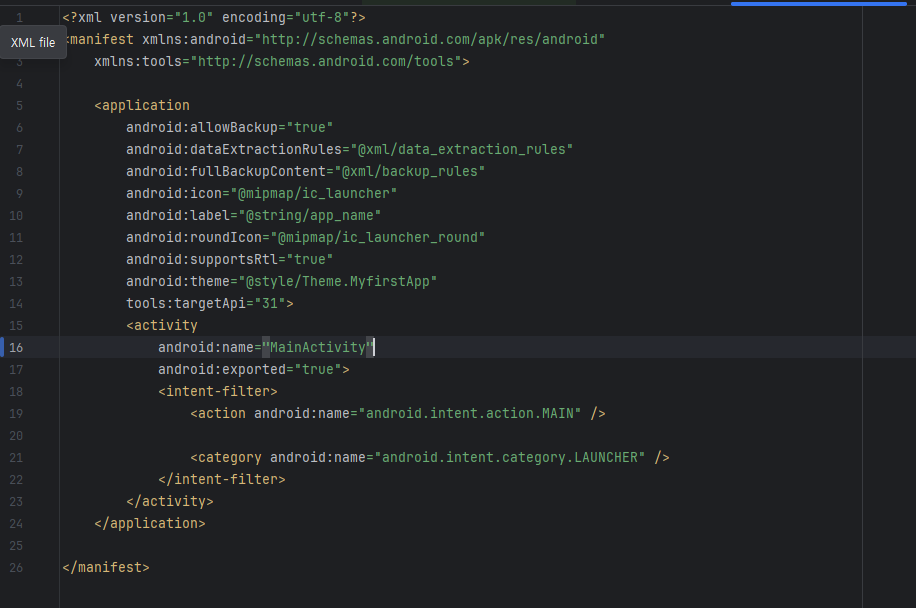
AndroidMainfest.xml
import android.os.Bundle
import android.widget.Button
import android.widget.TextView
import androidx.appcompat.app.AppCompatActivity
import com.example.myfirstapp.R
import kotlin.random.Random

class MainActivity : AppCompatActivity() {
    override fun onCreate(savedInstanceState: Bundle?) {
        super.onCreate(savedInstanceState)
        setContentView(R.layout.activity_main)

        val numberOne = findViewById<TextView>(R.id.number_one)
        val numberTwo = findViewById<TextView>(R.id.number_two)
        val numberThree = findViewById<TextView>(R.id.number_three)
        val numberFour = findViewById<TextView>(R.id.number_four)
        val numberFive = findViewById<TextView>(R.id.number_five)
        val numberSix = findViewById<TextView>(R.id.number_six)
        val numberBonus = findViewById<TextView>(R.id.number_bonus)
        val randomButton = findViewById<Button>(R.id.random_button)

        randomButton.setOnClickListener {
            val winNumbers = generateLottoNumbers().sorted()
            numberOne.text = winNumbers[0].toString()
            numberTwo.text = winNumbers[1].toString()
            numberThree.text = winNumbers[2].toString()
            numberFour.text = winNumbers[3].toString()
            numberFive.text = winNumbers[4].toString()
            numberSix.text = winNumbers[5].toString()
            numberBonus.text = winNumbers[6].toString()
            //val winNumbersView = listOf(numberOne, numberTwo, numberThree, numberFour, numberFive, numberSix, numberBonus)
            //winNumbers.mapIndexed { index, number -> winNumbersView[index].text = number.toString() }
        }
    }

    private fun generateLottoNumbers(): Set<Int> {
        val numbers = mutableSetOf<Int>()
        while (numbers.size < 7) {
            val randomNumber = Random.nextInt(1, 46) // 1부터 45까지의 숫자 중 랜덤 선택
            numbers.add(randomNumber)
        }
        return numbers
    }
}
MainActivity 입니다.
애초에 drawble 파일에 xml 파일 생성해서 복붙해서 ic_plus, number_background 같은거 했는데 주황색으로 뜨는데 맞는건가요?
또한 실행 누르면 pixel 7 api 34에선 그냥 폰 바탕화면으로밖에 안비춰지는데 도와주세요
그리고 실습 진행할라고 LoveCat 파일 생성했는데 layout 폴더가 생성되지 않습니다. 이건 또 뭐가 잘못된건가요?
너무 많은 질문 죄송합니다. 꼭 해결 부탁드립니
작성한 코드 및 에러 메세지
오류 발생 시, 작성한 코드 전체와 에러 메시지를 첨부해 주세요.
</FATAL EXCEPTION: main Process: com.example.myfirstapp, PID: 14347 java.lang.RuntimeException: Unable to instantiate activity ComponentInfo{com.example.myfirstapp/com.example.myfirstapp.MainActivity}: java.lang.ClassNotFoundException: Didn't find class "com.example.myfirstapp.MainActivity" on path: DexPathList[[zip file "/data/app/~~UVVASOT1qjbGy4hjXYISCg==/com.example.myfirstapp-RWAoLbVJXBhREPLfmFHDlw==/base.apk"],nativeLibraryDirectories=[/data/app/~~UVVASOT1qjbGy4hjXYISCg==/com.example.myfirstapp-RWAoLbVJXBhREPLfmFHDlw==/lib/x86_64, /system/lib64, /system_ext/lib64]] at android.app.ActivityThread.performLaunchActivity(ActivityThread.java:3689) at android.app.ActivityThread.handleLaunchActivity(ActivityThread.java:3922) at android.app.servertransaction.LaunchActivityItem.execute(LaunchActivityItem.java:103) at android.app.servertransaction.TransactionExecutor.executeCallbacks(TransactionExecutor.java:139) at android.app.servertransaction.TransactionExecutor.execute(TransactionExecutor.java:96) at android.app.ActivityThread$H.handleMessage(ActivityThread.java:2443) at android.os.Handler.dispatchMessage(Handler.java:106) at android.os.Looper.loopOnce(Looper.java:205) at android.os.Looper.loop(Looper.java:294) at android.app.ActivityThread.main(ActivityThread.java:8177) at java.lang.reflect.Method.invoke(Native Method) at com.android.internal.os.RuntimeInit$MethodAndArgsCaller.run(RuntimeInit.java:552) at com.android.internal.os.ZygoteInit.main(ZygoteInit.java:971) Caused by: java.lang.ClassNotFoundException: Didn't find class "com.example.myfirstapp.MainActivity" on path: DexPathList[[zip file "/data/app/~~UVVASOT1qjbGy4hjXYISCg==/com.example.myfirstapp-RWAoLbVJXBhREPLfmFHDlw==/base.apk"],nativeLibraryDirectories=[/data/app/~~UVVASOT1qjbGy4hjXYISCg==/com.example.myfirstapp-RWAoLbVJXBhREPLfmFHDlw==/lib/x86_64, /system/lib64, /system_ext/lib64]] at dalvik.system.BaseDexClassLoader.findClass(BaseDexClassLoader.java:259) at java.lang.ClassLoader.loadClass(ClassLoader.java:379) at java.lang.ClassLoader.loadClass(ClassLoader.java:312) at android.app.AppComponentFactory.instantiateActivity(AppComponentFactory.java:95) at androidx.core.app.CoreComponentFactory.instantiateActivity(CoreComponentFactory.java:45) at android.app.Instrumentation.newActivity(Instrumentation.java:1378) at android.app.ActivityThread.performLaunchActivity(ActivityThread.java:3676) at android.app.ActivityThread.handleLaunchActivity(ActivityThread.java:3922) at android.app.servertransaction.LaunchActivityItem.execute(LaunchActivityItem.java:103) at android.app.servertransaction.TransactionExecutor.executeCallbacks(TransactionExecutor.java:139) at android.app.servertransaction.TransactionExecutor.execute(TransactionExecutor.java:96) at android.app.ActivityThread$H.handleMessage(ActivityThread.java:2443) at android.os.Handler.dispatchMessage(Handler.java:106) at android.os.Looper.loopOnce(Looper.java:205) at android.os.Looper.loop(Looper.java:294) at android.app.ActivityThread.main(ActivityThread.java:8177) at java.lang.reflect.Method.invoke(Native Method) at com.android.internal.os.RuntimeInit$MethodAndArgsCaller.run(RuntimeInit.java:552) at com.android.internal.os.ZygoteInit.main(ZygoteInit.java:971) >
Tip 2) Ctrl+A(맥의 경우 Command+A) 단축키로 코드를 한 번에 선택할 수 있어요!


댓글 알림
