


API 오류 유형을 아래와 같이 찾았는데 해결 방법을 모르겠어요.
Prompt 에 타이핑을 하면 "Provided JSON string is invalid" 라고도 나옵니다.
400 Bad Request
The 400 Bad Request error message is one of the most generic HTTP status codes. It implies that you did not correctly format your API request. If no additional error information is given in the response body, you have to check the docs. You could be missing a query, a field in the request body, or a header field could be wrong. It could also be that some of your request data might have incorrect syntax.
This is different from the 422 Unprocessable Entity error message, which appears when your request is correctly formatted, but cannot be processed.
in this case, I pass a bad formatted latlang value to the API [ the correct one was: 40.714224,73.961452 } and I missed a single " , " in the field.
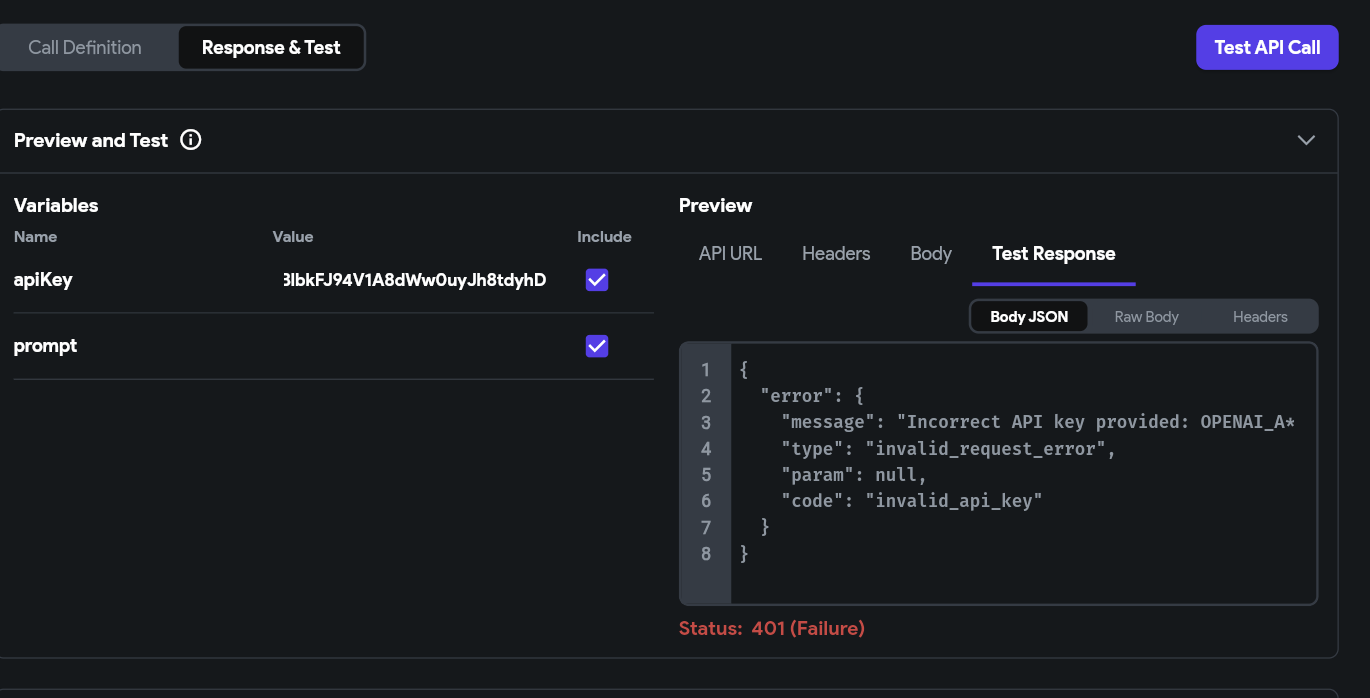
신 화면 전체를 캡처해 주시면, 튜터님들이 빠르게 상황을 이해할 수 있어요.
*{
"error": {
"message": "We could not parse the JSON body of your request. (HINT: This likely means you aren't using your HTTP library correctly. The OpenAI API expects a JSON payload, but what was sent was not valid JSON. If you have trouble figuring out how to fix this, please contact us through our help center at help.openai.com.)",
"type": "invalid_request_error",
"param": null,
"code": null
}
}
{
"error": {
"message": "Incorrect API key provided: OPENAI_A**_KEY. You can find your API key at https://platform.openai.com/account/api-keys.",
"type": "invalid_request_error",
"param": null,
"code": "invalid_api_key"
}
}


