


* 겪고 있는 문제 상황을 최대한 자세하게 작성해주세요.
* 문제 해결을 위해 어떤 시도를 해보았는지 구체적으로 함께 알려주세요.
기록하기를 누르면 이미지가 추가 되어야 하는데 숙제때 앨범 안나오게하는거 하던도중 너무 많은것을 지웠는지
눌러도 앨범이 추가되지 않습니다
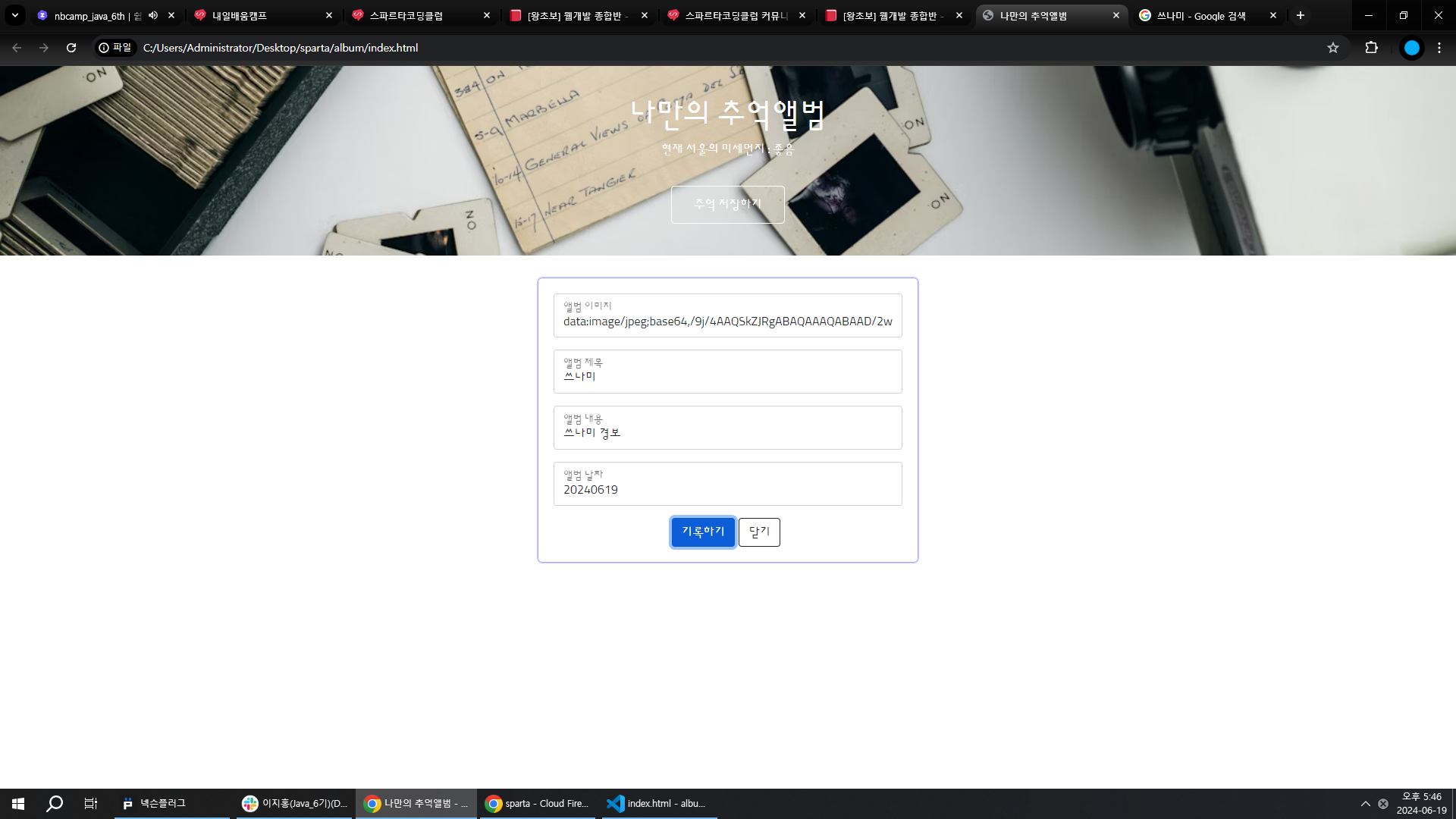
작성한 코드 및 에러 메세지
오류 발생 시, 작성한 코드 전체와 에러 메시지를 첨부해 주세요.
Tip 1) </> 아이콘을 눌러 코드박스를 만들어 보세요.
Tip 2) Ctrl+A(맥의 경우 Command+A) 단축키로 코드를 한 번에 선택할 수 있어요!<!DOCTYPE html>
<html lang="en">
<head>
<meta charset="UTF-8">
<meta name="viewport" content="width=device-width, initial-scale=1.0">
<title>나만의 추억앨범</title>
<script src="https://ajax.googleapis.com/ajax/libs/jquery/3.4.1/jquery.min.js"></script>
<link
href="https://cdn.jsdelivr.net/npm/bootstrap@5.0.2/dist/css/bootstrap.min.css"
rel="stylesheet"
integrity="sha384-EVSTQN3/azprG1Anm3QDgpJLIm9Nao0Yz1ztcQTwFspd3yD65VohhpuuCOmLASjC"
crossorigin="anonymous">
<style>
@import url('https://fonts.googleapis.com/css2?family=Sunflower:wght@300&display=swap');
* {
font-family: "Sunflower", sans-serif;
}
.mytitle {
height: 250px;
color: white;
display: flex;
flex-direction: column;
align-items: center;
justify-content: center;
background-image: url("https://images.unsplash.com/photo-1511992243105-2992b3fd0410?ixlib=rb-4.0.3&ixid=M3wxMjA3fDB8MHxwaG90by1wYWdlfHx8fGVufDB8fHx8fA%3D%3D&auto=format&fit=crop&w=1470&q=80");
background-position: center;
background-size: cover;
}
.mytitle > button {
width: 150px;
height: 50px;
background-color: transparent;
color: white;
border: 1px solid white;
border-radius: 5px;
margin-top: 20px;
}
.mycards {
width: 1200px;
margin: 30px auto 0;
}
.mypostingbox {
width: 500px;
margin: 30px auto 0;
padding: 20px;
box-shadow: 0 0 3px 0 blue;
border-radius: 5px;
}
.mybtn {
display: flex;
flex-direction: row;
align-items: center;
justify-content: center;
}
.mybtn > button {
margin-right: 5px;
}
</style>
<script type="module">
// Firebase SDK 라이브러리 가져오기
import {initializeApp} from "https://www.gstatic.com/firebasejs/9.22.0/firebase-app.js";
import {getFirestore} from "https://www.gstatic.com/firebasejs/9.22.0/firebase-firestore.js";
import {collection, addDoc} from "https://www.gstatic.com/firebasejs/9.22.0/firebase-firestore.js";
import {getDocs} from "https://www.gstatic.com/firebasejs/9.22.0/firebase-firestore.js";
// For Firebase JS SDK v7.20.0 and later, measurementId is optional
const firebaseConfig = {
apiKey: "AIzaSyDceDgdPWQ43NwA1W0kN0aRsYYKK0c-xE4",
authDomain: "sparta-15146.firebaseapp.com",
projectId: "sparta-15146",
storageBucket: "sparta-15146.appspot.com",
messagingSenderId: "414668803659",
appId: "1:414668803659:web:e282a33fd04840673507ce",
measurementId: "G-RVPZ39CPMR"
};
// Firebase 인스턴스 초기화
const app = initializeApp(firebaseConfig);
const db = getFirestore(app);
$("#postingbtn").click(async function () {
let image = $('#image').val();
let title = $('#title').val();
let content = $('#content').val();
let date = $('#date').val();
let doc = {
'image': image,
'title': title,
'content': content,
'date': date
};
await addDoc(collection(db, "albums"), doc);
alert('저장 완료!')
window
.location
.reload();
})
$("#savebtn").click(async function () {
$('#postingbox').toggle();
})
let url = "http://spartacodingclub.shop/sparta_api/seoulair";
fetch(url)
.then(res => res.json())
.then(data => {
let mise = data['RealtimeCityAir']['row'][0]['IDEX_NM']
$('#msg').text(mise)
})
let docs = await getDocs(collection(db, "albums"));
docs.forEach((doc) => {
let row = doc.data();
console.log(row);
let image = row['image']
let title = row['title']
let content = row['content']
let date = row['row']
let temp_html = `
<div class="col">
<div class="card h-100">
<img src="${image}"
<div class="card-body">
<h5 class="card-title">${title}</h5>
<p class="card-text">${content}</p>
</div>
<div class="card-footer">
<small class="text-body-secondary">${date}</small>
</div>
</div>
</div>`;
$('#card').append(temp_html);
});
</script>
</head>
<body>
<div class="mytitle">
<h1>나만의 추억앨범</h1>
<p>현재 서울의 미세먼지 :
<span id="msg">좋음</span></p>
<button id="savebtn">추억 저장하기</button>
</div>
<div class="mypostingbox" id="postingbox">
<div class="form-floating mb-3">
<input type="email" class="form-control" id="image" placeholder="앨범 이미지">
<label for="floatingInput">앨범 이미지</label>
</div>
<div class="form-floating mb-3">
<input type="email" class="form-control" id="title" placeholder="앨범 제목">
<label for="floatingInput">앨범 제목</label>
</div>
<div class="form-floating mb-3">
<input type="email" class="form-control" id="content" placeholder="앨범 내용">
<label for="floatingInput">앨범 내용</label>
</div>
<div class="form-floating mb-3">
<input type="email" class="form-control" id="date" placeholder="앨범 날짜">
<label for="floatingInput">앨범 날짜</label>
</div>
<div class="mybtn">
<button id="p ostingbtn" type="button" class="btn btn-primary">기록하기</button>
<button type="button" class="btn btn-outline-dark">닫기</button>
</div>
</div>
<div class="mycards">
</div>
</body>
</html>


