


* 겪고 있는 문제 상황을 최대한 자세하게 작성해주세요.
* 문제 해결을 위해 어떤 시도를 해보았는지 구체적으로 함께 알려주세요.
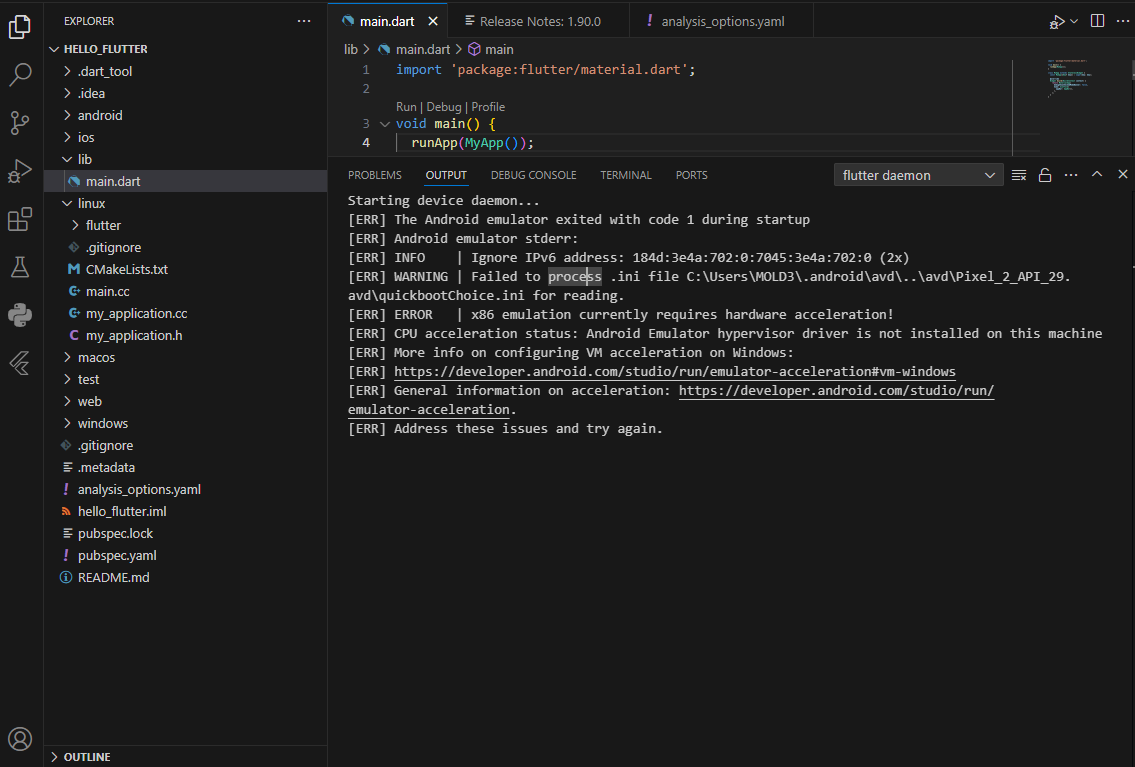
Emulator를 안드로이드 버전으로 실행하였는데 아래와 같은 화면이 나오면서 실행이 되지 않습니다... 어떻게 해결해야 할까요 ㅠ
아래 사진은 제가 에뮬레이터 실핸한 후 나온 오류 메시지입니다.
아래는 제 vs code의 li - main.dart 페이지 코드입니다.
import 'package:flutter/material.dart';
void main() {
runApp(MyApp());
}
class MyApp extends StatelessWidget {
const MyApp({Key? key}) : super(key: key);
@override
Widget build(BuildContext context) {
return MaterialApp(
debugShowCheckedModeBanner: false,
home: Scaffold(
appBar: AppBar(),
),
);
}
}
아래는 analysis_options.yaml의 코드입니다.
# This file configures the analyzer, which statically analyzes Dart code to
# check for errors, warnings, and lints.
#
# The issues identified by the analyzer are surfaced in the UI of Dart-enabled
# IDEs (https://dart.dev/tools#ides-and-editors). The analyzer can also be
# invoked from the command line by running `flutter analyze`.
# The following line activates a set of recommended lints for Flutter apps,
# packages, and plugins designed to encourage good coding practices.
include: package:flutter_lints/flutter.yaml
linter:
# The lint rules applied to this project can be customized in the
# section below to disable rules from the `package:flutter_lints/flutter.yaml`
# included above or to enable additional rules. A list of all available lints
# and their documentation is published at
# https://dart-lang.github.io/linter/lints/index.html.
#
# Instead of disabling a lint rule for the entire project in the
# section below, it can also be suppressed for a single line of code
# or a specific dart file by using the `// ignore: name_of_lint` and
# `// ignore_for_file: name_of_lint` syntax on the line or in the file
# producing the lint.
rules:
prefer_const_constructors: false
prefer_const_literals_to_create_immutables: false
# avoid_print: false # Uncomment to disable the `avoid_print` rule
# prefer_single_quotes: true # Uncomment to enable the `prefer_single_quotes` rule
# Additional information about this file can be found at
# https://dart.dev/guides/language/analysis-options


