


* 겪고 있는 문제 상황을 최대한 자세하게 작성해주세요.
* 문제 해결을 위해 어떤 시도를 해보았는지 구체적으로 함께 알려주세요.
튜터님께서 footer 까지 복사하라고 하셨는데 저는 세번 다시 질문해봐도 튜터님과는 너무 다르게 알려줍니다 ㅠㅠ
어떻게 해야할까요?
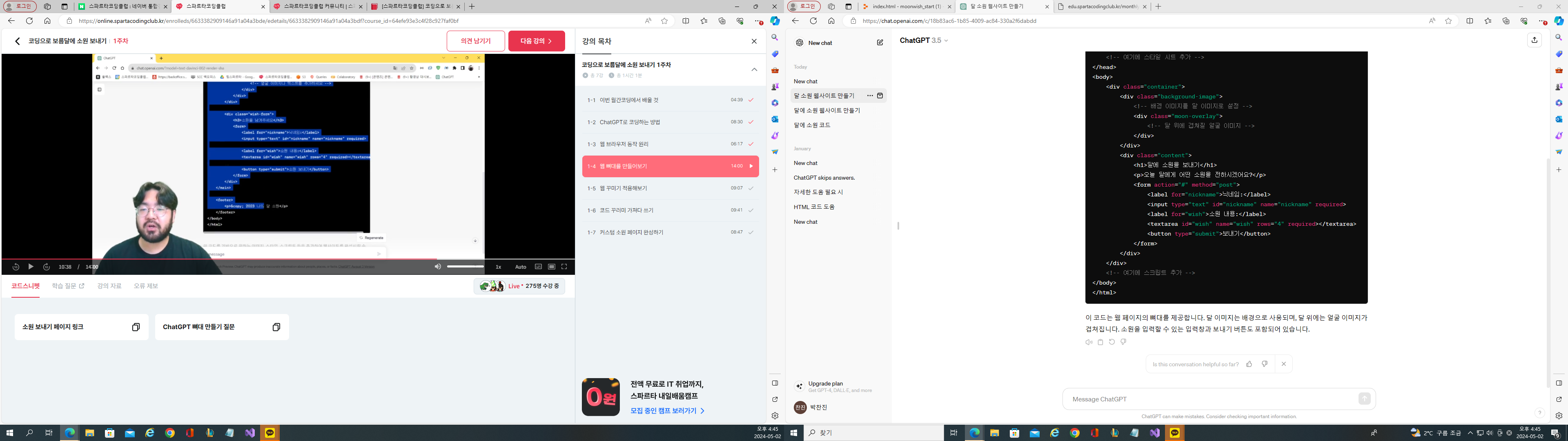
작성한 코드 및 에러 메세지
<!DOCTYPE html>
<html lang="ko">
<head>
<meta charset="UTF-8">
<meta name="viewport" content="width=device-width, initial-scale=1.0">
<title>달에 소원을 보내기</title>
<!-- 여기에 스타일 시트 추가 -->
</head>
<body>
<div class="container">
<div class="background-image">
<!-- 배경 이미지를 달 이미지로 설정 -->
<div class="moon-overlay">
<!-- 달 위에 겹쳐질 얼굴 이미지 -->
</div>
</div>
<div class="content">
<h1>달에 소원을 보내기</h1>
<p>오늘 달에게 어떤 소원을 전하시겠어요?</p>
<form action="#" method="post">
<label for="nickname">닉네임:</label>
<input type="text" id="nickname" name="nickname" required>
<label for="wish">소원 내용:</label>
<textarea id="wish" name="wish" rows="4" required></textarea>
<button type="submit">보내기</button>
</form>
</div>
</div>
<!-- 여기에 스크립트 추가 -->
</body>
</html>
제 코드는 이렇게 나옵니다!
<!DOCTYPE html>
<html lang="ko">
<head>
<meta charset="UTF-8">
<meta name="viewport" content="width=device-width, initial-scale=1.0">
<title>달에 소원 보내기</title>
<style>
body {
margin: 0;
padding: 0;
font-family: Arial, sans-serif;
background-color: #0c0c0c;
color: #ffffff;
}
.container {
width: 100%;
height: 100vh;
background-image: url('moon_background.jpg');
background-size: cover;
background-position: center;
position: relative;
overflow: hidden;
}
.wish-form {
position: absolute;
top: 50%;
left: 50%;
transform: translate(-50%, -50%);
text-align: center;
padding: 20px;
background-color: rgba(0, 0, 0, 0.7);
border-radius: 10px;
}
.wish-form h1 {
margin-top: 0;
}
.wish-form input[type="text"],
.wish-form textarea {
width: 100%;
padding: 10px;
margin-bottom: 10px;
border: none;
border-radius: 5px;
background-color: rgba(255, 255, 255, 0.1);
color: #ffffff;
resize: none;
}
.wish-form input[type="submit"] {
padding: 10px 20px;
border: none;
border-radius: 5px;
background-color: #1e90ff;
color: #ffffff;
cursor: pointer;
transition: background-color 0.3s ease;
}
.wish-form input[type="submit"]:hover {
background-color: #4169e1;
}
</style>
</head>
<body>
<div class="container">
<div class="wish-form">
<h1>달에 소원을 보내세요</h1>
<form action="#" method="post">
<input type="text" name="nickname" placeholder="닉네임을 입력하세요" required><br>
<textarea name="wish" rows="4" placeholder="소원을 입력하세요" required></textarea><br>
<input type="submit" value="보내기">
</form>
</div>
</div>
</body>
</html>
이렇게 두가지로 밖에 안알려줍니다 ㅠㅠ


