


* 겪고 있는 문제 상황을 최대한 자세하게 작성해주세요.
* 문제 해결을 위해 어떤 시도를 해보았는지 구체적으로 함께 알려주세요.
label. 부에 쓰는 칸 길이는 어떻게 조절하나요?
검색어를 입력해 주세요 라는 부분이 저는 두줄로 나와요.
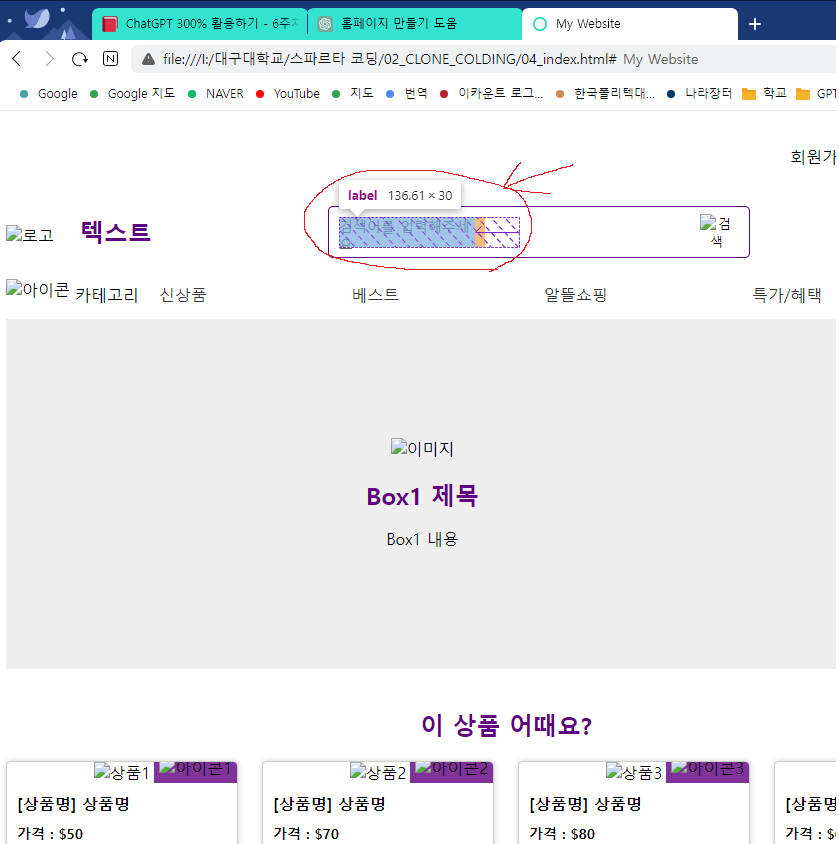
작성한 코드 및 에러 메세지
css파일이 안올라가네요. 내용 적었습니다.
html,
body {
height: 100%;
}
.container {
width: 100%;
height: 100%;
display: flex;
flex-direction: column;
}
header {
width: 1000px;
margin: 0 auto;
display: flex;
flex-direction: column;
height: 150px;
/* 높이 조정 */
}
.header-box1 {
display: flex;
justify-content: flex-end;
align-items: center;
height: 50%;
/* 높이 조정 */
}
.header-box1-right {
display: flex;
justify-content: space-between;
align-items: center;
}
.header-box1-right a {
color: #000;
text-decoration: none;
margin-left: 20px;
border-bottom: none;
}
.header-box2 {
display: flex;
justify-content: space-between;
align-items: center;
height: 50%;
/* 높이 조정 */
}
.header-box2-left img {
height: 60px;
margin-right: 20px;
}
.header-box2-left span {
font-size: 24px;
font-weight: bold;
}
.header-box2-center form {
display: flex;
align-items: center;
border: 1.5px solid #5F0080;
border-radius: 5px;
/* 모서리를 좀 덜 둥글게 */
padding: 10px;
width: 400px;
height: 30px;
/* 가로 길이를 400px로 */
}
.header-box2-center input[type="text"] {
border: none;
font-size: 16px;
margin-right: 10px;
flex-grow: 1;
/* input을 늘리기 위해 추가 */
}
.header-box2-center button[type="submit"] {
border: none;
background: none;
cursor: pointer;
}
.header-box2-center form {
border-color: #5F0080;
/* 테두리 색상 변경 */
}
.header-box2-center label {
color: #666;
/* 회색으로 변경 */
width: 180px;
height: 30px;
font-size: 14px;
margin-right: 10px;
}
.header-box2-right {
display: flex;
justify-content: space-between;
align-items: center;
width: 80px;
}
.header-box2-right img {
height: 30px;
}
nav {
width: 1000px;
margin: 0 auto;
display: flex;
justify-content: space-between;
align-items: center;
height: 50px;
}
.nav-left {
display: flex;
align-items: center;
}
.nav-left img {
height: 30px;
margin-right: 5px;
}
.nav-left span {
font-size: 16px;
}
.nav-center {
display: flex;
justify-content: space-between;
align-items: center;
flex-grow: 1;
margin: 0 20px;
}
.nav-center a {
color: #333;
text-decoration: none;
font-size: 16px;
margin-right: 20px;
}
.nav-right {
display: flex;
align-items: center;
}
.btn {
border-radius: 20px;
padding: 5px 10px;
background-color: #FFC300;
border: none;
color: #fff;
font-size: 14px;
font-weight: bold;
cursor: pointer;
}
.btn:hover {
background-color: #FFD966;
}
.box1 {
background-color: #eee;
height: 350px;
display: flex;
justify-content: center;
align-items: center;
}
.box1-content {
max-width: 100%;
text-align: center;
}
.box1-content img {
max-width: 100%;
height: auto;
}
.box1-content h2 {
color: #5f0080;
font-size: 24px;
margin-top: 20px;
margin-bottom: 10px;
}
.box1-content p {
font-size: 16px;
line-height: 1.5;
margin-bottom: 0;
}
.box2 {
width: 1000px;
margin: 0 auto;
text-align: center;
padding: 20px 0;
}
.box2-title {
color: #5f0080;
font-size: 24px;
margin-bottom: 20px;
}
.card-container {
display: flex;
justify-content: space-between;
align-items: center;
}
.card {
width: 23%;
border: 1px solid #ccc;
border-radius: 5px;
box-shadow: 0px 0px 5px 0px rgba(0, 0, 0, 0.2);
overflow: hidden;
margin-bottom: 20px;
}
.card-image {
position: relative;
}
.card-image img {
width: 100%;
height: auto;
}
.card-icon {
position: absolute;
bottom: 0;
right: 0;
background-color: rgba(95, 0, 128, 0.8);
padding: 5px;
}
.card-icon img {
width: 20px;
height: 20px;
}
.card-content {
text-align: left;
padding: 10px;
}
.card-content h3 {
margin: 0;
font-size: 16px;
}
.card-content p {
margin: 10px 0 0;
font-size: 14px;
font-weight: bold;
}오류 발생 시, 작성한 코드 전체와 에러 메시지를 첨부해 주세요.
Tip 1) </> 아이콘을 눌러 코드박스를 만들어 보세요.
Tip 2) Ctrl+A(맥의 경우 Command+A) 단축키로 코드를 한 번에 선택할 수 있어요!
첨부파일 (1)


