커뮤니티

포인트
쿠폰
내 강의실
국비 신청 내역
증명서
계정
로그아웃
학습 질문
개발 일지
나의 활동
답변 완료
5주차 광고 관련 오류
게임개발 종합반 v0
5주차


천*혁
댓글
6
・
추천
0
・
조회수
38
조회수
38
답변 완료
* 겪고 있는 문제 상황을 최대한 자세하게 작성해주세요.
* 문제 해결을 위해 어떤 시도를 해보았는지 구체적으로 함께 알려주세요.
5주차 광고 붙이기 강의 후반부쯤
RewardedButton 스크립트 생성 및 수정 작업 후에
게임을 실행했을 때 제대로 작동하지 않습니다.
어떤 이유 때문인가요?
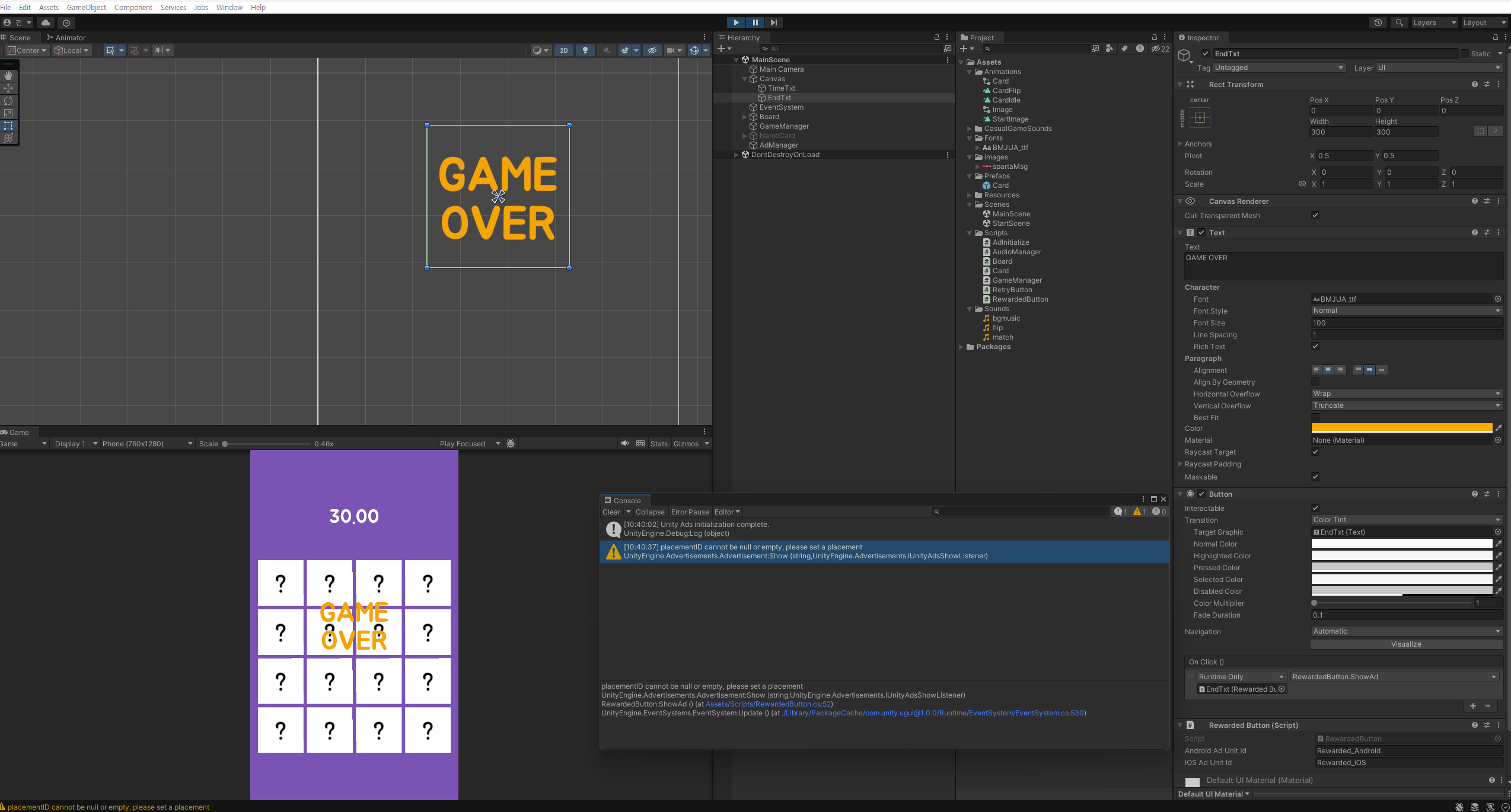
작성한 코드 및 에러 메세지
RewardedButton.cs

using UnityEngine;
using UnityEngine.UI;
using UnityEngine.Advertisements;
using UnityEngine.SceneManagement;


public class RewardedButton : MonoBehaviour, IUnityAdsLoadListener, IUnityAdsShowListener
{

    [SerializeField] string _androidAdUnitId = "Rewarded_Android";
    [SerializeField] string _iOSAdUnitId = "Rewarded_iOS";
    string _adUnitId = null; // This will remain null for unsupported platforms


    void Awake()
    {
        // Get the Ad Unit ID for the current platform:
#if UNITY_IOS
        _adUnitId = _iOSAdUnitId;
#elif UNITY_ANDROID
        _adUnitId = _androidAdUnitId;
#endif


    }


    // Call this public method when you want to get an ad ready to show.
    public void LoadAd()
    {
        // IMPORTANT! Only load content AFTER initialization (in this example, initialization is handled in a different script).
        Debug.Log("Loading Ad: " + _adUnitId);
        Advertisement.Load(_adUnitId, this);
    }


    // If the ad successfully loads, add a listener to the button and enable it:
    public void OnUnityAdsAdLoaded(string adUnitId)
    {
        Debug.Log("Ad Loaded: " + adUnitId);


        if (adUnitId.Equals(_adUnitId))
        {
            // Configure the button to call the ShowAd() method when clicked:

        }
    }


    // Implement a method to execute when the user clicks the button:
    public void ShowAd()
    {

        // Then show the ad:
        Advertisement.Show(_adUnitId, this);
    }


    // Implement the Show Listener's OnUnityAdsShowComplete callback method to determine if the user gets a reward:
    public void OnUnityAdsShowComplete(string adUnitId, UnityAdsShowCompletionState showCompletionState)
    {
        if (adUnitId.Equals(_adUnitId) && showCompletionState.Equals(UnityAdsShowCompletionState.COMPLETED))
        {
            Debug.Log("Unity Ads Rewarded Ad Completed");
            // Grant a reward.
            SceneManager.LoadScene("MainScene");
        }
    }


    // Implement Load and Show Listener error callbacks:
    public void OnUnityAdsFailedToLoad(string adUnitId, UnityAdsLoadError error, string message)
    {
        Debug.Log($"Error loading Ad Unit {adUnitId}: {error.ToString()} - {message}");
        // Use the error details to determine whether to try to load another ad.
    }


    public void OnUnityAdsShowFailure(string adUnitId, UnityAdsShowError error, string message)
    {
        Debug.Log($"Error showing Ad Unit {adUnitId}: {error.ToString()} - {message}");
        // Use the error details to determine whether to try to load another ad.
    }


    public void OnUnityAdsShowStart(string adUnitId) { }
    public void OnUnityAdsShowClick(string adUnitId) { }

}
에러 메세지

placementID cannot be null or empty, please set a placement
UnityEngine.Advertisements.Advertisement:Show (string,UnityEngine.Advertisements.IUnityAdsShowListener)
RewardedButton:ShowAd () (at Assets/Scripts/RewardedButton.cs:52)
UnityEngine.EventSystems.EventSystem:Update () (at ./Library/PackageCache/com.unity.ugui@1.0.0/Runtime/EventSystem/EventSystem.cs:530)
Tip 1) </> 아이콘을 눌러 코드박스를 만들어 보세요.
Tip 2) Ctrl+A(맥의 경우 Command+A) 단축키로 코드를 한 번에 선택할 수 있어요!


댓글 알림
