


* 겪고 있는 문제 상황을 최대한 자세하게 작성해주세요.
* 문제 해결을 위해 어떤 시도를 해보았는지 구체적으로 함께 알려주세요.
3-5 수업에서 image, title, comment를 console창에 띄우는 과정에서 에러가 발생하여 질문드립니다.
다른 분이 같은 질문을 하신 것 같아 답변을 보니 영화 이미지 주소를 url이 아닌 임의로 ABC를 입력하여 문제가 발생할 수 있다는 것을 참고하여 구글에서 이미지 링크를 따와서 수정해보았지만 해결되지 않았습니다.
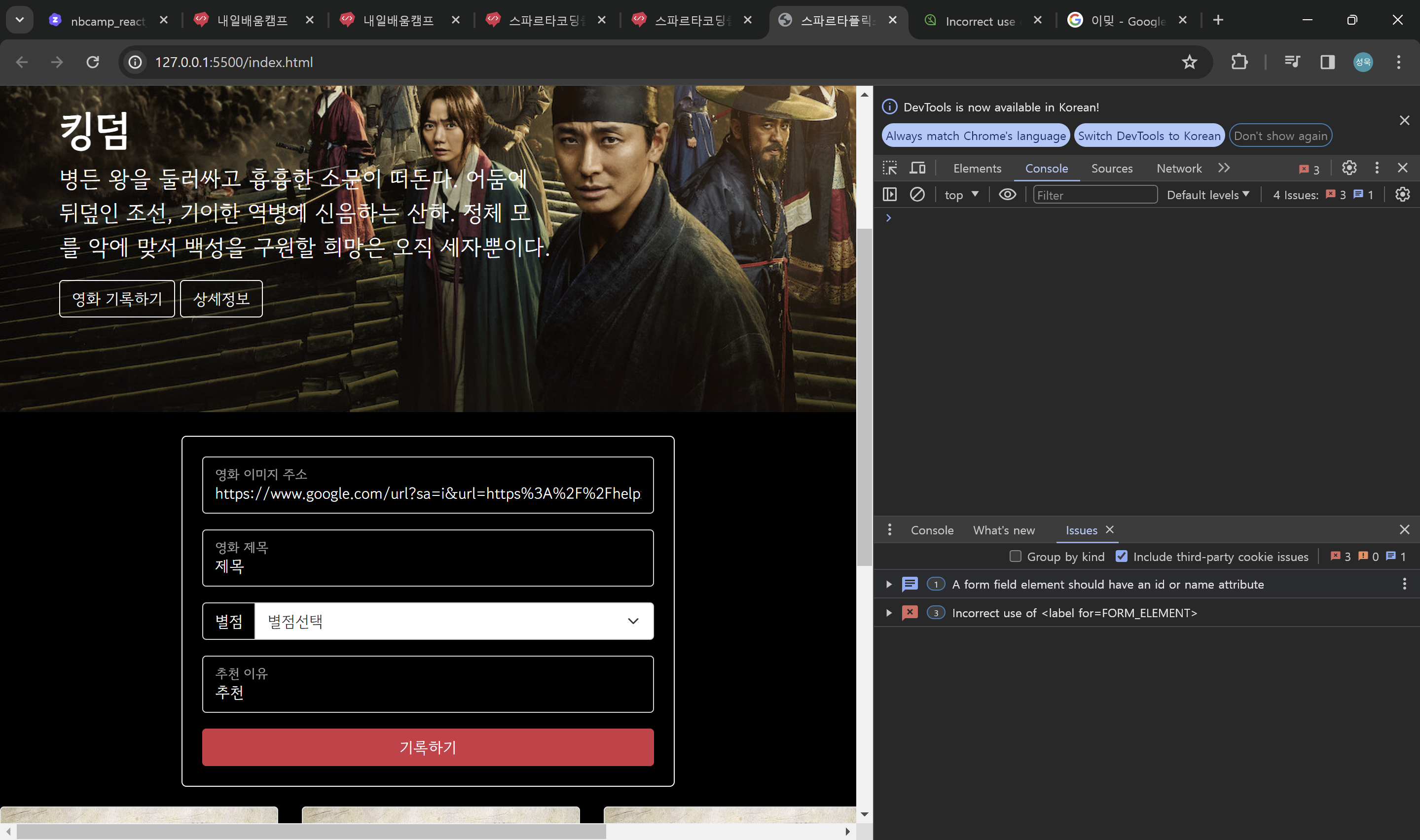
-작성한코드-
<!DOCTYPE html>
<html lang="en">
<head>
<meta charset="UTF-8">
<meta name="viewport" content="width=device-width, initial-scale=1.0">
<title>스파르타플릭스</title>
<script src="https://ajax.googleapis.com/ajax/libs/jquery/3.5.1/jquery.min.js"></script>
<link href="https://cdn.jsdelivr.net/npm/bootstrap@5.0.2/dist/css/bootstrap.min.css" rel="stylesheet"
integrity="sha384-EVSTQN3/azprG1Anm3QDgpJLIm9Nao0Yz1ztcQTwFspd3yD65VohhpuuCOmLASjC" crossorigin="anonymous">
<style>
@import url('https://fonts.googleapis.com/css2?family=Gowun+Dodum&display=swap');
* {
font-family: "Gowun Dodum", sans-serif;
}
.main {
color: white;
background-image: url('https://occ-0-1123-1217.1.nflxso.net/dnm/api/v6/6AYY37jfdO6hpXcMjf9Yu5cnmO0/AAAABeIfo7VL_VDyKnljV66IkR-4XLb6xpZqhpLSo3JUtbivnEW4s60PD27muH1mdaANM_8rGpgbm6L2oDgA_iELHZLZ2IQjG5lvp5d2.jpg?r=e6e.jpg');
background-position: center;
background-size: cover;
}
body {
background-color: black;
}
.mycards {
width: 1200px;
margin: 20px auto 20px auto;
}
.mypostingbox {
width: 500px;
margin: 20px auto 20px auto;
border: 1px solid white;
padding: 20px;
border-radius: 5px;
}
.form-floating>input {
background-color: transparent;
color: white;
}
.form-floating>label {
color: white;
}
.input-group>label {
background-color: transparent;
color: white;
}
.mypostingbox>button {
width: 100%;
}
</style>
<script>
function openclose() {
$('#postingbox').toggle();
}
function makeCard() {
let image = $('#image').val();
let title = $('#title').val();
let comment = $('#comment').val();
console.log(image, title, comment);
}
</script>
</head>
<body>
<header class="p-3 text-bg-dark">
<div class="container">
<div class="d-flex flex-wrap align-items-center justify-content-center justify-content-lg-start">
<a href="/" class="d-flex align-items-center mb-2 mb-lg-0 text-white text-decoration-none">
<svg class="bi me-2" width="40" height="32" role="img" aria-label="Bootstrap">
<use xlink:href="#bootstrap"></use>
</svg>
</a>
<ul class="nav col-12 col-lg-auto me-lg-auto mb-2 justify-content-center mb-md-0">
<li><a href="#" class="nav-link px-2 text-danger">spartaflix</a></li>
<li><a href="#" class="nav-link px-2 text-white">홈</a></li>
<li><a href="#" class="nav-link px-2 text-white">시리즈</a></li>
<li><a href="#" class="nav-link px-2 text-white">영화</a></li>
<li><a href="#" class="nav-link px-2 text-white">내가 찜한 콘텐츠</a></li>
</ul>
<form class="col-12 col-lg-auto mb-3 mb-lg-0 me-lg-3" role="search">
<input type="search" class="form-control form-control-dark text-bg-dark" placeholder="Search..."
aria-label="Search">
</form>
<div class="text-end">
<button type="button" class="btn btn-outline-light me-2">Login</button>
<button type="button" class="btn btn-danger">Sign-up</button>
</div>
</div>
</div>
</header>
<div class="main">
<div class="p-5 mb-4 bg-body-tertiary rounded-3">
<div class="container-fluid py-5">
<h1 class="display-5 fw-bold">킹덤</h1>
<p class="col-md-8 fs-4">병든 왕을 둘러싸고 흉흉한 소문이 떠돈다. 어둠에 뒤덮인 조선, 기이한 역병에 신음하는 산하. 정체 모를 악에 맞서 백성을 구원할 희망은 오직
세자뿐이다.</p>
<button onclick="openclose()" type="button" class="btn btn-outline-light">영화 기록하기</button>
<button type="button" class="btn btn-outline-light">상세정보</button>
</div>
</div>
</div>
<div class="mypostingbox" id="postingbox">
<div class="form-floating mb-3">
<input type="email" class="form-control" id="image" placeholder="영화 이미지 주소">
<label for="floatingInput">영화 이미지 주소</label>
</div>
<div class="form-floating mb-3">
<input type="email" class="form-control" id="title" placeholder="영화 제목">
<label for="floatingInput">영화 제목</label>
</div>
<div class="input-group mb-3">
<label class="input-group-text" for="inputGroupSelect01">별점</label>
<select class="form-select" id="inputGroupSelect01">
<option selected>별점선택</option>
<option value="1">⭐</option>
<option value="2">⭐⭐</option>
<option value="3">⭐⭐⭐</option>
<option value="4">⭐⭐⭐⭐</option>
<option value="5">⭐⭐⭐⭐⭐</option>
</select>
</div>
<div class="form-floating mb-3">
<input type="email" class="form-control" id="comment" placeholder="추천 이유">
<label for="floatingInput">추천 이유</label>
</div>
<button type="button" class="btn btn-danger">기록하기</button>
</div>
<div class="mycards">
<div class="row row-cols-1 row-cols-md-4 g-4">
<div class="col">
<div class="card h-100">
<img src="https://movie-phinf.pstatic.net/20210728_221/1627440327667GyoYj_JPEG/movie_image.jpg"
class="card-img-top" alt="...">
<div class="card-body">
<h5 class="card-title">영화 제목</h5>
<p class="card-text">⭐⭐⭐</p>
<p class="card-text">영화 코멘트</p>
</div>
</div>
</div>
<div class="col">
<div class="card h-100">
<img src="https://movie-phinf.pstatic.net/20210728_221/1627440327667GyoYj_JPEG/movie_image.jpg"
class="card-img-top" alt="...">
<div class="card-body">
<h5 class="card-title">영화 제목</h5>
<p class="card-text">⭐⭐⭐</p>
<p class="card-text">영화 코멘트</p>
</div>
</div>
</div>
<div class="col">
<div class="card h-100">
<img src="https://movie-phinf.pstatic.net/20210728_221/1627440327667GyoYj_JPEG/movie_image.jpg"
class="card-img-top" alt="...">
<div class="card-body">
<h5 class="card-title">영화 제목</h5>
<p class="card-text">⭐⭐⭐</p>
<p class="card-text">영화 코멘트</p>
</div>
</div>
</div>
<div class="col">
<div class="card h-100">
<img src="https://movie-phinf.pstatic.net/20210728_221/1627440327667GyoYj_JPEG/movie_image.jpg"
class="card-img-top" alt="...">
<div class="card-body">
<h5 class="card-title">영화 제목</h5>
<p class="card-text">⭐⭐⭐</p>
<p class="card-text">영화 코멘트</p>
</div>
</div>
</div>
</div>
</div>
</body>
</html>
-에러메세지-
A form field element has neither an id nor a name attribute. This might prevent the browser from correctly autofilling the form.
To fix this issue, add a unique id or name attribute to a form field. This is not strictly needed, but still recommended even if you have an autocomplete attribute on the same element.
The label's for attribute doesn't match any element id. This might prevent the browser from correctly autofilling the form and accessibility tools from working correctly.
To fix this issue, make sure the label's for attribute references the correct id of a form field.


