


* 겪고 있는 문제 상황을 최대한 자세하게 작성해주세요.
* 문제 해결을 위해 어떤 시도를 해보았는지 구체적으로 함께 알려주세요.
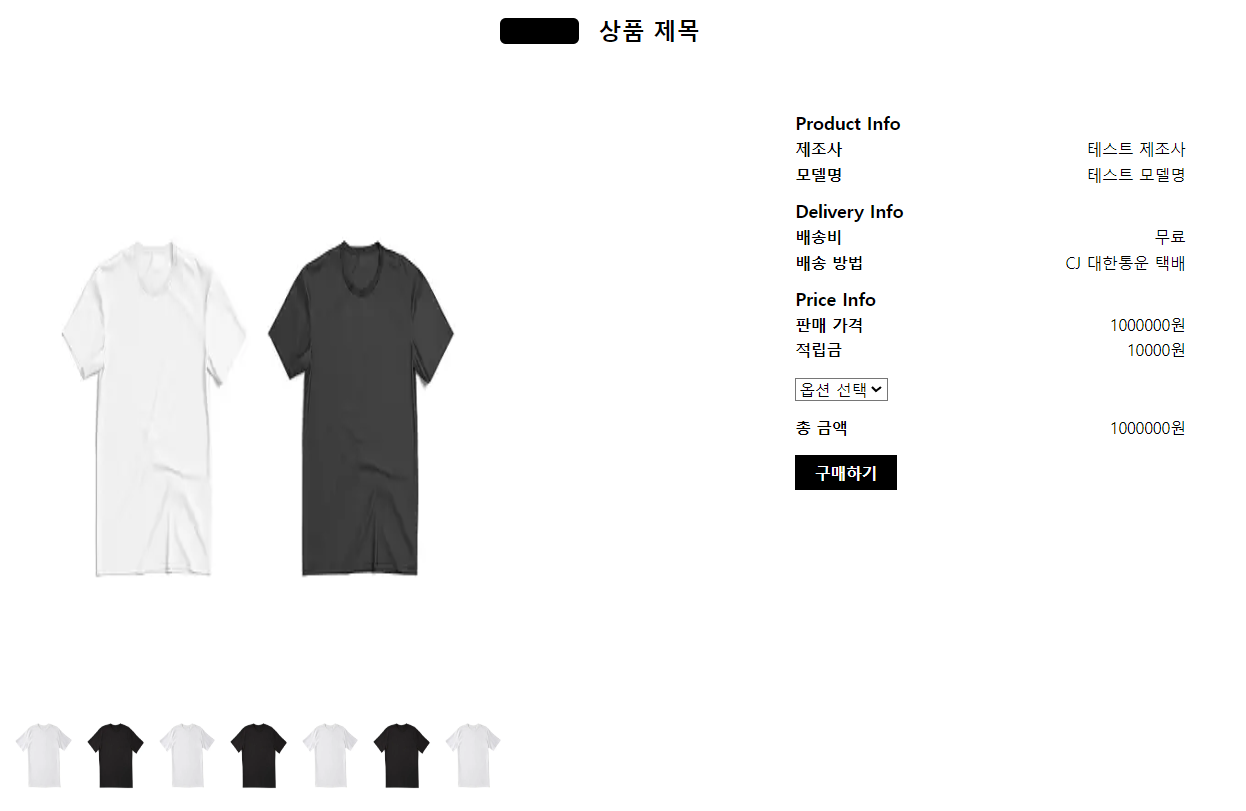
- 한정 판매를 흰색으로 적용해도 반영이 안됩니다.
- class="main-right" 글자들이 우측으로 치우쳐 있어서 왼쪽 정렬을 진행해 보는데 적용이 되지 않습니다. 이미지 여백 때문에 안되는것 처럼 보이는 것인지요?? 알수가 없네요.
조언 좀 부탁 드립니다. 개발자가 아니다 보니 생소하고 어렵네요ㅜㅜ
보고
계신 화면 전체를 캡처해 주시면, 튜터님들이 빠르게 상황을 이해할 수 있어요.
작성한 코드 및 에러 메세지
detail.html 소스
<!DOCTYPE html>
<html lang="ko">
<head>
<meta charset="UTF-8">
<meta http-equiv="X-UA-Compatible" content="IE=edge">
<meta name="viewport" content="width=device-width, initial-scale=1.0">
<link rel="stylesheet" href="https://cdnjs.cloudflare.com/ajax/libs/font-awesome/5.15.3/css/all.min.css" />
<link href="https://cdn.jsdelivr.net/npm/bootstrap@5.3.0-alpha3/dist/css/bootstrap.min.css" rel="stylesheet"
integrity="sha384-KK94CHFLLe+nY2dmCWGMq91rCGa5gtU4mk92HdvYe+M/SXH301p5ILy+dN9+nJOZ" crossorigin="anonymous">
<link rel="stylesheet" href="reset.css">
<link rel="stylesheet" href="style.css">
</head>
<body>
<header>
<div class="badge">
<span>한정 판매</span>
</div>
<h1 class="product-title">상품 제목</h1>
</header>
<main>
<div class="main-left">
alt="상품 이미지">
<div class="thumbnail-wrapper">
alt="썸네일 이미지 1">
alt="썸네일 이미지 2">
alt="썸네일 이미지 3">
alt="썸네일 이미지 4">
alt="썸네일 이미지 5">
alt="썸네일 이미지 6">
alt="썸네일 이미지 7">
</div>
</div>
<div class="main-right">
<div class="product-info">
<h2 class="info-title">Product Info</h2>
<div class="info-item">
<span class="info-label">제조사</span>
<span class="info-text">테스트 제조사</span>
</div>
<div class="info-item">
<span class="info-label">모델명</span>
<span class="info-text">테스트 모델명</span>
</div>
</div>
<div class="delivery-info">
<h2 class="info-title">Delivery Info</h2>
<div class="info-item">
<span class="info-label">배송비</span>
<span class="info-text">무료</span>
</div>
<div class="info-item">
<span class="info-label">배송 방법</span>
<span class="info-text">CJ 대한통운 택배</span>
</div>
</div>
<div class="price-info">
<h2 class="info-title">Price Info</h2>
<div class="info-item">
<span class="info-label">판매 가격</span>
<span class="info-text">1000000원</span>
</div>
<div class="info-item">
<span class="info-label">적립금</span>
<span class="info-text">10000원</span>
</div>
</div>
<div class="purchase">
<select name="options" id="options">
<option value="">옵션 선택</option>
<option value="1">옵션 1</option>
<option value="2">옵션 2</option>
<option value="3">옵션 3</option>
</select>
<div class="total-price">
<span class="total-label">총 금액</span>
<span class="total-text">1000000원</span>
</div>
<button class="purchase-button">구매하기</button>
</div>
</div>
</main>
</body>
</html>
style.css
header {
height: 70px;
display: flex;
align-items: center;
justify-content: center;
background-color: #fff;
}
.header-wrapper {
display: flex;
align-items: center;
justify-content: center;
max-width: 1200px;
width: 100%;
padding: 0 20px;
}
.badge {
height: 26px;
padding: 0 10px;
font-size: 14px;
font-weight: bold;
background-color: #000000;
color: #ffffff;
/* 흰색으로 설정 */
margin-right: 20px;
}
.product-title {
font-size: 24px;
font-weight: bold;
}
main {
max-width: 1200px;
margin: 0 auto;
display: flex;
justify-content: space-between;
padding: 50px 0;
}
.main-wrapper {
display: flex;
justify-content: space-between;
}
.main-left img {
width: 500px;
height: 600px;
}
.thumbnail-wrapper {
display: flex;
justify-content: space-between;
margin-top: 20px;
}
.thumbnail-wrapper img {
width: 60px;
height: 72px;
}
.main-right {
width: 400px;
/* 가로 사이즈 설정 */
/* margin-left: 20px; */
}
.product-info,
.delivery-info,
.price-info,
.purchase {
margin-bottom: 20px;
/* 각 섹션들 사이 여백 설정 */
}
.product-info,
.delivery-info,
.price-info,
.purchase {
text-align: left;
/* 정보들을 왼쪽 정렬 */
}
.purchase select {
margin-bottom: 10px;
/* 선택 옵션과 버튼 사이 여백 설정 */
}
.info-title {
font-size: 18px;
font-weight: bold;
}
.info-item {
display: flex;
justify-content: space-between;
margin-top: 10px;
}
.info-label {
font-weight: bold;
}
.total-price {
display: flex;
justify-content: space-between;
margin-top: 10px;
}
.total-label {
font-weight: bold;
}
.purchase-button {
background-color: #000;
color: #fff;
font-size: 16px;
font-weight: bold;
border: none;
padding: 10px 20px;
margin-top: 20px;
cursor: pointer;
}


