커뮤니티

포인트
쿠폰
내 강의실
국비 신청 내역
증명서
계정
로그아웃
학습 질문
개발 일지
나의 활동
답변 완료
github에 올린 url로 웹페이지를 열면 fetch에서 얻은 temp 값이 안뜹니다.
[왕초보] 웹개발 종합반 v0
5주차


윤*호
댓글
3
・
추천
0
・
조회수
17
조회수
17
답변 완료
* 겪고 있는 문제 상황을 최대한 자세하게 작성해주세요.
* 문제 해결을 위해 어떤 시도를 해보았는지 구체적으로 함께 알려주세요.
개인 html 파일로 웹페이지를 열면 '현재 서울의 날씨: 추워요' 이렇게 정상적으로 temp 값이 뜨는데
github 에 html 파일을 올리고 url 로 웹페이지를 들어가면 '현재 서울의 날씨: ' 이렇게 temp 값이 안뜹니다.
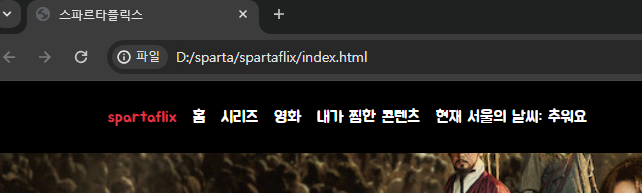
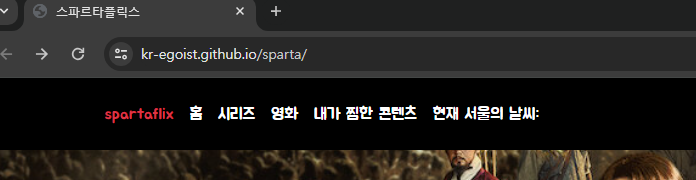
<!DOCTYPE html>
<html lang="en">


<head>
    <meta charset="UTF-8" />
    <meta name="viewport" content="width=device-width, initial-scale=1.0" />
    <title>스파르타플릭스</title>
    <script src="https://ajax.googleapis.com/ajax/libs/jquery/3.5.1/jquery.min.js"></script>
    <link href="https://cdn.jsdelivr.net/npm/bootstrap@5.0.2/dist/css/bootstrap.min.css" rel="stylesheet"
        integrity="sha384-EVSTQN3/azprG1Anm3QDgpJLIm9Nao0Yz1ztcQTwFspd3yD65VohhpuuCOmLASjC" crossorigin="anonymous" />
    <style>
        @import url("https://fonts.googleapis.com/css2?family=Jua&display=swap");


        * {
            font-family: "Jua", sans-serif;
        }


        .main {
            color: white;


            background-image: url("https://occ-0-1123-1217.1.nflxso.net/dnm/api/v6/6AYY37jfdO6hpXcMjf9Yu5cnmO0/AAAABeIfo7VL_VDyKnljV66IkR-4XLb6xpZqhpLSo3JUtbivnEW4s60PD27muH1mdaANM_8rGpgbm6L2oDgA_iELHZLZ2IQjG5lvp5d2.jpg?r=e6e.jpg");
            background-position: center;
            background-size: cover;
        }


        body {
            background-color: black;
        }


        .mycards {
            width: 1200px;
            margin: 20px auto 20px auto;
        }


        .mypostingbox {
            width: 500px;
            margin: 20px auto 20px auto;


            border: 1px solid white;
            border-radius: 5px;
            padding: 20px;
        }


        .form-floating>input {
            background-color: transparent;
            color: white;
        }


        .form-floating>label {
            color: white;
        }


        .input-group>label {
            background-color: transparent;
            color: white;
        }


        .mypostingbox>button {
            width: 100%;
        }
    </style>
    <script type="module">
        // Firebase SDK 라이브러리 가져오기
        import { initializeApp } from "https://www.gstatic.com/firebasejs/9.22.0/firebase-app.js";
        import { getFirestore } from "https://www.gstatic.com/firebasejs/9.22.0/firebase-firestore.js";
        import { collection, addDoc } from "https://www.gstatic.com/firebasejs/9.22.0/firebase-firestore.js";
        import { getDocs } from "https://www.gstatic.com/firebasejs/9.22.0/firebase-firestore.js";


        // Firebase 구성 정보 설정
        // For Firebase JS SDK v7.20.0 and later, measurementId is optional
        const firebaseConfig = {
            apiKey: "AIzaSyBKiu3vfUnvjHx5_M4XD25B6hY26LNPfEw",
            authDomain: "sparta-77b4a.firebaseapp.com",
            projectId: "sparta-77b4a",
            storageBucket: "sparta-77b4a.appspot.com",
            messagingSenderId: "541201543394",
            appId: "1:541201543394:web:0913c44614cba2b523eebb",
            measurementId: "G-97BRQ5KXHR"
        };


        // Firebase 인스턴스 초기화
        const app = initializeApp(firebaseConfig);
        const db = getFirestore(app);


        // 기존 카드 내용 지우기
        $('#card').empty();


        $("#postingbtn").click(async function () {
            let image = $('#image').val();
            let title = $('#title').val();
            let star = $('#star').val();
            let comment = $('#comment').val();


            let doc = {
                'image': image,
                'title': title,
                'star': star,
                'comment': comment,
            };
            await addDoc(collection(db, "movies"), doc);
            alert('영화가 추가되었습니다!');
            window.location.reload();
        })


        let url = "http://spartacodingclub.shop/sparta_api/weather/seoul";
        fetch(url).then(res => res.json()).then(data => {
            let temp = data['temp'];


            if (temp > 20) {
                $('#msg').text('더워요');
            } else {
                $('#msg').text('추워요');
            };
        });


        $("#savebtn").click(async function () {
            $('#postingbox').toggle();
        })


        let docs = await getDocs(collection(db, "movies"));
        docs.forEach((doc) => {
            let row = doc.data();


            let image = row['image'];
            let title = row['title'];
            let star = row['star'];
            let comment = row['comment'];


            let temp_html = `
            <div class="col">
                <div class="card">
                    <img src="${image}"
                        class="card-img-top" alt="..." />
                    <div class="card-body">
                        <h5 class="card-title">${title}</h5>
                        <p class="card-text">${star}</p>
                        <p class="card-text">${comment}</p>
                    </div>
                </div>
            </div>`;
            $('#card').append(temp_html);
        });
    </script>
</head>


<body>
    <header class="p-3 text-bg-dark">
        <div class="container">
            <div class="d-flex flex-wrap align-items-center justify-content-center justify-content-lg-start">
                <a href="/" class="d-flex align-items-center mb-2 mb-lg-0 text-white text-decoration-none">
                    <svg class="bi me-2" width="40" height="32" role="img" aria-label="Bootstrap">
                        <use xlink:href="#bootstrap"></use>
                    </svg>
                </a>


                <ul class="nav col-12 col-lg-auto me-lg-auto mb-2 justify-content-center mb-md-0">
                    <li>
                        <a href="#" class="nav-link px-2 text-danger">spartaflix</a>
                    </li>
                    <li><a href="#" class="nav-link px-2 text-white">홈</a></li>
                    <li><a href="#" class="nav-link px-2 text-white">시리즈</a></li>
                    <li><a href="#" class="nav-link px-2 text-white">영화</a></li>
                    <li><a href="#" class="nav-link px-2 text-white">내가 찜한 콘텐츠</a></li>
                    <li><a href="#" class="nav-link px-2 text-white">현재 서울의 날씨: <span id="msg"></span></a></li>
                </ul>


                <form class="col-12 col-lg-auto mb-3 mb-lg-0 me-lg-3" role="search">
                    <input type="search" class="form-control form-control-dark text-bg-dark" placeholder="Search..."
                        aria-label="Search" />
                </form>


                <div class="text-end">
                    <button type="button" class="btn btn-outline-light me-2">
                        Login
                    </button>
                    <button type="button" class="btn btn-danger">Sign-up</button>
                </div>
            </div>
        </div>
    </header>
    <div class="main">
        <div class="p-5 mb-4 bg-body-tertiary rounded-3">
            <div class="container-fluid py-5">
                <h1 class="display-5 fw-bold">킹덤</h1>
                <p class="col-md-8 fs-4">
                    병든 왕을 둘러싸고 흉흉한 소문이 떠돈다. 어둠에 뒤덮인 조선, 기이한
                    역병에 신음하는 산하. 정체 모를 악에 맞서 백성을 구원할 희망은 오직
                    세자뿐이다.
                </p>
                <button id="savebtn" type="button" class="btn btn-outline-light">영화 기록하기</button>
                <button type="button" class="btn btn-outline-light">상세정보</button>
            </div>
        </div>
    </div>
    <div id="postingbox" class="mypostingbox">
        <div class="form-floating mb-3">
            <input type="email" class="form-control" id="image" placeholder="영화 이미지 주소">
            <label for="floatingInput">영화 이미지 주소</label>
        </div>
        <div class="form-floating mb-3">
            <input type="email" class="form-control" id="title" placeholder="영화 제목">
            <label for="floatingInput">영화 제목</label>
        </div>
        <div class="input-group mb-3">
            <label class="input-group-text" for="inputGroupSelect01">별점</label>
            <select class="form-select" id="star">
                <option selected>별점선택</option>
                <option value="⭐">⭐</option>
                <option value="⭐⭐">⭐⭐</option>
                <option value="⭐⭐⭐">⭐⭐⭐</option>
                <option value="⭐⭐⭐⭐">⭐⭐⭐⭐</option>
                <option value="⭐⭐⭐⭐⭐">⭐⭐⭐⭐⭐</option>
            </select>
        </div>
        <div class="form-floating mb-3">
            <input type="email" class="form-control" id="comment" placeholder="추천 이유">
            <label for="floatingInput">추천 이유</label>
        </div>
        <button id="postingbtn" type="button" class="btn btn-danger">기록하기</button>
    </div>
    <div class="mycards">
        <div id="card" class="row row-cols-1 row-cols-md-4 g-4">
            <div class="col">
                <div class="card">
                    <img src="https://movie-phinf.pstatic.net/20210728_221/1627440327667GyoYj_JPEG/movie_image.jpg"
                        class="card-img-top" alt="..." />
                    <div class="card-body">
                        <h5 class="card-title">영화 제목</h5>
                        <p class="card-text">⭐⭐⭐</p>
                        <p class="card-text">영화 코멘트</p>
                    </div>
                </div>
            </div>
        </div>
    </div>
</body>


</html>


댓글 알림
