커뮤니티

포인트
쿠폰
내 강의실
국비 신청 내역
증명서
계정
로그아웃
학습 질문
개발 일지
나의 활동
답변 완료
토스앱 꾸미기에서 박스 가로 정렬이 안돼요
[왕초보] ChatGPT 300% 활용하기 v0
0주차


이*연
댓글
10
・
추천
0
・
조회수
15
조회수
15
답변 완료
* 겪고 있는 문제 상황을 최대한 자세하게 작성해주세요.
* 문제 해결을 위해 어떤 시도를 해보았는지 구체적으로 함께 알려주세요.
박스2의 카드 3개가 가로 정렬되지 않아요.
챗gpt 내용 그대로 복붙해도, 학습자료 답변으로 복붙해도 그대로에요 ㅠ
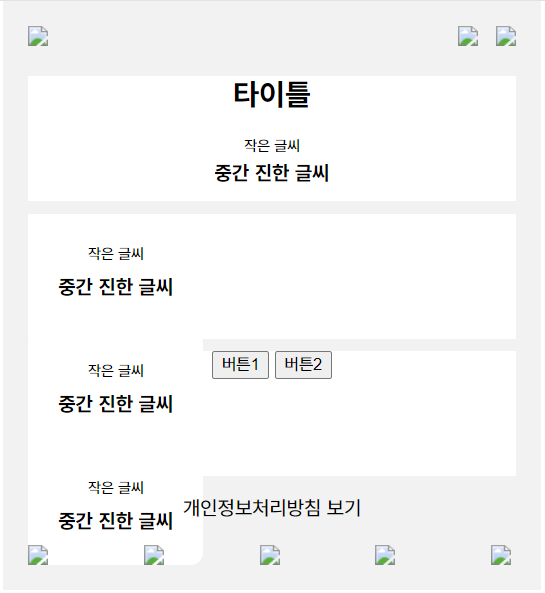
<html lang="ko">


<head>
    <meta charset="UTF-8">
    <meta name="viewport" content="width=device-width, initial-scale=1.0">
    <title>웹 기반 애플리케이션</title>
    <link rel="stylesheet" href="08_styles.css">
</head>


<body>
    <div class="container">
        <header>
            <div class="logo">
                <img src="logo.png">
            </div>
            <div class="icons">
                <img src="icon1.png">
                <img src="icon2.png">
            </div>
        </header>
        <main>
            <div class="box box1">
                <div class="content">
                    <h2>타이틀</h2>
                    <p class="small-text">작은 글씨</p>
                    <p class="bold-text">중간 진한 글씨</p>
                </div>
            </div>


            <div class="box box2">
                <div class="card">
                    <p class="small-text">작은 글씨</p>
                    <p class="bold-text">중간 진한 글씨</p>
                </div>
                <div class="card">
                    <p class="small-text">작은 글씨</p>
                    <p class="bold-text">중간 진한 글씨</p>
                </div>
                <div class="card">
                    <p class="small-text">작은 글씨</p>
                    <p class="bold-text">중간 진한 글씨</p>
                </div>
            </div>


            <div class="box box3">
                <div class="button-group">
                    <button class="gray-button">버튼1</button>
                    <button class="gray-button">버튼2</button>
                </div>
            </div>
            <p>개인정보처리방침 보기</p>
        </main>
        <footer>
            <img src="icon3.png">
            <img src="icon4.png">
            <img src="icon5.png">
            <img src="icon6.png">
            <img src="icon7.png">
        </footer>
    </div>
</body>


</html>
body {
    margin: 0;
    padding: 0;
    font-family: Arial, sans-serif;
}


.container {
    width: 390px;
    margin: 0 auto;
    text-align: center;
    background-color: #f2f2f2; /* 옅은 회색 계열 */
    padding: 20px;
}


header {
    display: flex;
    justify-content: space-between;
    align-items: center;
    margin-bottom: 20px;
}


.logo img {
    max-width: 100%;
}


.icons img {
    margin-left: 10px;
}


main {
    margin-bottom: 20px;
}


.box {
    height: 100px;
    background-color: #fff; /* 하얀색 배경 */
    margin-bottom: 10px;
}


.box1, .box2, .box3 {
    .box1 {
        padding: 20px;
        background-color: #fff;
        border-radius: 10px;
    }

    .box1 .content {
        display: flex;
        flex-direction: column;
        align-items: flex-start;
    }

    .box1 h2, .box1 p {
        margin: 0;
    }

    .box1 .bold-text {
        font-weight: bold;
    }

    .box1 {
        margin-bottom: 10px;
    }
    .box2 {
        height: 100px;
        background-color: transparent;
        display: flex;
        justify-content: space-between;


      }

      .card {

        background-color: #fff;
        padding: 20px;
        border-radius: 10px;
        width: 100px;
        display: flex;
        flex-direction: column;
        justify-content: space-between;
        margin-right: 20px;
      }

      .card:last-child {
        margin-right: 0;
      }

      .small-text {
        font-size: 12px;
        margin: 5px 0;
      }

      .bold-text {
        font-weight: bold;
        margin: 5px 0;
      }
    /* 추가적인 스타일링이 필요하다면 여기에 추가 */
}


footer {
    display: flex;
    justify-content: space-between;
}


footer img {
    width: 20px;
}


댓글 알림
