


* 겪고 있는 문제 상황을 최대한 자세하게 작성해주세요.
* 문제 해결을 위해 어떤 시도를 해보았는지 구체적으로 함께 알려주세요.
4주차 숙제를 진행하는데 VBA 매크로 저장 하려면 어떻게 해야 하나요? 이것 저것 해보고 저장하고 나오면 VBA 모듈이 저장 되지 않습니다. 방법을 좀 알려 주세요ㅜㅜ
보면 전체를 캡처해 주시면, 튜터님들이 빠르게 상황을 이해할 수 있어요.
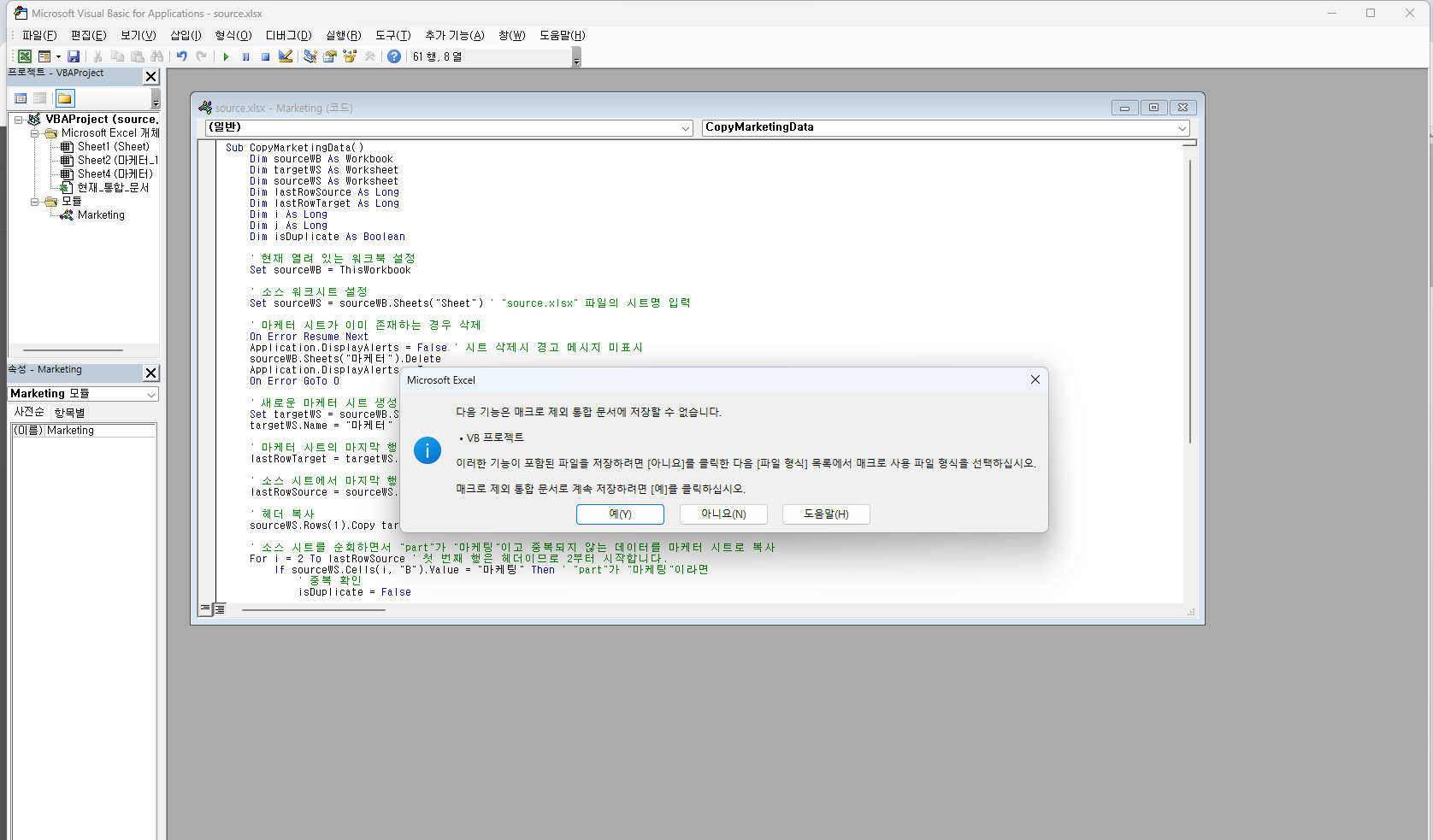
작성한 코드 및 에러 메세지
오Sub CopyMarketingData()
Dim sourceWB As Workbook
Dim targetWS As Worksheet
Dim sourceWS As Worksheet
Dim lastRowSource As Long
Dim lastRowTarget As Long
Dim i As Long
Dim j As Long
Dim isDuplicate As Boolean
' 현재 열려 있는 워크북 설정
Set sourceWB = ThisWorkbook
' 소스 워크시트 설정
Set sourceWS = sourceWB.Sheets("Sheet") ' "source.xlsx" 파일의 시트명 입력
' 마케터 시트가 이미 존재하는 경우 삭제
On Error Resume Next
Application.DisplayAlerts = False ' 시트 삭제시 경고 메시지 미표시
sourceWB.Sheets("마케터").Delete
Application.DisplayAlerts = True
On Error GoTo 0
' 새로운 마케터 시트 생성
Set targetWS = sourceWB.Sheets.Add(After:=sourceWB.Sheets(sourceWB.Sheets.Count))
targetWS.Name = "마케터"
' 마케터 시트의 마지막 행 찾기
lastRowTarget = targetWS.Cells(targetWS.Rows.Count, "A").End(xlUp).Row + 1
' 소스 시트에서 마지막 행 찾기
lastRowSource = sourceWS.Cells(sourceWS.Rows.Count, "A").End(xlUp).Row
' 헤더 복사
sourceWS.Rows(1).Copy targetWS.Rows(1)
' 소스 시트를 순회하면서 "part"가 "마케팅"이고 중복되지 않는 데이터를 마케터 시트로 복사
For i = 2 To lastRowSource ' 첫 번째 행은 헤더이므로 2부터 시작합니다.
If sourceWS.Cells(i, "B").Value = "마케팅" Then ' "part"가 "마케팅"이라면
' 중복 확인
isDuplicate = False
For j = 2 To lastRowTarget
If targetWS.Cells(j, "A").Value = sourceWS.Cells(i, "A").Value Then
isDuplicate = True
Exit For
End If
Next j
' 중복되지 않은 경우에만 데이터를 복사
If Not isDuplicate Then
targetWS.Cells(lastRowTarget, "A").Value = sourceWS.Cells(i, "A").Value
targetWS.Cells(lastRowTarget, "B").Value = sourceWS.Cells(i, "B").Value
targetWS.Cells(lastRowTarget, "C").Value = sourceWS.Cells(i, "C").Value
lastRowTarget = lastRowTarget + 1
End If
End If
Next i
' 복사가 완료되었습니다. 메시지 표시
MsgBox "마케터 시트로 데이터가 복사되었습니다.", vbInformation
End Sub
류 발생 시, 작성한 코드 전체와 에러 메시지를 첨부해 주세요.
Tip 1) </> 아이콘을 눌러 코드박스를 만들어 보세요.
Tip 2) Ctrl+A(맥의 경우 Command+A) 단축키로 코드를 한 번에 선택할 수 있어요!


