커뮤니티

포인트
쿠폰
내 강의실
국비 신청 내역
증명서
계정
로그아웃
학습 질문
개발 일지
나의 활동
답변 완료
한셀로는 과제 제출 할 수 없나요?
[왕초보] ChatGPT 300% 활용하기 v0
4주차


박*희
댓글
1
・
추천
0
・
조회수
4
조회수
4
답변 완료
한셀로는 vbs 안 된다고는 하셨는데
한셀 메뉴에도 비슷한 게 있어서 간단한 데이터 분류는 할 수 있을 거 같아서 따로 엑셀 체험판을 안 깔았습니다.
새시트는 생겼는데 데이터를 끌어오지 못 합니다.
참고로 모듈에 넣은 코드도 첨부합니다.
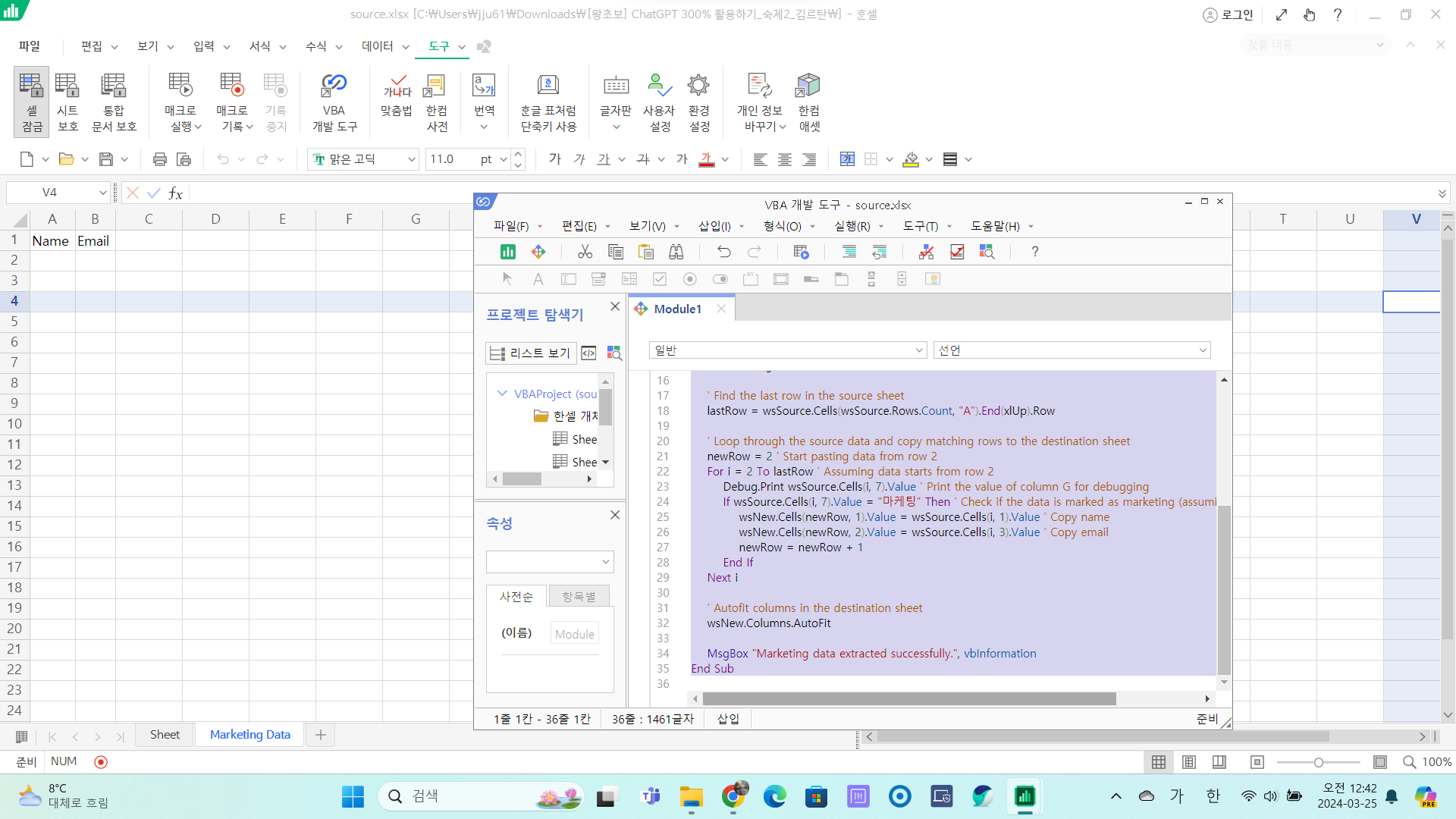
고 계신 화면 전체를 캡처해 주시면, 튜터님들이 빠르게 상황을 이해할 수 있어요.
Sub ExtractMarketingData()
    Dim wsSource As Worksheet
    Dim wsNew As Worksheet
    Dim lastRow As Long
    Dim newRow As Long
    Dim i As Long

    ' Specify source and destination worksheets
    Set wsSource = ThisWorkbook.Sheets("Sheet") ' Change "Sheet" to the name of your source sheet
    Set wsNew = ThisWorkbook.Sheets.Add(After:=Sheets(Sheets.Count))
    wsNew.Name = "Marketing Data" ' Rename the new sheet as needed

    ' Add headers to destination sheet
    wsNew.Range("A1").Value = "Name"
    wsNew.Range("B1").Value = "Email"

    ' Find the last row in the source sheet
    lastRow = wsSource.Cells(wsSource.Rows.Count, "A").End(xlUp).Row

    ' Loop through the source data and copy matching rows to the destination sheet
    newRow = 2 ' Start pasting data from row 2
    For i = 2 To lastRow ' Assuming data starts from row 2
        Debug.Print wsSource.Cells(i, 7).Value ' Print the value of column G for debugging
        If wsSource.Cells(i, 7).Value = "마케팅" Then ' Check if the data is marked as marketing (assuming it's in column G)
            wsNew.Cells(newRow, 1).Value = wsSource.Cells(i, 1).Value ' Copy name
            wsNew.Cells(newRow, 2).Value = wsSource.Cells(i, 3).Value ' Copy email
            newRow = newRow + 1
        End If
    Next i

    ' Autofit columns in the destination sheet
    wsNew.Columns.AutoFit

    MsgBox "Marketing data extracted successfully.", vbInformation
End Sub


댓글 알림
