커뮤니티

포인트
쿠폰
내 강의실
국비 신청 내역
증명서
계정
로그아웃
학습 질문
개발 일지
나의 활동
답변 완료
1-9 질문 (ValueError)
[왕초보] ChatGPT 300% 활용하기 v0
1주차


양*현
댓글
7
・
추천
0
・
조회수
23
조회수
23
답변 완료
* 겪고 있는 문제 상황을 최대한 자세하게 작성해주세요.
* 문제 해결을 위해 어떤 시도를 해보았는지 구체적으로 함께 알려주세요.
안녕하세요~ ChatGPT 300% 활용하기 강의 수강 중 궁금한 것이 생겨 질문드립니다.
강의에서 말씀하신 대로 ChatGPT에게 요청하여 종목코드를 가지고 재무제표를 불러오는 코드를 Google colab으로 실행해보았는데요,
ValueError: cannot handle a non-unique multi-index 라는 에러가 다음 줄에서 발생하였는데,
df.set_index('주요재무정보', inplace=True
이건 혹시 어째서 발생한 건가요?
1주차 코드는 죄다 한 파일에서 박스만 추가해서 진행 중인데, 그래서 중복된 걸까요?
ChatGPT에게 물어보니 이런 식으로 수정해볼 수 있다고 추천하는데
The error is caused by a non-unique multi-index in the DataFrame. To fix it, you can either:
- Use set_index() with drop=True: This will remove the duplicate index values and create a unique index.
content_copy
df.set_index('주요재무정보', drop=True, inplace=True)
- Use reset_index() to convert the multi-index to a regular column:
content_copy
df = df.reset_index()
- Use unique() to remove duplicate index values:
content_copy
df.index = df.index.unique()
After making the change, the code should run without errors.
혹시 설명 부탁드려도 될까요...ㅋㄷㅋㄷ ㅜ
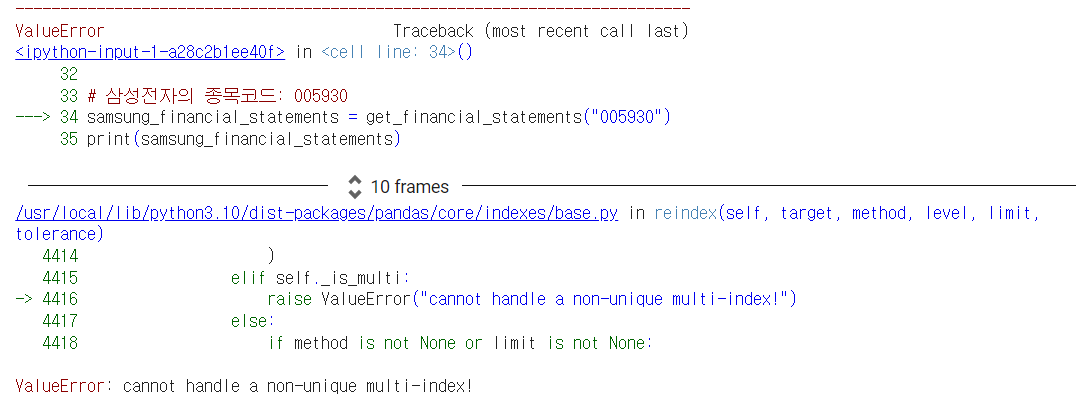
작성한 코드 및 에러 메세지
!pip install requests
!pip install beautifulsoup4
!pip install pandas


import requests
from bs4 import BeautifulSoup
import pandas as pd


def get_financial_statements(code):
    url = f"https://finance.naver.com/item/main.nhn?code={code}"
    # 네이버 금융의 재무제표 페이지 URL


    # HTTP 요청을 보내고 페이지의 내용을 받아옴
    response = requests.get(url)
    soup = BeautifulSoup(response.text, 'html.parser')


    # 재무제표 테이블에 해당하는 태그를 찾음
    tables = soup.find_all("table", {"class": "tb_type1 tb_num tb_type1_ifrs"})


    # 첫 번째 테이블은 연간 재무제표
    annual_table = tables[0]


    # 데이터프레임으로 변환
    df = pd.read_html(str(annual_table))[0]
    df.columns = df.columns.droplevel(0)  # 다중 인덱스 제거
    df.set_index('주요재무정보', inplace=True)


    return df


# 삼성전자의 종목코드: 005930
samsung_financial_statements = get_financial_statements("005930")
print(samsung_financial_statements)
오류 발생 시, 작성한 코드 전체와 에러 메시지를 첨부해 주세요.
Tip 1) </> 아이콘을 눌러 코드박스를 만들어 보세요.
Tip 2) Ctrl+A(맥의 경우 Command+A) 단축키로 코드를 한 번에 선택할 수 있어요!


댓글 알림
