커뮤니티

포인트
쿠폰
내 강의실
국비 신청 내역
증명서
계정
로그아웃
학습 질문
개발 일지
나의 활동
답변 완료
firebase에 저장이 되지 않습니다..
[왕초보] 웹개발 종합반 v0
4주차


강*지
댓글
5
・
추천
0
・
조회수
12
조회수
12
답변 완료
* 겪고 있는 문제 상황을 최대한 자세하게 작성해주세요.
* 문제 해결을 위해 어떤 시도를 해보았는지 구체적으로 함께 알려주세요.
계속 코드를 살펴보았는데 어디에 문제가 있어 오류가 발생하는지 찾지 못하였습니다..
기록하기를 눌렀을때 콘솔창을 확인하면 해당 오류가 발생합니다.
데이터가 아예 저장이 안되고 당연히 albums컬렉션도 만들어지지 않습니다.
임의의 데이터값을 주어도 저장이 안됩니다....ㅜㅜ
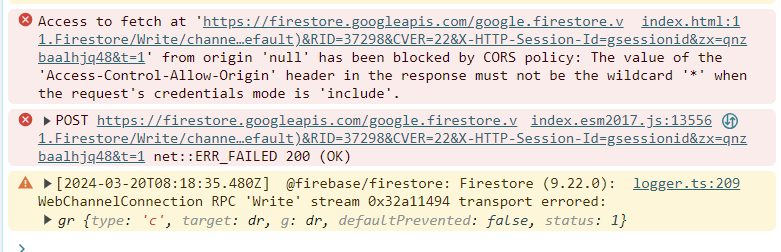
ㅜㅜㅜ
작성한 코드 및 에러 메세지
script코드 전체
<!DOCTYPE html>
<html lang="en">
  <head>
    <meta charset="UTF-8" />
    <meta name="viewport" content="width=device-width, initial-scale=1.0" />
    <title>나만의 추억앨범</title>
    <script src="https://ajax.googleapis.com/ajax/libs/jquery/3.4.1/jquery.min.js"></script>
    <link
      href="https://cdn.jsdelivr.net/npm/bootstrap@5.0.2/dist/css/bootstrap.min.css"
      rel="stylesheet"
      integrity="sha384-EVSTQN3/azprG1Anm3QDgpJLIm9Nao0Yz1ztcQTwFspd3yD65VohhpuuCOmLASjC"
      crossorigin="anonymous"
    />
    <style>
      @import url("https://fonts.googleapis.com/css2?family=Gowun+Dodum&display=swap");
      * {
        font-family: "Gowun Dodum", sans-serif;
      }
      .mytitle {
        height: 250px;
        background-color: aquamarine;
        color: white;


        display: flex;
        flex-direction: column;
        align-items: center;
        justify-content: center;


        background-image: url("https://images.unsplash.com/photo-1511992243105-2992b3fd0410?ixlib=rb-4.0.3&ixid=M3wxMjA3fDB8MHxwaG90by1wYWdlfHx8fGVufDB8fHx8fA%3D%3D&auto=format&fit=crop&w=1470&q=80");
        background-position: center;
        background-size: cover;
      }
      .mytitle > button {
        width: 150px;
        height: 50px;
        background-color: transparent;
        color: white;
        border: 1px solid white;
        border-radius: 5px;
        margin-top: 20px;
      }
      .mypostingbox {
        width: 500px;
        margin: 30px auto 0px auto;
        padding: 20px;
        box-shadow: 0px 0px 3px 0px blue;
        border-radius: 5px;
      }
      .mybtn {
        display: flex;
        flex-direction: row;
        align-items: center;
        justify-content: center;
      }
      .mybtn > button {
        margin-right: 5px;
      }
      .mycards {
        width: 1200px;
        margin: 30px auto 0px auto;
      }
    </style>
    <script type="module">
      //위에 처럼 타입을 module로 바꾸면 onclick이 잘안된다.
      //그래서 바꿔줘야한다.


      // Firebase SDK 라이브러리 가져오기
      import { initializeApp } from "https://www.gstatic.com/firebasejs/9.22.0/firebase-app.js";
      import { getFirestore } from "https://www.gstatic.com/firebasejs/9.22.0/firebase-firestore.js";
      import {
        collection,
        addDoc,
      } from "https://www.gstatic.com/firebasejs/9.22.0/firebase-firestore.js";
      import { getDocs } from "https://www.gstatic.com/firebasejs/9.22.0/firebase-firestore.js";


      // Firebase 구성 정보 설정
      // For Firebase JS SDK v7.20.0 and later, measurementId is optional
      const firebaseConfig = {
        apiKey: "AIzaSyBQ3aC9hoVbzZ2dhRJNekvtrc-nQ4rbjSs",
        authDomain: "sparta-b08ac.firebaseapp.com",
        projectId: "sparta-b08ac",
        storageBucket: "sparta-b08ac.appspot.com",
        messagingSenderId: "982297765581",
        appId: "1:982297765581:web:0a8b45b5c1b9675e9feb84",
        measurementId: "G-LHKE6TL5T2",
      };


      // Firebase 인스턴스 초기화
      const app = initializeApp(firebaseConfig);
      const db = getFirestore(app);


      //
      $("#postingbtn").click(async function () {//어떤id에 클릭을 담았더니 이것을 실행해라라고 하는 것이다.
        let image = $('#image').val();
        let title = $('#title').val();
        let content = $('#content').val();
        let date = $('#date').val();


        let doc={
          'image':image,
          'title':title,
          'content':content,
          'date':date
        };


        await addDoc(collection(db, "albums"), doc);//여기가 중요하다.
        alert('저장완료');
        window.location.reload();
      });//어떤 태그가, 아이디가 클릭이 되면 위 두줄이 일어나게 하라는 뜻이다.


      $(document).ready(function () {
        let url = "http://spartacodingclub.shop/sparta_api/seoulair";
        fetch(url)
          .then((res) => res.json())
          .then((data) => {
            let mise = data["RealtimeCityAir"]["row"][0]["IDEX_NM"];
            console.log(mise);
            $("#msg").text(mise);
          });
      });
      function openclose() {
        $("#postingbox").toggle();
      }
      function makeCard() {
        let image = $("#image").val();
        let title = $("#title").val();
        let content = $("#content").val();
        let date = $("#date").val();


        let temp_html = `
              <div class="col">
                <div class="card h-100">
                  <img
                    src="${image}"
                    class="card-img-top"
                    alt="..."
                  />
                  <div class="card-body">
                    <h5 class="card-title">${title}</h5>
                    <p class="card-text">${content}</p>
                  </div>
                  <div class="card-footer">
                    <small class="text-body-secondary">${date}</small>
                  </div>
                </div>
              </div>`;
        $("#card").append(temp_html);
      }
    </script>
  </head>
  <body>
    <div class="mytitle">
      <h1>나만의 추억앨범</h1>
      <p>현재 서울의 미세먼지 : <span id="msg">좋음</span></p>
      <button onclick="openclose()">추억저장하기</button>
    </div>


    <div class="mypostingbox" id="postingbox">
      <div class="form-floating mb-3">
        <input
          type="email"
          class="form-control"
          id="image"
          placeholder="앨범 이미지"
        />
        <label for="floatingInput">앨범 이미지</label>
      </div>
      <div class="form-floating mb-3">
        <input
          type="email"
          class="form-control"
          id="title"
          placeholder="앨범 제목"
        />
        <label for="floatingInput">앨범 제목</label>
      </div>
      <div class="form-floating mb-3">
        <input
          type="email"
          class="form-control"
          id="content"
          placeholder="앨범 내용"
        />
        <label for="floatingInput">앨범 내용</label>
      </div>
      <div class="form-floating mb-3">
        <input
          type="email"
          class="form-control"
          id="date"
          placeholder="앨범 날짜"
        />
        <label for="floatingInput">앨범 날짜</label>
      </div>
      <div class="mybtn">
        <button id="postingbtn" type="button" class="btn btn-primary">
          기록하기
        </button>
        <button type="button" class="btn btn-outline-dark">닫기</button>
      </div>
    </div>


    <div class="mycards">
      <div id="card" class="row row-cols-1 row-cols-md-4 g-4">
        <div class="col">
          <div class="card h-100">
            <img
              src="https://images.unsplash.com/photo-1446768500601-ac47e5ec3719?ixlib=rb-4.0.3&ixid=M3wxMjA3fDB8MHxwaG90by1wYWdlfHx8fGVufDB8fHx8fA%3D%3D&auto=format&fit=crop&w=1446&q=80"
              class="card-img-top"
              alt="..."
            />
            <div class="card-body">
              <h5 class="card-title">앨범 제목</h5>
              <p class="card-text">앨범 내용</p>
            </div>
            <div class="card-footer">
              <small class="text-body-secondary">앨범날짜</small>
            </div>
          </div>
        </div>
        <div class="col">
          <div class="card h-100">
            <img
              src="https://images.unsplash.com/photo-1446768500601-ac47e5ec3719?ixlib=rb-4.0.3&ixid=M3wxMjA3fDB8MHxwaG90by1wYWdlfHx8fGVufDB8fHx8fA%3D%3D&auto=format&fit=crop&w=1446&q=80"
              class="card-img-top"
              alt="..."
            />
            <div class="card-body">
              <h5 class="card-title">앨범 제목</h5>
              <p class="card-text">앨범 내용</p>
            </div>
            <div class="card-footer">
              <small class="text-body-secondary">앨범날짜</small>
            </div>
          </div>
        </div>
        <div class="col">
          <div class="card h-100">
            <img
              src="https://images.unsplash.com/photo-1446768500601-ac47e5ec3719?ixlib=rb-4.0.3&ixid=M3wxMjA3fDB8MHxwaG90by1wYWdlfHx8fGVufDB8fHx8fA%3D%3D&auto=format&fit=crop&w=1446&q=80"
              class="card-img-top"
              alt="..."
            />
            <div class="card-body">
              <h5 class="card-title">앨범 제목</h5>
              <p class="card-text">앨범 내용</p>
            </div>
            <div class="card-footer">
              <small class="text-body-secondary">앨범날짜</small>
            </div>
          </div>
        </div>
        <div class="col">
          <div class="card h-100">
            <img
              src="https://images.unsplash.com/photo-1446768500601-ac47e5ec3719?ixlib=rb-4.0.3&ixid=M3wxMjA3fDB8MHxwaG90by1wYWdlfHx8fGVufDB8fHx8fA%3D%3D&auto=format&fit=crop&w=1446&q=80"
              class="card-img-top"
              alt="..."
            />
            <div class="card-body">
              <h5 class="card-title">앨범 제목</h5>
              <p class="card-text">앨범 내용</p>
            </div>
            <div class="card-footer">
              <small class="text-body-secondary">앨범날짜</small>
            </div>
          </div>
        </div>
      </div>
    </div>
  </body>
</html>


댓글 알림
