커뮤니티

포인트
쿠폰
내 강의실
국비 신청 내역
증명서
계정
로그아웃
학습 질문
개발 일지
나의 활동
답변 완료
webview 패키지 설치도 했는데, quick fix에서 라이브러리 추가가 안되네요.
[왕초보] 플러터(Flutter)로 시작하는 앱개발 종합반 v0
4주차


정*민
댓글
4
・
추천
0
・
조회수
6
조회수
6
답변 완료
* 겪고 있는 문제 상황을 최대한 자세하게 작성해주세요.
* 문제 해결을 위해 어떤 시도를 해보았는지 구체적으로 함께 알려주세요.
4-9 내용입니다.
webview 패키지 설치도 했는데, quick fix에서 라이브러리 추가가 안되네요. 도와주세요!
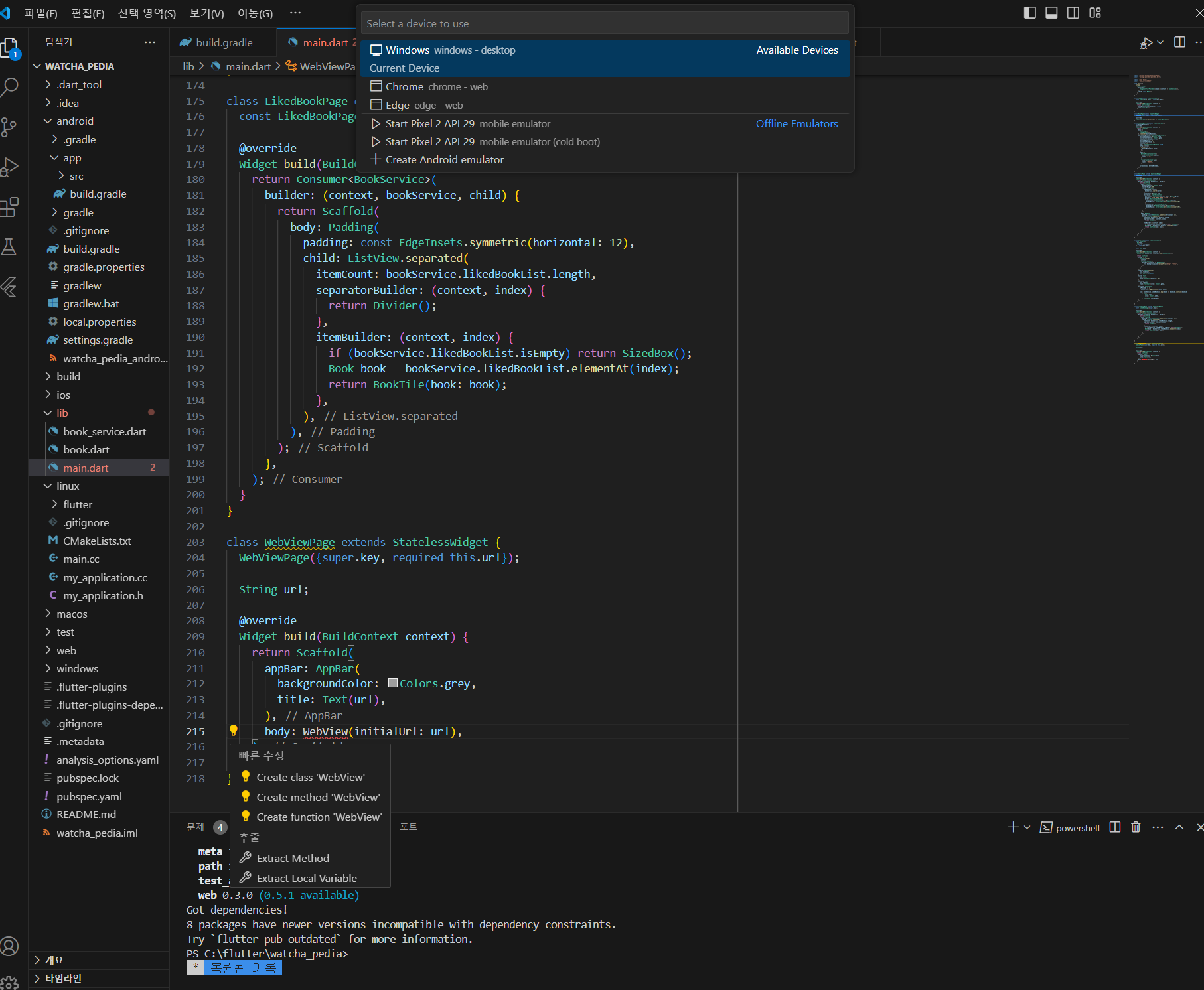
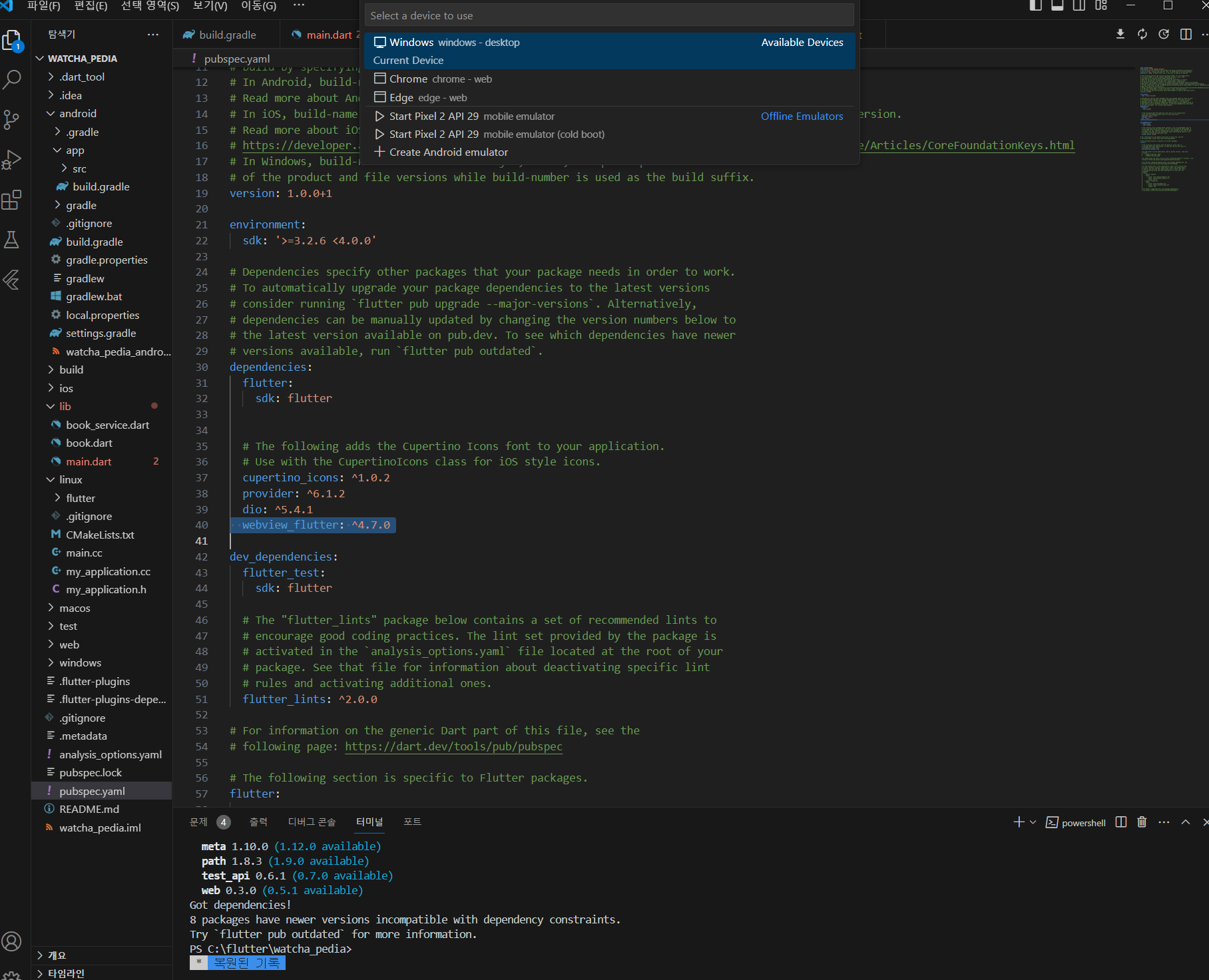
작성한 코드 및 에러 메세지
import 'package:flutter/material.dart';
import 'package:provider/provider.dart';


import 'book.dart';
import 'book_service.dart';


void main() {
  runApp(
    MultiProvider(
      providers: [
        ChangeNotifierProvider(create: (context) => BookService()),
      ],
      child: const MyApp(),
    ),
  );
}


class MyApp extends StatelessWidget {
  const MyApp({Key? key}) : super(key: key);


  @override
  Widget build(BuildContext context) {
    return MaterialApp(
      debugShowCheckedModeBanner: false,
      home: HomePage(),
    );
  }
}


class HomePage extends StatefulWidget {
  HomePage({Key? key}) : super(key: key);


  @override
  State<HomePage> createState() => _HomePageState();
}


class _HomePageState extends State<HomePage> {
  var bottomNavIndex = 0;
  @override
  Widget build(BuildContext context) {
    return Scaffold(
      body: [
        SearchPage(),
        LikedBookPage(),
      ].elementAt(bottomNavIndex),
      bottomNavigationBar: BottomNavigationBar(
        selectedItemColor: Colors.black,
        unselectedItemColor: Colors.grey,
        showUnselectedLabels: true,
        selectedFontSize: 12,
        unselectedFontSize: 12,
        iconSize: 28,
        type: BottomNavigationBarType.fixed,
        onTap: (value) {
          setState(() {
            bottomNavIndex = value;
          });
        },
        items: [
          BottomNavigationBarItem(
            icon: Icon(Icons.search),
            label: '검색',
          ),
          BottomNavigationBarItem(
            icon: Icon(Icons.star),
            label: '좋아요',
          ),
        ],
        currentIndex: bottomNavIndex,
      ),
    );
  }
}


class SearchPage extends StatelessWidget {
  SearchPage({super.key});


  @override
  Widget build(BuildContext context) {
    return Consumer<BookService>(
      builder: (context, bookService, child) {
        return Scaffold(
          appBar: AppBar(
            backgroundColor: Colors.white,
            toolbarHeight: 80,
            title: TextField(
              onSubmitted: (value) {
                bookService.search(value);
              },
              cursorColor: Colors.grey,
              decoration: InputDecoration(
                prefixIcon: Icon(Icons.search, color: Colors.grey),
                hintText: "작품, 감독, 배우, 컬렉션, 유저 등",
                border: OutlineInputBorder(
                  borderSide: BorderSide(color: Colors.white),
                  borderRadius: BorderRadius.all(Radius.circular(10)),
                ),
                focusedBorder: OutlineInputBorder(
                  borderSide: BorderSide(color: Colors.grey),
                  borderRadius: BorderRadius.all(Radius.circular(10)),
                ),
              ),
            ),
          ),
          body: Padding(
            padding: const EdgeInsets.symmetric(horizontal: 12),
            child: ListView.separated(
              itemCount: bookService.bookList.length,
              separatorBuilder: (context, index) {
                return Divider();
              },
              itemBuilder: (context, index) {
                if (bookService.bookList.isEmpty) return SizedBox();
                Book book = bookService.bookList.elementAt(index);
                return BookTile(book: book);
              },
            ),
          ),
        );
      },
    );
  }
}


class BookTile extends StatelessWidget {
  const BookTile({
    Key? key,
    required this.book,
  }) : super(key: key);


  final Book book;


  @override
  Widget build(BuildContext context) {
    BookService bookService = context.read<BookService>();


    return ListTile(
      onTap: () {
        Navigator.push(
          context,
          MaterialPageRoute(
            builder: (context) => WebViewPage(
              url: book.previewLink.replaceFirst("http", "https"),
            ),
          ),
        );
      },
      leading: Image.network(
        book.thumbnail,
        fit: BoxFit.fitHeight,
      ),
      title: Text(
        book.title,
        style: TextStyle(fontSize: 16),
      ),
      subtitle: Text(
        book.subtitle,
        style: TextStyle(color: Colors.grey),
      ),
      trailing: IconButton(
        onPressed: () {
          bookService.toggleLikeBook(book: book);
        },
        icon: bookService.likedBookList.map((book) => book.id).contains(book.id)
            ? Icon(
                Icons.star,
                color: Colors.amber,
              )
            : Icon(Icons.star_border),
      ),
    );
  }
}


class LikedBookPage extends StatelessWidget {
  const LikedBookPage({super.key});


  @override
  Widget build(BuildContext context) {
    return Consumer<BookService>(
      builder: (context, bookService, child) {
        return Scaffold(
          body: Padding(
            padding: const EdgeInsets.symmetric(horizontal: 12),
            child: ListView.separated(
              itemCount: bookService.likedBookList.length,
              separatorBuilder: (context, index) {
                return Divider();
              },
              itemBuilder: (context, index) {
                if (bookService.likedBookList.isEmpty) return SizedBox();
                Book book = bookService.likedBookList.elementAt(index);
                return BookTile(book: book);
              },
            ),
          ),
        );
      },
    );
  }
}


class WebViewPage extends StatelessWidget {
  WebViewPage({super.key, required this.url});


  String url;


  @override
  Widget build(BuildContext context) {
    return Scaffold(
      appBar: AppBar(
        backgroundColor: Colors.grey,
        title: Text(url),
      ),
      body: WebView(initialUrl: url),
    );
  }
}


댓글 알림
