


* 겪고 있는 문제 상황을 최대한 자세하게 작성해주세요.
* 문제 해결을 위해 어떤 시도를 해보았는지 구체적으로 함께 알려주세요.
빌드하는 과정에서 오류가 발생합니다. 오류메세지 첨부드립니다.
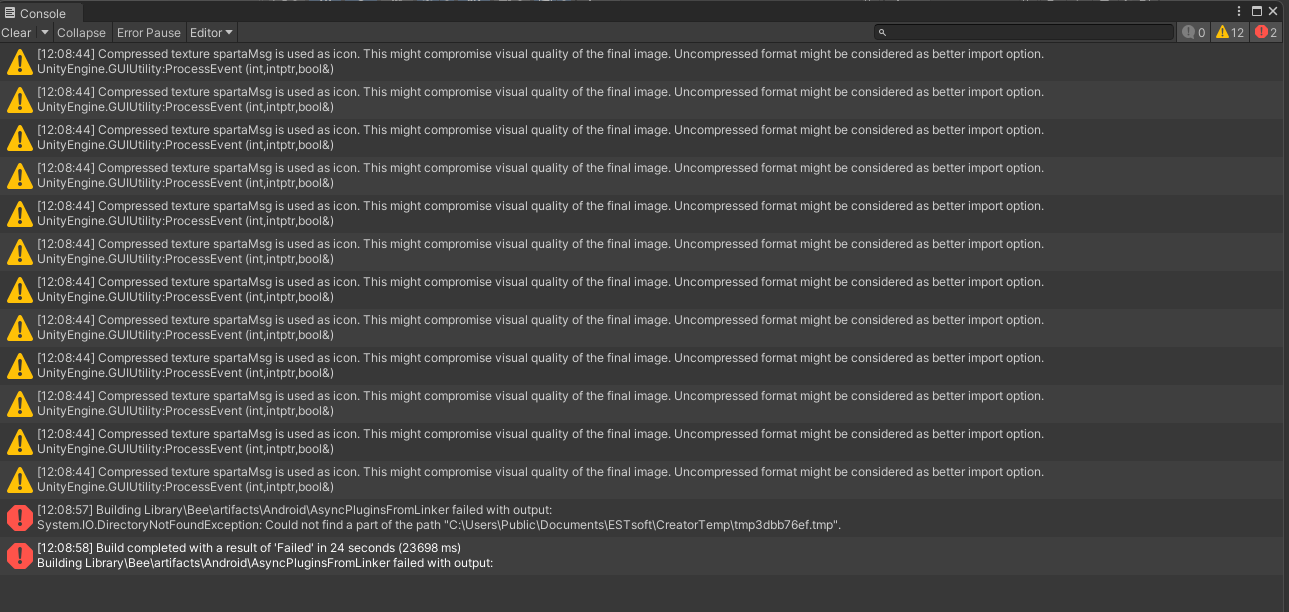
작성한 코드 및 에러 메세지
Building Library\Bee\artifacts\Android\AsyncPluginsFromLinker failed with output:
System.IO.DirectoryNotFoundException: Could not find a part of the path "C:\Users\Public\Documents\ESTsoft\CreatorTemp\tmp3dbb76ef.tmp".
at System.IO.FileStream..ctor (System.String path, System.IO.FileMode mode, System.IO.FileAccess access, System.IO.FileShare share, System.Int32 bufferSize, System.Boolean anonymous, System.IO.FileOptions options) [0x00164] in <bfbc89a04b6b4dd49c3614d03fc31ce8>:0
at (wrapper remoting-invoke-with-check) System.IO.FileStream..ctor(string,System.IO.FileMode,System.IO.FileAccess,System.IO.FileShare,int,bool,System.IO.FileOptions)
at System.IO.Path.GetTempFileName () [0x00072] in <bfbc89a04b6b4dd49c3614d03fc31ce8>:0
at Unity.Burst.Editor.BurstAotCompiler.OnPostBuildPlayerScriptDLLsImpl (Unity.Burst.Editor.BurstAotCompiler+BurstAOTSettings settings, UnityEditor.Compilation.Assembly[] playerAssemblies) [0x00890] in .\Library\PackageCache\com.unity.burst@1.8.12\Editor\BurstAotCompiler.cs:842
at Unity.Burst.Editor.BurstAOTCompilerPostprocessor.DoGenerate (UnityEditor.Compilation.Assembly[] assemblies) [0x00013] in .\Library\PackageCache\com.unity.burst@1.8.12\Editor\BurstAotCompiler.cs:331
at Unity.Burst.Editor.BurstAOTCompilerPostprocessor.GenerateNativePluginsForAssemblies (UnityEditor.Build.IGenerateNativePluginsForAssemblies+GenerateArgs args) [0x0007d] in .\Library\PackageCache\com.unity.burst@1.8.12\Editor\BurstAotCompiler.cs:184
at UnityEditor.Modules.BeeBuildPostprocessor.GenerateNativePluginsForAssemblies (PlayerBuildProgramLibrary.Data.GenerateNativePluginsForAssembliesArgs args) [0x00050] in <2acbecbc299e4654adc94df891af51f2>:0
at Bee.BeeDriver.BuildRequest+<>c__DisplayClass63_0`1[T].<RegisterRPCCallback>b__0 (System.Object o) [0x00000] in <3f5bd82a14d442d9848a73363c91f22e>:0
at Bee.BeeDriver.BeeDriver_RunBackend+<>c__DisplayClass1_0.<ProcessRPCRequest>b__0 () [0x00021] in <3f5bd82a14d442d9848a73363c91f22e>:0
at System.Threading.Tasks.Task.InnerInvoke () [0x0000f] in <bfbc89a04b6b4dd49c3614d03fc31ce8>:0
at System.Threading.Tasks.Task.Execute () [0x00000] in <bfbc89a04b6b4dd49c3614d03fc31ce8>:0
--- End of stack trace from previous location where exception was thrown ---
at Bee.BeeDriver.BeeDriver_RunBackend.ProcessRPCRequest (Bee.BinLog.RPCActionMessage msg, Bee.BeeDriver.BuildRequest+RPCCallback rpcCallback, IPCConnection ipcConnection, System.Threading.Tasks.Task writePipeConnectionTask, Bee.BeeDriver.InternalState state) [0x00102] in <3f5bd82a14d442d9848a73363c91f22e>:0
UnityEngine.GUIUtility:ProcessEvent (int,intptr,bool&)
Build completed with a result of 'Failed' in 24 seconds (23698 ms)
Building Library\Bee\artifacts\Android\AsyncPluginsFromLinker failed with output:
System.IO.DirectoryNotFoundException: Could not find a part of the path "C:\Users\Public\Documents\ESTsoft\CreatorTemp\tmp3dbb76ef.tmp".
at System.IO.FileStream..ctor (System.String path, System.IO.FileMode mode, System.IO.FileAccess access, System.IO.FileShare share, System.Int32 bufferSize, System.Boolean anonymous, System.IO.FileOptions options) [0x00164] in <bfbc89a04b6b4dd49c3614d03fc31ce8>:0
at (wrapper remoting-invoke-with-check) System.IO.FileStream..ctor(string,System.IO.FileMode,System.IO.FileAccess,System.IO.FileShare,int,bool,System.IO.FileOptions)
at System.IO.Path.GetTempFileName () [0x00072] in <bfbc89a04b6b4dd49c3614d03fc31ce8>:0
at Unity.Burst.Editor.BurstAotCompiler.OnPostBuildPlayerScriptDLLsImpl (Unity.Burst.Editor.BurstAotCompiler+BurstAOTSettings settings, UnityEditor.Compilation.Assembly[] playerAssemblies) [0x00890] in .\Library\PackageCache\com.unity.burst@1.8.12\Editor\BurstAotCompiler.cs:842
at Unity.Burst.Editor.BurstAOTCompilerPostprocessor.DoGenerate (UnityEditor.Compilation.Assembly[] assemblies) [0x00013] in .\Library\PackageCache\com.unity.burst@1.8.12\Editor\BurstAotCompiler.cs:331
at Unity.Burst.Editor.BurstAOTCompilerPostprocessor.GenerateNativePluginsForAssemblies (UnityEditor.Build.IGenerateNativePluginsForAssemblies+GenerateArgs args) [0x0007d] in .\Library\PackageCache\com.unity.burst@1.8.12\Editor\BurstAotCompiler.cs:184
at UnityEditor.Modules.BeeBuildPostprocessor.GenerateNativePluginsForAssemblies (PlayerBuildProgramLibrary.Data.GenerateNativePluginsForAssembliesArgs args) [0x00050] in <2acbecbc299e4654adc94df891af51f2>:0
at Bee.BeeDriver.BuildRequest+<>c__DisplayClass63_0`1[T].<RegisterRPCCallback>b__0 (System.Object o) [0x00000] in <3f5bd82a14d442d9848a73363c91f22e>:0
at Bee.BeeDriver.BeeDriver_RunBackend+<>c__DisplayClass1_0.<ProcessRPCRequest>b__0 () [0x00021] in <3f5bd82a14d442d9848a73363c91f22e>:0
at System.Threading.Tasks.Task.InnerInvoke () [0x0000f] in <bfbc89a04b6b4dd49c3614d03fc31ce8>:0
at System.Threading.Tasks.Task.Execute () [0x00000] in <bfbc89a04b6b4dd49c3614d03fc31ce8>:0
--- End of stack trace from previous location where exception was thrown ---
at Bee.BeeDriver.BeeDriver_RunBackend.ProcessRPCRequest (Bee.BinLog.RPCActionMessage msg, Bee.BeeDriver.BuildRequest+RPCCallback rpcCallback, IPCConnection ipcConnection, System.Threading.Tasks.Task writePipeConnectionTask, Bee.BeeDriver.InternalState state) [0x00102] in <3f5bd82a14d442d9848a73363c91f22e>:0
UnityEngine.GUIUtility:ProcessEvent (int,intptr,bool&)
오류 발생 시, 작성한 코드 전체와 에러 메시지를 첨부해 주세요.
Tip 1) </> 아이콘을 눌러 코드박스를 만들어 보세요.
Tip 2) Ctrl+A(맥의 경우 Command+A) 단축키로 코드를 한 번에 선택할 수 있어요!


