


* 겪고 있는 문제 상황을 최대한 자세하게 작성해주세요.
* 문제 해결을 위해 어떤 시도를 해보았는지 구체적으로 함께 알려주세요.
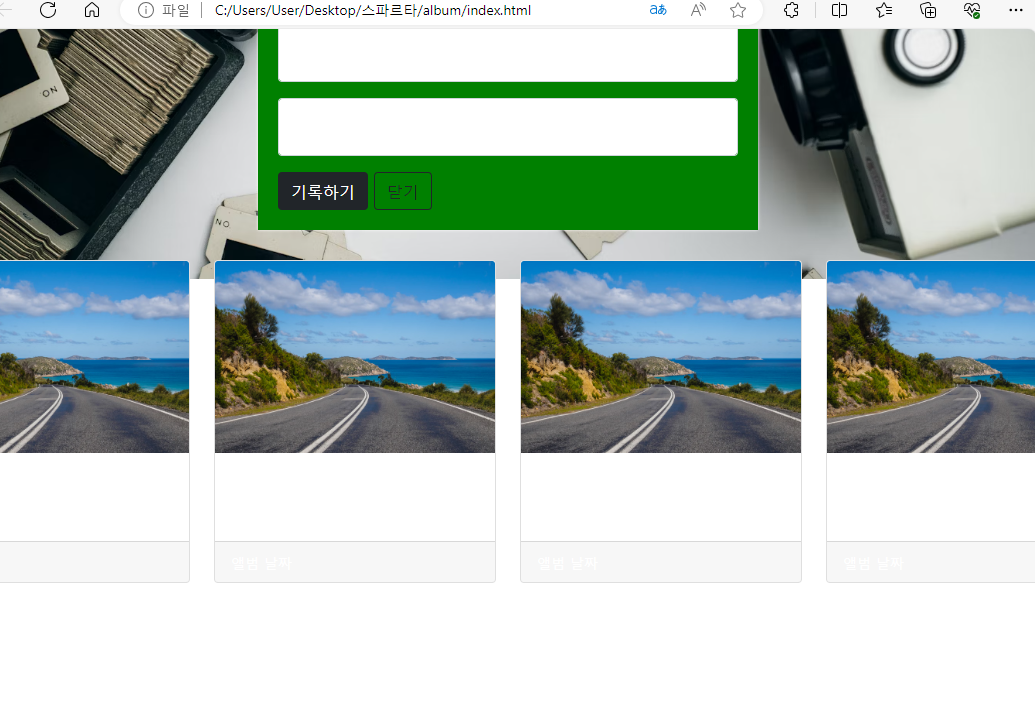
요렇게 배너 이미지에 붙어 있는데 어떻게 해결하나요??
너무 어려워서 아직도 해메는 중입니다ㅜㅡㅠ
아직 듣는중이라 다른 틀린 부분이 있다면 같이 고쳐주셔도 됩니다!!
그리고 폰트 적용하는방법 사이트에 나온게 튜터님과 달라서 해당 코드?를 찾을 수 없더라구요. 모르겠어서 폰트부분은 일단 빼뒀습니다..!
<!DOCTYPE html>
<html lang="en">
<head>
<meta charset="UTF-8">
<meta name="viewport" content="width=device-width, initial-scale=1.0">
<title>나만의 추억앨범</title>
<link href="https://cdn.jsdelivr.net/npm/bootstrap@5.0.2/dist/css/bootstrap.min.css" rel="stylesheet"
integrity="sha384-EVSTQN3/azprG1Anm3QDgpJLIm9Nao0Yz1ztcQTwFspd3yD65VohhpuuCOmLASjC" crossorigin="anonymous">
<style>
.mytitle {
height: 250px;
color: white;
display: flex;
flex-direction: column;
align-items: center;
justify-content: center;
background-image: url('https://images.unsplash.com/photo-1511992243105-2992b3fd0410?ixlib=rb-4.0.3&ixid=M3wxMjA3fDB8MHxwaG90by1wYWdlfHx8fGVufDB8fHx8fA%3D%3D&auto=format&fit=crop&w=1470&q=80');
background-position: center;
background-size: cover;
}
.mytitle>button {
width: 150px;
height: 50px;
background-color: transparent;
color: white;
border: 1px solid white;
border-radius: 5px;
margin-top: 20px;
}
.mycards {
width: 1200px;
margin: 30px auto 0px auto;
}
.mypostingbox {
background-color: green;
width: 500px;
margin: 30px auto 0px auto;
padding: 20px;
box-shadow: 0px 0px 3px 0px;
}
</style>
</head>
<body>
<div class="mytitle">
<h1>나만의 추억앨범</h1>
<button>추억 저장하기</button>
<div>
<div Class="mypostingbox">
<div class="form-floating mb-3">
<input type="email" class="form-control" id="floatingInput" placeholder="앨범 이미지">
<label for="floatingInput">앨범 이미지</label>
</div>
<div class="form-floating mb-3">
<input type="email" class="form-control" id="floatingInput" placeholder="앨범 이미지">
<label for="floatingInput">앨범 이미지</label>
</div>
<div class="form-floating mb-3">
<input type="email" class="form-control" id="floatingInput" placeholder="앨범 이미지">
<label for="floatingInput">앨범 이미지</label>
</div>
<div class="form-floating mb-3">
<input type="email" class="form-control" id="floatingInput" placeholder="앨범 이미지">
<label for="floatingInput">앨범 이미지</label>
</div>
<div class="mybtn">
<button type="button" class="btn btn-dark">기록하기</button>
<button type="button" class="btn btn-outline-dark">닫기</button>
</div>
</div>
<div class="mycards">
<div class="row row-cols-1 row-cols-md-4 g-4">
<div class="col">
<div class="card h-100">
class="card-img-top" alt="...">
<div class="card-body">
<h5 class="card-title">앨범 제목</h5>
<p class="card-text">앨범 내용</p>
</div>
<div class="card-footer">
<small class="text-body-secondary">앨범 날짜</small>
</div>
</div>
</div>
<div class="col">
<div class="card h-100">
class="card-img-top" alt="...">
<div class="card-body">
<h5 class="card-title">앨범 제목</h5>
<p class="card-text">앨범 내용</p>
</div>
<div class="card-footer">
<small class="text-body-secondary">앨범 날짜</small>
</div>
</div>
</div>
<div class="col">
<div class="card h-100">
class="card-img-top" alt="...">
<div class="card-body">
<h5 class="card-title">앨범 제목</h5>
<p class="card-text">앨범 내용</p>
</div>
<div class="card-footer">
<small class="text-body-secondary">앨범 날짜</small>
</div>
</div>
</div>
<div class="col">
<div class="card h-100">
class="card-img-top" alt="...">
<div class="card-body">
<h5 class="card-title">앨범 제목</h5>
<p class="card-text">앨범 내용</p>
</div>
<div class="card-footer">
<small class="text-body-secondary">앨범 날짜</small>
</div>
</div>
</div>
</div>
</div>
</body>
</html>


