


* 겪고 있는 문제 상황을 최대한 자세하게 작성해주세요.
* 문제 해결을 위해 어떤 시도를 해보았는지 구체적으로 함께 알려주세요.
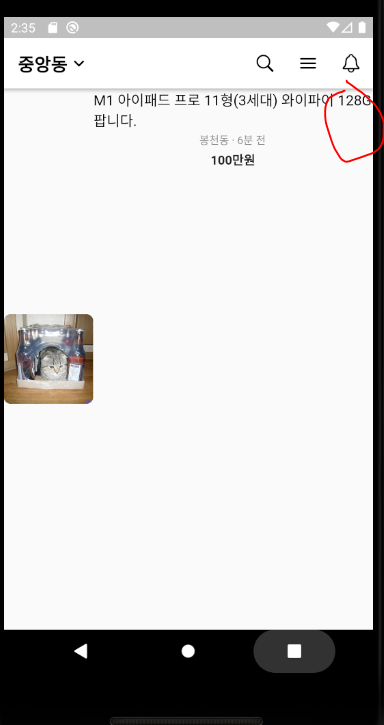
75번 Column을 Wrap with widget후에 Expaned로 바꾸어 주었는데 오류가 뜨면서 화면 배치도 제대로 되지 않습니다.
코드체크를 해봐도 undefine이라고 뜨고, 오류 내용을 읽어봐도 아직 무슨말인지 잘 모르겠습니다 ㅠ
아래 캡쳐내용과 코드 , 에러메세지 첨부하겠습니다.
import 'package:flutter/cupertino.dart';
import 'package:flutter/material.dart';


void main() {
  runApp(MyApp());
}


class MyApp extends StatelessWidget {
  const MyApp({Key? key}) : super(key: key);


  @override
  Widget build(BuildContext context) {
    return MaterialApp(
      debugShowCheckedModeBanner: false, //매개변수(함수를 실행할때 집어 넣어주는 값들)
      home: HomePage(), //매개변수
    );
  }
}


class HomePage extends StatelessWidget {
  const HomePage({super.key}); //생성자 (해당클래스가 만들어질때, 호출되는 함수)


  @override
  Widget build(BuildContext context) {
    return Scaffold(
      appBar: AppBar(
        backgroundColor: Colors.white,
        elevation: 3,
        leading: Row(
          children: [
            SizedBox(width: 16),
            Text(
              '중앙동',
              style: TextStyle(
                color: Colors.black,
                fontWeight: FontWeight.bold,
                fontSize: 20,
              ),
            ),
            Icon(
              Icons.keyboard_arrow_down_rounded,
              color: Colors.black,
            ),
          ],
        ),
        leadingWidth: 100,
        actions: [
          IconButton(
            onPressed: () {},
            icon: Icon(CupertinoIcons.search, color: Colors.black),
          ),
          IconButton(
            onPressed: () {},
            icon: Icon(Icons.menu_rounded, color: Colors.black),
          ),
          IconButton(
            onPressed: () {},
            icon: Icon(CupertinoIcons.bell, color: Colors.black),
          ),
        ],
      ),
      body: Row(
        children: [
          // CilpRRect 를 통해 이미지에 곡선 border 생성
          ClipRRect(
            borderRadius: BorderRadius.circular(8),
            // 이미지
            child: Image.network(
              'https://cdn2.thecatapi.com/images/6bt.jpg',
              width: 100,
              height: 100,
              fit: BoxFit.cover,
            ),
          ),
          Expanded(
            child: Column(
              children: [
                Text(
                  'M1 아이패드 프로 11형(3세대) 와이파이 128G 팝니다.',
                  style: TextStyle(
                    fontSize: 16,
                    color: Colors.black,
                  ),
                  softWrap: false,
                  maxLines: 2,
                  overflow: TextOverflow.ellipsis,
                ),
                SizedBox(height: 2),
                Text(
                  '봉천동 · 6분 전',
                  style: TextStyle(
                    fontSize: 12,
                    color: Colors.black45,
                  ),
                ),
                SizedBox(height: 4),
                Text(
                  '100만원',
                  style: TextStyle(
                    fontSize: 14,
                    fontWeight: FontWeight.bold,
                  ),
                ),
                Row(
                  children: [
                    // 빈 칸
                    // 하트 아이콘
                    // '1'
                  ],
                ),
              ],
            ),
          ),
        ],
      ),
    );
  }
}
Exception caught by rendering library ═════════════════════════════════
The following assertion was thrown during layout:
A RenderFlex overflowed by 52 pixels on the right.
The relevant error-causing widget was
Row
main.dart:63
You can inspect this widget using the 'Inspect Widget' button in the VS Code notification.
The overflowing RenderFlex has an orientation of Axis.horizontal.
The edge of the RenderFlex that is overflowing has been marked in the rendering with a yellow and black striped pattern. This is usually caused by the contents being too big for the RenderFlex.
Consider applying a flex factor (e.g. using an Expanded widget) to force the children of the RenderFlex to fit within the available space instead of being sized to their natural size.
This is considered an error condition because it indicates that there is content that cannot be seen. If the content is legitimately bigger than the available space, consider clipping it with a ClipRect widget before putting it in the flex, or using a scrollable container rather than a Flex, like a ListView.
The specific RenderFlex in question is: RenderFlex#fdf1d relayoutBoundary=up1 OVERFLOWING


