커뮤니티

포인트
쿠폰
내 강의실
국비 신청 내역
증명서
계정
로그아웃
학습 질문
개발 일지
나의 활동
답변 완료
center 입력했는데 타이틀이 아직 맨꼭대기에 붙어있어요
2024 나만의 버킷리스트 만들기 v0
기타


김******a
댓글
20
・
추천
0
・
조회수
54
조회수
54
답변 완료
* 겪고 있는 문제 상황을 최대한 자세하게 작성해주세요.
* 문제 해결을 위해 어떤 시도를 해보았는지 구체적으로 함께 알려주세요.
center 입력했는데 타이틀이 아직 맨꼭대기에 붙어있어요.ㅜㅜ 무엇을 실수한걸까요?
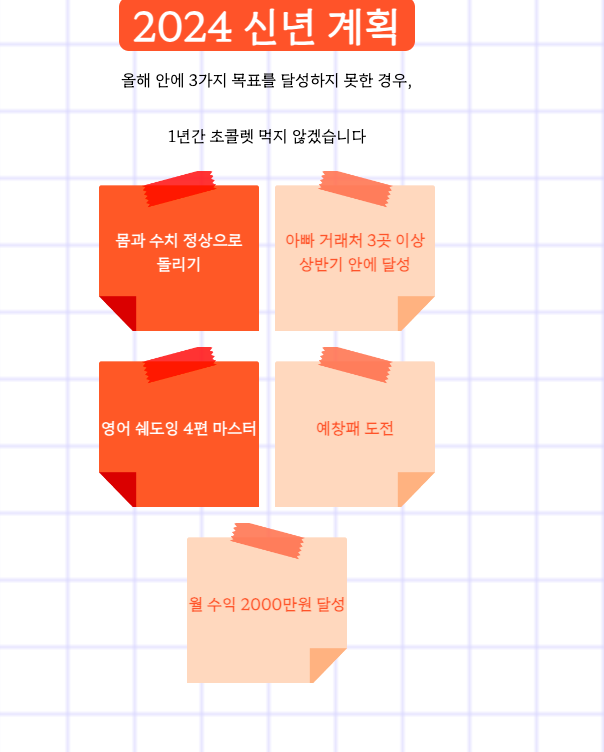
작성한 코드 및 에러 메세지
<!doctype html>
<html>
  <head>
    <meta charset="utf-8" />
    <meta name="viewport" content="width=device-width" />
    <title>2024 나만의 신년 계획</title>
    <link href="style.css" rel="stylesheet" type="text/css" />
    <style>
      @import url("https://fonts.googleapis.com/css2?family=Hahmlet:wght@300&display=swap");
      * {
        font-family: "Hahmlet", serif;
      }
      .bg{
        background-image: url("https://s3.ap-northeast-2.amazonaws.com/materials.spartacodingclub.kr/bucketList/bg-grid.png");
        background-position: center;
        background-size: cover;
        margin: auto;
        width: 360px;
      }
      .title {
        background-color: tomato;
        border-radius: 10px;
        color: white;
        font-size: 40px;
        text-align: center;
        padding: 4px 14px;
      }
      .bucket {
        width: 160px;
        height: 160px;
        background-position: center;
        background-size: cover;
      }
      .img1 {
      background-image: url('https://s3.ap-northeast-2.amazonaws.com/materials.spartacodingclub.kr/bucketList/bucket-red.png');
      }
      .img2 {
        background-image: url('https://s3.ap-northeast-2.amazonaws.com/materials.spartacodingclub.kr/bucketList/bucket-lightred.png');
      }
      .text{
        color:black;
      }
    </style>
    <link rel="stylesheet" type="text/css" href="https://s3.ap-northeast-2.amazonaws.com/materials.spartacodingclub.kr/bucketList/sparta-bucket2.css">


  </head>


  <body class="bg center">
    <h1 class="title">2024 신년 계획</h1>
    <p class='text center'>올해 안에 3가지 목표를 달성하지 못한 경우,</p>
    <p class='text center center'>1년간 초콜렛 먹지 않겠습니다</p>
    <div class='flex-row wrap'>
      <div class='bucket img1 center'>몸과 수치 정상으로 돌리기</div>
      <div class='bucket img2 center'>아빠 거래처 3곳 이상 상반기 안에 달성</div>
      <div class='bucket img1 center'>영어 쉐도잉 4편 마스터</div>
      <div class='bucket img2 center'>예창패 도전</div>
      <div class='bucket img2 center'>월 수익 2000만원 달성</div>
    </div>
    <script
      src="https://replit.com/public/js/replit-badge-v2.js"
      theme="dark"
      position="bottom-right"
    ></script>
  </body>
</html>
Tip 1) </> 아이콘을 눌러 코드박스를 만들어 보세요.
Tip 2) Ctrl+A(맥의 경우 Command+A) 단축키로 코드를 한 번에 선택할 수 있어요!


댓글 알림
