커뮤니티

포인트
쿠폰
내 강의실
국비 신청 내역
증명서
계정
로그아웃
학습 질문
개발 일지
나의 활동
답변 완료
flutter doctor 최종 체크 시 오류 화면
[왕초보] 플러터(Flutter)로 시작하는 앱개발 종합반 v0
1주차


이*지
댓글
3
・
추천
0
・
조회수
16
조회수
16
답변 완료
* 겪고 있는 문제 상황을 최대한 자세하게 작성해주세요.
* 문제 해결을 위해 어떤 시도를 해보았는지 구체적으로 함께 알려주세요.
https://teamsparta.notion.site/Windows-09b8eccbe0f84282ae024424bc7474b6
윈도우 용 사전 설치 프로그램 4. 안드로이드 라이센스까지 모두 설치 후
명령 프롬프터에 flutter doctor 검색하니 [V] 체크박스가 캡쳐 화면처럼 뜨고
아래 코드 누르고 엔터 치니 오류가 뜹니다.
flutter doctor --android-licenses
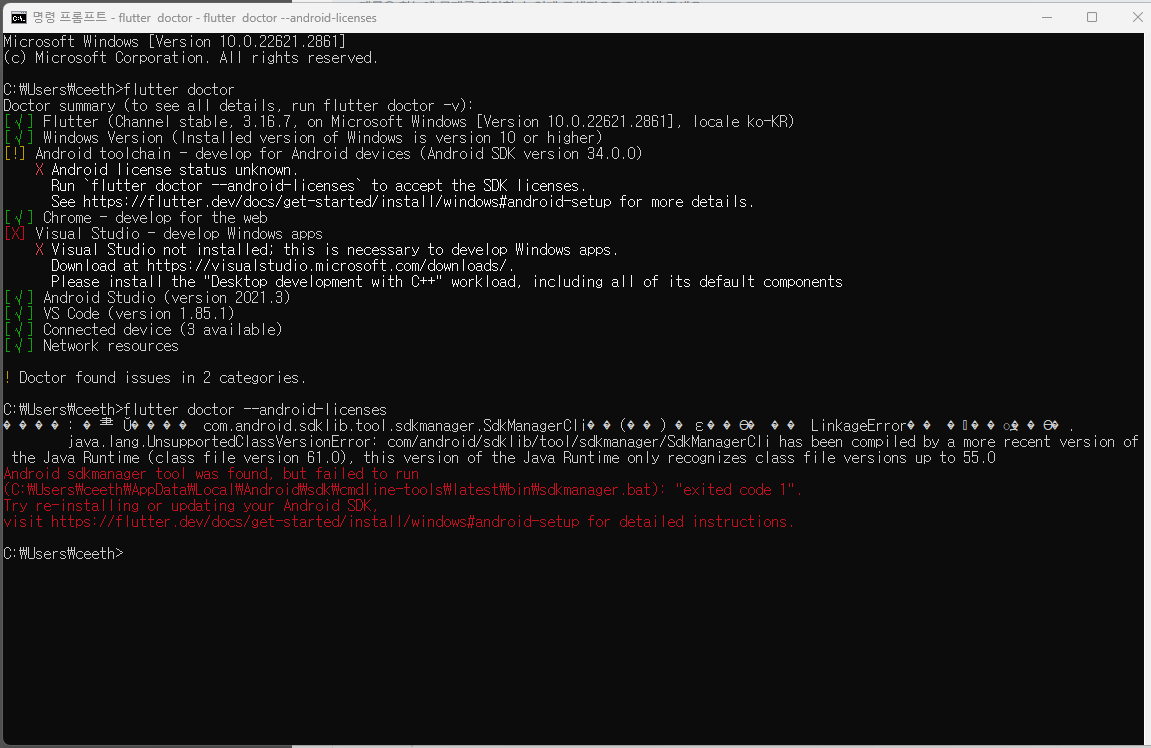
작성한 코드 및 에러 메세지
Microsoft Windows [Version 10.0.22621.2861] (c) Microsoft Corporation. All rights reserved. C:\Users\ceeth>flutter doctor Doctor summary (to see all details, run flutter doctor -v): [√] Flutter (Channel stable, 3.16.7, on Microsoft Windows [Version 10.0.22621.2861], locale ko-KR) [√] Windows Version (Installed version of Windows is version 10 or higher) [!] Android toolchain - develop for Android devices (Android SDK version 34.0.0) X Android license status unknown. Run `flutter doctor --android-licenses` to accept the SDK licenses. See https://flutter.dev/docs/get-started/install/windows#android-setup for more details. [√] Chrome - develop for the web [X] Visual Studio - develop Windows apps X Visual Studio not installed; this is necessary to develop Windows apps. Download at https://visualstudio.microsoft.com/downloads/. Please install the "Desktop development with C++" workload, including all of its default components [√] Android Studio (version 2021.3) [√] VS Code (version 1.85.1) [√] Connected device (3 available) [√] Network resources ! Doctor found issues in 2 categories. C:\Users\ceeth>flutter doctor --android-licenses ����: �⺻ Ŭ���� com.android.sdklib.tool.sdkmanager.SdkManagerCli��(��) �ε��ϴ� �� LinkageError�� ���߽��ϴ�. java.lang.UnsupportedClassVersionError: com/android/sdklib/tool/sdkmanager/SdkManagerCli has been compiled by a more recent version of the Java Runtime (class file version 61.0), this version of the Java Runtime only recognizes class file versions up to 55.0 Android sdkmanager tool was found, but failed to run (C:\Users\ceeth\AppData\Local\Android\sdk\cmdline-tools\latest\bin\sdkmanager.bat): "exited code 1". Try re-installing or updating your Android SDK, visit https://flutter.dev/docs/get-started/install/windows#android-setup for detailed instructions. C:\Users\ceeth>


댓글 알림
