


* 겪고 있는 문제 상황을 최대한 자세하게 작성해주세요.
* 문제 해결을 위해 어떤 시도를 해보았는지 구체적으로 함께 알려주세요.
void OnCollisionEnter2D(Collision2D coll)
{
if (coll.gameObject.tag == "balloon")
{
gameManager.I.gameOver();
}
} 해당 코드를 적용시켜도 네모와 풍선이 충돌 시 생기는 변화가 없습니다
네모와 풍선이 충돌하면 게임이 끝나면서 생성한 다시하기 버튼이 나와야 하는데 게임이 종료되지 않습니다 ㅠ
문제가 있나 싶어 강의를 처음부터 다시 들어도 어느 부분이 문제인지 모르겠습니다
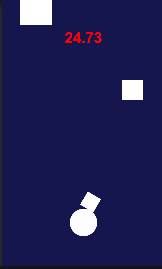
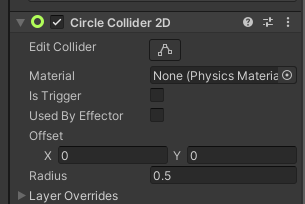
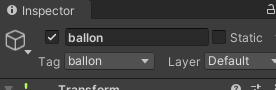
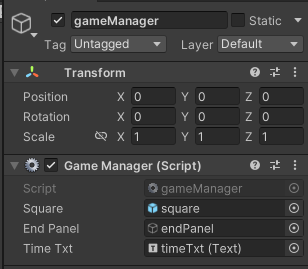
작성한 코드 및 에러 메세지
게임 매니저
using System.Collections;
using System.Collections.Generic;
using UnityEngine;
using UnityEngine.UI;
public class gameManager : MonoBehaviour
{
public GameObject square;
public GameObject endPanel;
public Text timeTxt;
float alive = 0f;
public static gameManager I;
void Awake()
{
I = this;
}
// Start is called before the first frame update
void Start()
{
InvokeRepeating("makeSquare", 0.0f, 0.5f);
}
// Update is called once per frame
void Update()
{
alive += Time.deltaTime;
timeTxt.text = alive.ToString("N2");
}
void makeSquare()
{
Instantiate(square);
}
public void gameOver()
{
Time.timeScale = 0.0f;
endPanel.SetActive(true);
}
}
스퀘어
using System.Collections;
using System.Collections.Generic;
using UnityEngine;
public class square : MonoBehaviour
{
// Start is called before the first frame update
void Start()
{
float x = Random.Range(-3.0f, 3.0f);
float y = Random.Range(3.0f, 5.0f);
transform.position = new Vector3(x, y, 0);
float size = Random.Range(0.5f, 1.5f);
transform.localScale = new Vector3(size, size, 1);
}
// Update is called once per frame
void Update()
{
}
void OnCollisionEnter2D(Collision2D coll)
{
if (coll.gameObject.tag == "balloon")
{
gameManager.I.gameOver();
}
}
}


