


* 겪고 있는 문제 상황을 최대한 자세하게 작성해주세요.
* 문제 해결을 위해 어떤 시도를 해보았는지 구체적으로 함께 알려주세요.
안녕하세요
카드 테두리가 둥글게 안 됩니다.
검색해 봐도 저 명령어가 맞는 것 같은데 안 됩니다.. 왜일까요?
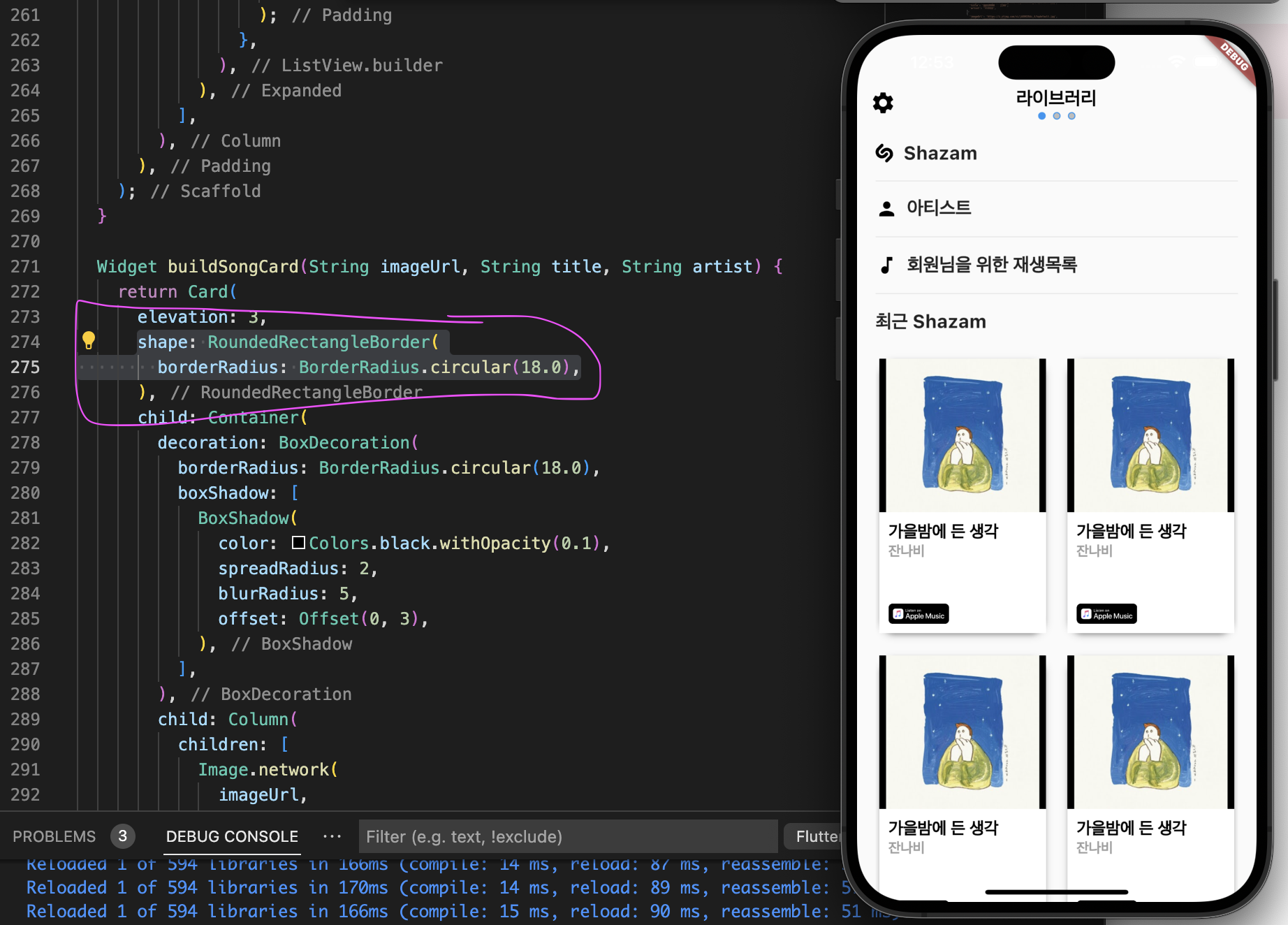
작성한 코드 및 에러 메세지
// 첫번째 페이지
class FirstTab extends StatelessWidget {
const FirstTab({Key? key}) : super(key: key);
@override
Widget build(BuildContext context) {
const songs = [
{
'imageUrl': 'https://i.ytimg.com/vi/jAO0KXRdz_4/hqdefault.jpg',
'title': '가을밤에 든 생각',
'artist': '잔나비',
},
{
'imageUrl': 'https://i.ytimg.com/vi/jAO0KXRdz_4/hqdefault.jpg',
'title': '가을밤에 든 생각',
'artist': '잔나비',
},
{
'imageUrl': 'https://i.ytimg.com/vi/jAO0KXRdz_4/hqdefault.jpg',
'title': '가을밤에 든 생각',
'artist': '잔나비',
},
{
'imageUrl': 'https://i.ytimg.com/vi/jAO0KXRdz_4/hqdefault.jpg',
'title': '가을밤에 든 생각',
'artist': '잔나비',
},
{
'imageUrl': 'https://i.ytimg.com/vi/jAO0KXRdz_4/hqdefault.jpg',
'title': '가을밤에 든 생각',
'artist': '잔나비',
},
{
'imageUrl': 'https://i.ytimg.com/vi/jAO0KXRdz_4/hqdefault.jpg',
'title': '가을밤에 든 생각',
'artist': '잔나비',
},
];
return Scaffold(
appBar: AppBar(
backgroundColor: Colors.transparent,
elevation: 0,
leading: SizedBox(
child: Column(
children: [
Icon(
Icons.settings,
color: Colors.black,
size: 28,
),
],
),
),
title: SizedBox(
height: 60, // 위쪽 여백 조절
child: Column(
children: [
Text(
'라이브러리',
style: TextStyle(
color: Colors.black,
fontSize: 20,
fontWeight: FontWeight.bold,
),
),
],
),
),
),
body: Padding(
padding: const EdgeInsets.symmetric(horizontal: 20),
child: Column(
children: [
Row(
children: [
Image.network(
'https://i.ibb.co/hxNbZ8p/shazam.png',
width: 20,
color: Colors.black,
),
SizedBox(width: 10),
Center(
child: Text(
'Shazam',
style: TextStyle(fontSize: 20, fontWeight: FontWeight.bold),
)),
],
),
SizedBox(height: 10),
Divider(
thickness: 1, // 구분선의 두께 조절
color: Color(0xffe5e5e5), // 구분선의 색상 조절
),
SizedBox(height: 10),
Row(
children: [
Icon(
Icons.person,
size: 24,
color: Colors.black,
),
SizedBox(width: 10),
Center(
child: Text(
'아티스트',
style: TextStyle(fontSize: 20, fontWeight: FontWeight.bold),
)),
],
),
SizedBox(height: 10),
Divider(
thickness: 1, // 구분선의 두께 조절
color: Color(0xffe5e5e5), // 구분선의 색상 조절
),
SizedBox(height: 10),
Row(
children: [
Icon(
Icons.music_note,
size: 24,
color: Colors.black,
),
SizedBox(width: 10),
Center(
child: Text(
'회원님을 위한 재생목록',
style: TextStyle(fontSize: 20, fontWeight: FontWeight.bold),
)),
],
),
SizedBox(height: 10),
Divider(
thickness: 1, // 구분선의 두께 조절
color: Color(0xffe5e5e5), // 구분선의 색상 조절
),
SizedBox(height: 10),
Row(
children: [
Center(
child: Text(
'최근 Shazam',
style: TextStyle(fontSize: 20, fontWeight: FontWeight.bold),
)),
],
),
SizedBox(height: 15),
// 가로로 2장씩 배치되는 ListView.builder
Expanded(
child: ListView.builder(
shrinkWrap: true,
itemCount: songs.length ~/ 2, // 2개씩 묶어서 표시하므로 절반의 개수만큼만 표시
itemBuilder: (context, index) {
final startIndex = index * 2; // 현재 인덱스에 해당하는 첫 번째 항목의 인덱스
final song1 = songs[startIndex];
final song2 = startIndex + 1 < songs.length
? songs[startIndex + 1]
: null;
return Padding(
padding: const EdgeInsets.symmetric(vertical: 8.0),
child: Row(
children: [
Expanded(
child: song1 != null
? buildSongCard(song1['imageUrl']!,
song1['title']!, song1['artist']!)
: Container(), // 데이터가 없을 경우 빈 컨테이너
),
SizedBox(width: 15),
Expanded(
child: song2 != null
? buildSongCard(song2['imageUrl']!,
song2['title']!, song2['artist']!)
: Container(), // 데이터가 없을 경우 빈 컨테이너
),
],
),
);
},
),
),
],
),
),
);
}
Widget buildSongCard(String imageUrl, String title, String artist) {
return Card(
elevation: 3,
shape: RoundedRectangleBorder(
borderRadius: BorderRadius.circular(18.0),
),
child: Container(
decoration: BoxDecoration(
borderRadius: BorderRadius.circular(18.0),
boxShadow: [
BoxShadow(
color: Colors.black.withOpacity(0.1),
spreadRadius: 2,
blurRadius: 5,
offset: Offset(0, 3),
),
],
),
child: Column(
children: [
Image.network(
imageUrl,
fit: BoxFit.cover,
height: 165,
),
Container(
height: 130,
padding: EdgeInsets.all(10),
color: Colors.white,
child: Column(
crossAxisAlignment: CrossAxisAlignment.start,
children: [
Text(
title,
style: TextStyle(
color: Colors.black,
fontWeight: FontWeight.bold,
fontSize: 18,
),
),
Text(
artist,
style: TextStyle(
color: Colors.grey,
fontWeight: FontWeight.bold,
fontSize: 15,
),
),
Spacer(),
Align(
alignment: Alignment.bottomLeft,
child: Image.network(
'https://i.ibb.co/KG9m5QS/applemusic.png',
width: 65,
),
),
],
),
),
],
),
),
);
}
}오류 발생 시, 작성한 코드 전체와 에러 메시지를 첨부해 주세요.
Tip 1) </> 아이콘을 눌러 코드박스를 만들어 보세요.
Tip 2) Ctrl+A(맥의 경우 Command+A) 단축키로 코드를 한 번에 선택할 수 있어요!


