


* 겪고 있는 문제 상황을 최대한 자세하게 작성해주세요.
* 문제 해결을 위해 어떤 시도를 해보았는지 구체적으로 함께 알려주세요.
두 번째 페이지 먼저 작성 중인데요(절대 해답 안 보고 하려고 하고 있으니 다른 페이지는 스포?하지 말아 주세요!)
앱바의 '라이브러리' 부분에서 글자는 안 잘리는데 계속 overflowed 띠가 뜹니다.
이걸 container로 묶어서 width를 늘려도 글자는 넓어지는데 계속 저 띠가 떠 있네요.
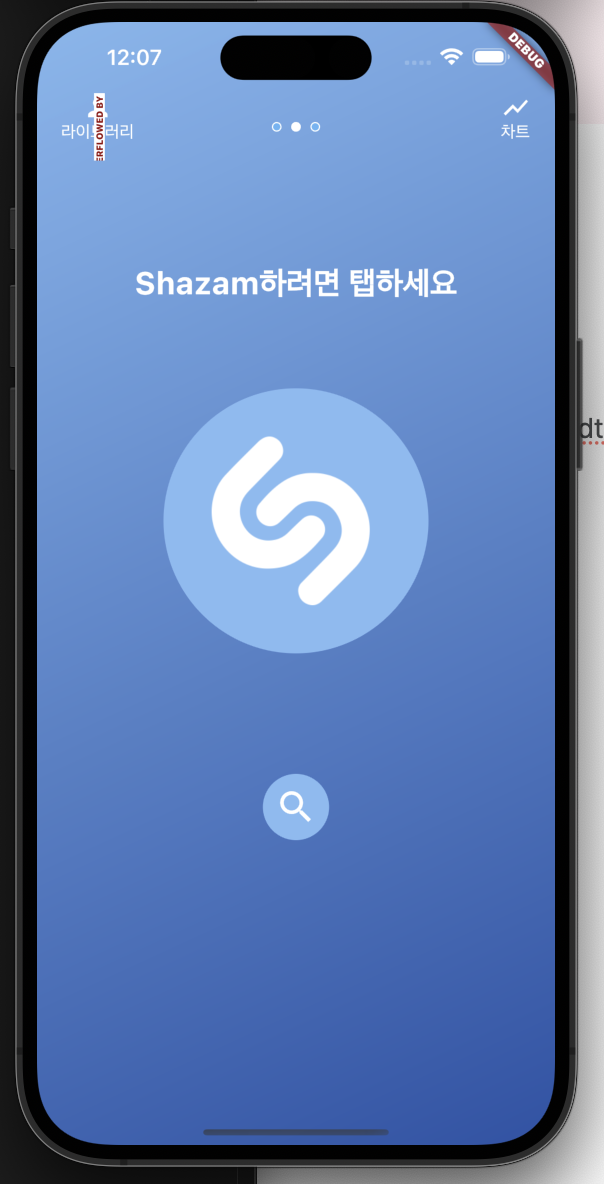
그리고
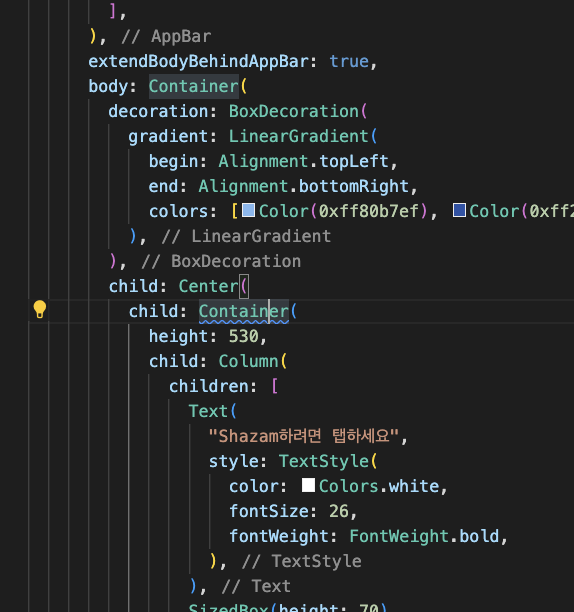
저기 container에 밑줄 그어진 이유도 궁금합니다.
작성한 코드 및 에러 메세지
다른 부분은 복붙 그대로라 두 번째 페이지 부분만 첨부합니다.
오류 발생 시, 작성한 코드
// 두번째 페이지
class SecondTab extends StatelessWidget {
const SecondTab({Key? key}) : super(key: key);
@override
Widget build(BuildContext context) {
return Scaffold(
appBar: AppBar(
backgroundColor: Colors.transparent,
elevation: 0,
leading: Row(
children: [
SizedBox(width: 20), // 여백 추가
Column(
children: [
Icon(Icons.person, color: Colors.white),
Expanded(
// Expanded 추가
child: Text(
'라이브러리',
style: TextStyle(color: Colors.white),
),
),
],
),
],
),
actions: [
Row(
children: [
Column(
children: [
Icon(Icons.show_chart, color: Colors.white),
Text('차트', style: TextStyle(color: Colors.white)),
],
),
SizedBox(width: 20), // 여백 추가
],
),
],
),
extendBodyBehindAppBar: true,
body: Container(
decoration: BoxDecoration(
gradient: LinearGradient(
begin: Alignment.topLeft,
end: Alignment.bottomRight,
colors: [Color(0xff80b7ef), Color(0xff2753a8)],
),
),
child: Center(
child: Container(
height: 530,
child: Column(
children: [
Text(
"Shazam하려면 탭하세요",
style: TextStyle(
color: Colors.white,
fontSize: 26,
fontWeight: FontWeight.bold,
),
),
SizedBox(height: 70),
Stack(
alignment: Alignment.center,
children: [
Container(
width: 220,
height: 220,
decoration: BoxDecoration(
shape: BoxShape.circle,
color: Color(0xff84bbf3),
),
),
Image.network(
'https://i.ibb.co/hxNbZ8p/shazam.png',
width: 140,
color: Colors.white,
),
],
),
SizedBox(height: 100),
SizedBox(
width: 55,
height: 55,
child: Container(
decoration: BoxDecoration(
shape: BoxShape.circle,
color: Color(0xff84bbf3),
),
child: Icon(
Icons.search,
color: Colors.white,
size: 35,
),
),
),
],
),
),
),
),
);
}
}전체와 에러 메시지를 첨부해 주세요.
Tip 1) </> 아이콘을 눌러 코드박스를 만들어 보세요.
Tip 2) Ctrl+A(맥의 경우 Command+A) 단축키로 코드를 한 번에 선택할 수 있어요!


