


* 겪고 있는 문제 상황을 최대한 자세하게 작성해주세요.
* 문제 해결을 위해 어떤 시도를 해보았는지 구체적으로 함께 알려주세요.
5-7 토스 레이아웃 구성 수업을 듣고 있습니다.
안에 내용은 말씀해주신대로 변화됨을 확인하고있는데, 전체적인 비율이 맞지않습니다. 이 경우 어떻게 정렬해야할까요?
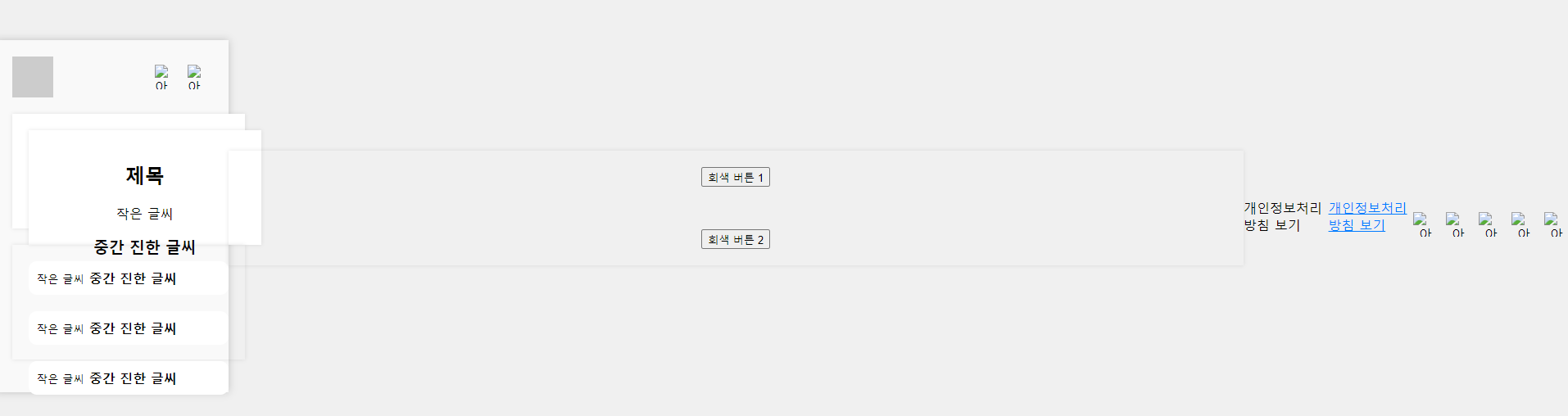
작성한 코드 및 에러 메세지
<!DOCTYPE html>
<html lang="ko-KR">
<head>
<meta charset="UTF-8">
<meta name="viewport" content="width=device-width, initial-scale=1.0">
<style>
/* 전체 레이아웃 스타일 */
body {
background-color: #f0f0f0;
display: flex;
justify-content: center;
align-items: center;
height: 100vh;
margin: 0;
}
/* 컨테이너 스타일 */
.container {
width: 390px;
background-color: #f9f9f9;
padding: 20px;
box-shadow: 0px 0px 10px rgba(0, 0, 0, 0.2);
}
/* 헤더 스타일 */
.header {
display: flex;
justify-content: space-between;
align-items: center;
margin-bottom: 20px;
}
.logo {
width: 50px;
height: 50px;
background-color: #ccc;
/* 로고 이미지 대체 */
}
.icon-buttons {
display: flex;
gap: 10px;
}
/* 메인 스타일 */
.main {
text-align: center;
}
.box {
width: 100%;
background-color: white;
padding: 20px;
margin-bottom: 20px;
box-shadow: 0px 0px 5px rgba(0, 0, 0, 0.1);
}
.box1,
.box2,
.box3 {
height: 100px;
}
.privacy-link {
color: #007bff;
text-decoration: underline;
}
/* 푸터 스타일 */
.footer {
text-align: center;
margin-top: 20px;
}
.icon-buttons {
display: flex;
justify-content: center;
gap: 10px;
}
/* 추가 스타일 */
.separator {
border-bottom: 1px solid #ddd;
margin: 20px 0;
}
</style>
</head>
<body>
<div class="container">
<div class="header">
<div class="logo"></div>
<div class="icon-buttons">
<img src="icon1.png" alt="아이콘1" width="30" height="30">
<img src="icon2.png" alt="아이콘2" width="30" height="30">
</div>
</div>
<div class="main">
<div class="box box1">
<div class="box box1">
<h2 class="title">제목</h2>
<p class="small-text">작은 글씨</p>
<h3 class="bold-text">중간 진한 글씨</h3>
</div>
</div>
</div>
<div class="box box2" style="background-color: transparent; height: 100px;">
<div class="card"
style="display: flex; justify-content: space-between; align-items: center; background-color: white; padding: 10px; margin-bottom: 20px; border-radius: 10px;">
<div>
<small>작은 글씨</small>
<strong>중간 진한 글씨</strong>
</div>
</div>
<div class="card"
style="display: flex; justify-content: space-between; align-items: center; background-color: white; padding: 10px; margin-bottom: 20px; border-radius: 10px;">
<div>
<small>작은 글씨</small>
<strong>중간 진한 글씨</strong>
</div>
</div>
<div class="card"
style="display: flex; justify-content: space-between; align-items: center; background-color: white; padding: 10px; border-radius: 10px;">
<div>
<small>작은 글씨</small>
<strong>중간 진한 글씨</strong>
</div>
</div>
</div>
</div>
<div class="box box3"
style="background-color: transparent; display: flex; flex-direction: column; align-items: center; justify-content: space-between;">
<button class="gray-button">회색 버튼 1</button>
<button class="gray-button">회색 버튼 2</button>
</div>
<div class="privacy-policy">개인정보처리방침 보기</div>
</div>
<div class="separator"></div>
<p><a class="privacy-link" href="#">개인정보처리방침 보기</a></p>
</div>
<div class="footer">
<div class="icon-buttons">
<img src="icon3.png" alt="아이콘3" width="30" height="30">
<img src="icon4.png" alt="아이콘4" width="30" height="30">
<img src="icon5.png" alt="아이콘5" width="30" height="30">
<img src="icon6.png" alt="아이콘6" width="30" height="30">
<img src="icon7.png" alt="아이콘7" width="30" height="30">
</div>
</div>
</div>
</body>
</html>


